
热门标签
热门文章
- 1jpa多数据源时Hibernate配置自动生成表不生效_orm.jpa.hibernateproperties' that could not be fou
- 2npm切换镜像下载npm切换镜像源:解决npm安装慢卡顿reify:ajv: timing reifyNode问题、报错require() of ES Module_reify:@esbuild/android-arm: timing reifynode:node_
- 3python def函数调用_python def 定义函数,调用函数方式
- 4基于Python的酒店点餐系统的设计与实现_基于python的点餐系统的国内外研究现状
- 5eclipse 安装Tomcat报错Unable to read repository暴躁整理出来的解决办法
- 6不允许输入特殊字符的正则表达式_前人栽树,咱乘凉——正则表达式二
- 7使用 Spring Boot 整合 ZooKeeper 构建分布式应用_zookeeper在spring boot使用
- 8leetcode 80 删除排序数组中的重复项 II c++
- 912个python超强学习网站!_python学习网站
- 10Android与H5交互 -- 点击H5跳转到 Android原生 页面 ,webview与h5(js)交互
当前位置: article > 正文
Spring Boot学习:如何使用Druid数据源_application-druid.yml
作者:数据科学创新者 | 2024-01-30 13:00:34
赞
踩
application-druid.yml
Druid概述
Druid是阿里巴巴开源的一款非常优秀的数据库连接池。在Java应用程序开发中,常用的连接池还有DBCP、C3P0、Proxool等。
SpringBoot2.X 版本开始默认的是HikariCP(号称性能最好的数据库连接池),Druid性能好而且监控也比较方便。
感兴趣的同学可以读一下:Druid连接池介绍
接下来我们就来讲解如何集成Druid数据源
集成Druid
- 首先是在pom.xml中添加依赖
        <!--阿里数据库连接池 -->
        <dependency>
            <groupId>com.alibaba</groupId>
            <artifactId>druid-spring-boot-starter</artifactId>
            <version>${druid.version}</version>
        </dependency>

        <!-- Mysql驱动包 -->
        <dependency>
            <groupId>mysql</groupId>
            <artifactId>mysql-connector-java</artifactId>
        </dependency>

        <!-- mybatis框架 -->
        <dependency>
            <groupId>org.mybatis.spring.boot</groupId>
            <artifactId>mybatis-spring-boot-starter</artifactId>
            <version>${mybatis.boot.version}</version>
        </dependency>

- 1
- 2
- 3
- 4
- 5
- 6
- 7
- 8
- 9
- 10
- 11
- 12
- 13
- 14
- 15
- 16
- 17
- 18
- 19
- 接着在资源根目录下添加一个配置文件,命名为application-druid.yml

内容如下:
spring:
  ## 数据库配置
  datasource:
    type: com.alibaba.druid.pool.DruidDataSource
    driver-class-name: com.mysql.cj.jdbc.Driver
    druid:
      url: jdbc:mysql://localhost:3306/demo?useUnicode=true&characterEncoding=utf8&zeroDateTimeBehavior=convertToNull&useSSL=true&serverTimezone=GMT%2B8
      username: root
      password: root
      # 初始连接数
      initialSize: 5
      # 最小连接池数量
      minIdle: 10
      # 最大连接池数量
      maxActive: 20
      # 配置获取连接等待超时的时间
      maxWait: 60000
      # 配置间隔多久才进行一次检测,检测需要关闭的空闲连接,单位是毫秒
      timeBetweenEvictionRunsMillis: 60000
      # 配置一个连接在池中最小生存的时间,单位是毫秒
      minEvictableIdleTimeMillis: 300000
      # 配置一个连接在池中最大生存的时间,单位是毫秒
      maxEvictableIdleTimeMillis: 900000
      # 配置检测连接是否有效
      validationQuery: SELECT 1 FROM DUAL
      testWhileIdle: true
      testOnBorrow: false
      testOnReturn: false
      webStatFilter:
        enabled: true
      statViewServlet:
        enabled: true
        # 设置白名单,不填则允许所有访问
        allow:
        url-pattern: /druid/*
        # 控制台管理用户名和密码
        login-username: root
        login-password: root
      filter:
        stat:
          enabled: true
          # 慢SQL记录
          log-slow-sql: true
          slow-sql-millis: 1000
          merge-sql: true
        wall:
          config:
            multi-statement-allow: true
- 1
- 2
- 3
- 4
- 5
- 6
- 7
- 8
- 9
- 10
- 11
- 12
- 13
- 14
- 15
- 16
- 17
- 18
- 19
- 20
- 21
- 22
- 23
- 24
- 25
- 26
- 27
- 28
- 29
- 30
- 31
- 32
- 33
- 34
- 35
- 36
- 37
- 38
- 39
- 40
- 41
- 42
- 43
- 44
- 45
- 46
- 47
- 48
参数说明:
- spring.datasource.druid.max-active 最大连接数
- spring.datasource.druid.initial-size 初始化大小
- spring.datasource.druid.min-idle 最小连接数
- spring.datasource.druid.max-wait 获取连接等待超时时间
- spring.datasource.druid.time-between-eviction-runs-millis 间隔多久才进行一次检测,检测需要关闭的空闲连接,单位是毫秒
- spring.datasource.druid.min-evictable-idle-time-millis 一个连接在池中最小生存的时间,单位是毫秒
- spring.datasource.druid.filters=config,stat,wall,log4j 配置监控统计拦截的filters,去掉后监控界面SQL无法进行统计,’wall’用于防火墙
这样就可以最简单的启动了
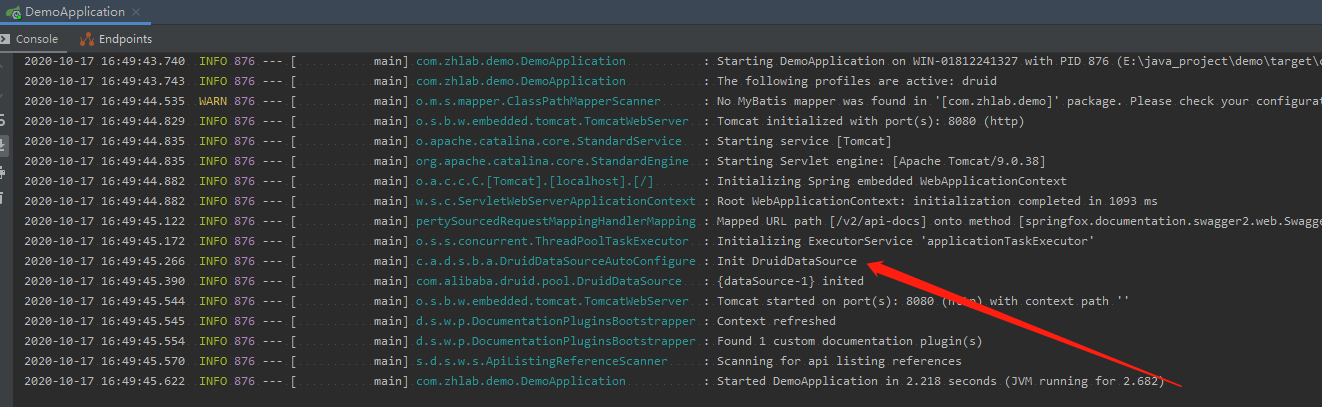
有人可能会遇到如下的错误信息:
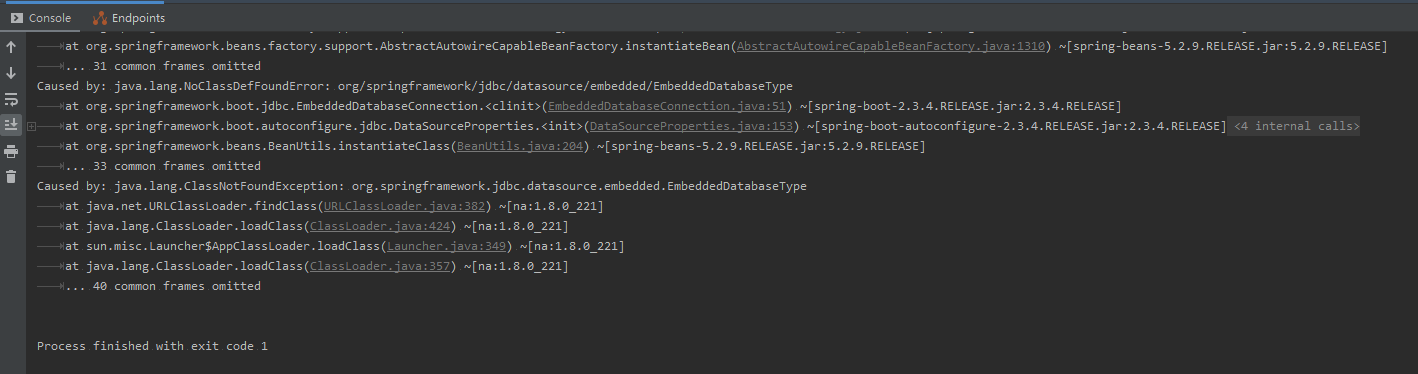
缺少了类似mybatis、spring-data-jpa这类的数据包,Druid需要依赖这些才能启动
测试一下
在浏览器输入:http://localhost:8080/druid/login.html,出现Druid监控登录框,用户名和密码为配置文件里的内容
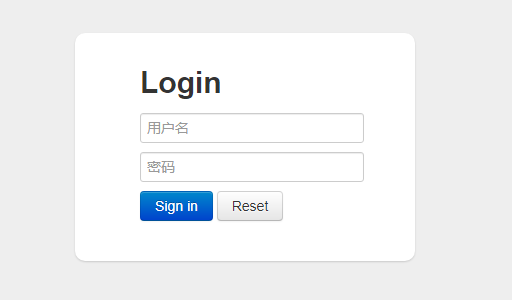
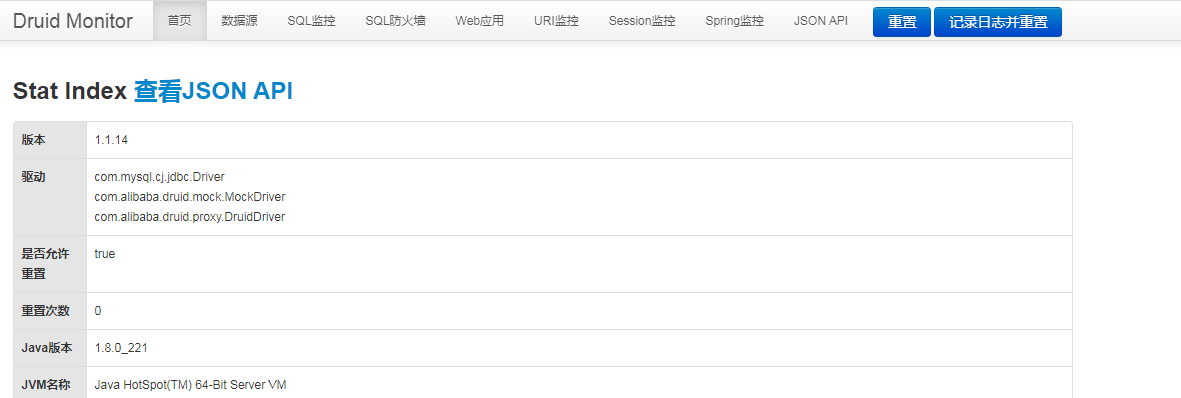
在这里可以查看各类数据的监控信息,帮助系统的优化。
总结
这里只是做了最简单的集成,在后续的项目中使用的话会另起一篇深入探讨。
项目地址
https://gitee.com/kaixinshow/springboot-note
声明:本文内容由网友自发贡献,不代表【wpsshop博客】立场,版权归原作者所有,本站不承担相应法律责任。如您发现有侵权的内容,请联系我们。转载请注明出处:https://www.wpsshop.cn/article/detail/46579
推荐阅读

相关标签

