
热门标签
热门文章
- 1springboot详解 yaml_Spring Boot学习之YAML文件配置
- 2UnityWebRequest_unitywebrequest unityaction
- 3卷积神经网络算法解读
- 4同态滤波(Homomorphic filtering)(附源码)_同态滤波算法
- 5搭建个人博客:域名解析 + 备案
- 6Sublime 使用笔记(一):安装 & 配置编译环境(C++、Python、Java、JavaScript)_sublime如何下载c++ single file
- 7Spring Security Oauth2实践(1) - 授权码模式_spring security oauth2.0 授权码模式 formlogin
- 8SpringSecurity之Oauth2介绍
- 9《UE5_C++多人TPS完整教程》学习笔记7 ——《P8 为项目配置 Steam(Configuring A Project for Steam)》
- 10es6类的继承,看完还不会我也没办法_es6 继承类
当前位置: article > 正文
Android Studio的OkHttp3使用_android studio okhttp3
作者:思考机器4 | 2024-01-29 23:46:06
赞
踩
android studio okhttp3
OkHttp是由Square公司开发的,OkHttp的开发项目主页地址:http://github.com/square/okhttp。
创建一个项目:
由于今天是4月5号所以就要Test0405命名。
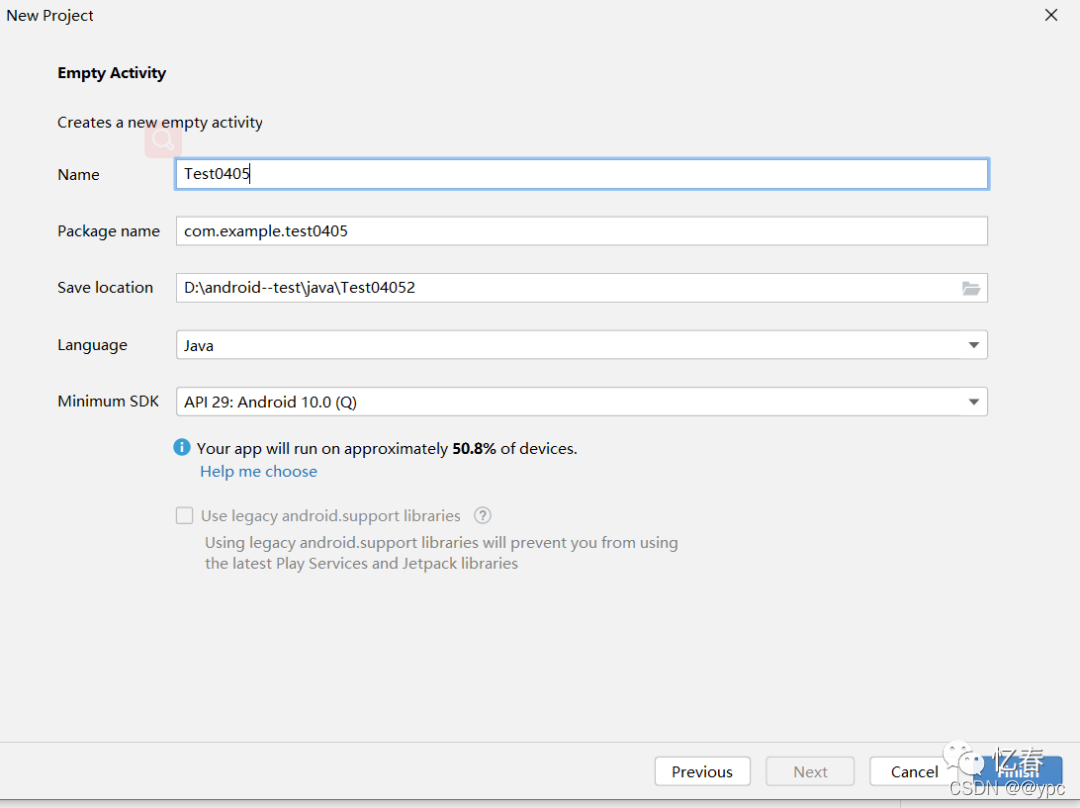
在使用OkHttp是先在项目中添加OkHttp库,编辑app/build.gradle文件。
在dependencies中添加
implementation 'com.squareup.okhttp3:okhttp:3.14.2'  //okhtttp库
implementation 'com.squareup.okio:okio:1.17.4'       //okhttp需要依赖的基础
- 1
- 2
在activity_main.xml中添加一个button按钮,和一个textview控件。
<Button
    android:id="@+id/send_request"
    android:layout_width="match_parent"
    android:layout_height="wrap_content"
	android:text="Send request get" />
<TextView
    android:id="@+id/request_text"
    android:layout_width="match_parent"
    android:layout_height="match_parent"/>
- 1
- 2
- 3
- 4
- 5
- 6
- 7
- 8
- 9
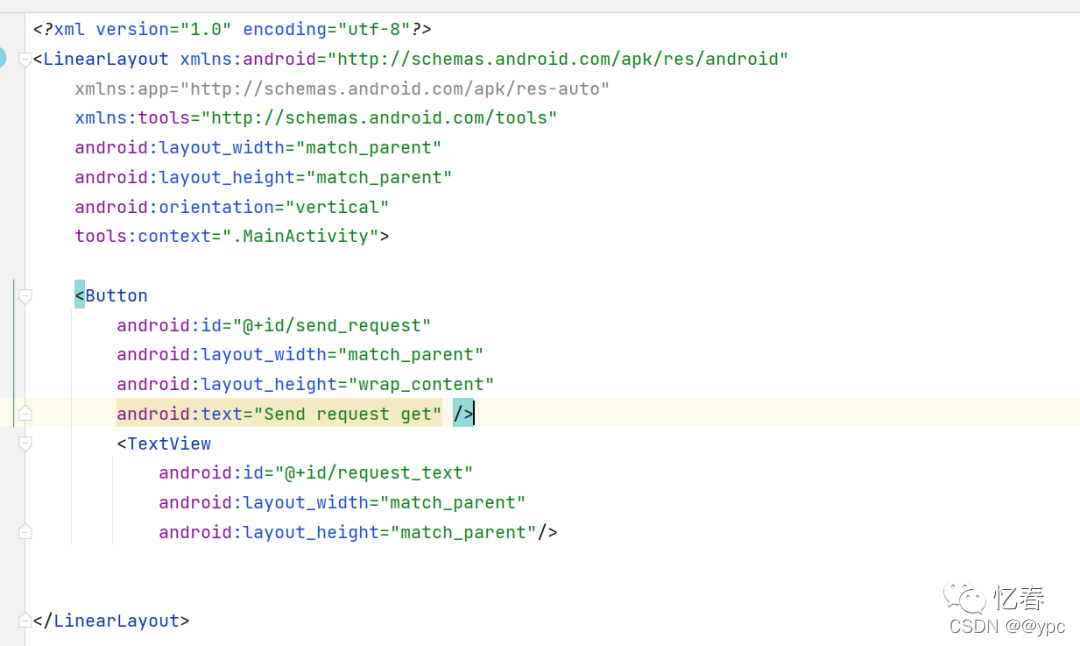
在MainActivity.java中来使用OkHttp
package com.example.test0405; import androidx.appcompat.app.AppCompatActivity; import android.os.Bundle; import android.view.View; import android.widget.Button; import android.widget.TextView; import okhttp3.OkHttpClient; import okhttp3.Request; import okhttp3.Response; public class MainActivity extends AppCompatActivity implements View.OnClickListener{ TextView responseText; Button send_request; @Override protected void onCreate(Bundle savedInstanceState) { super.onCreate(savedInstanceState); setContentView(R.layout.activity_main); //对控件的实例化 responseText=findViewById(R.id.request_text); send_request=findViewById(R.id.send_request); send_request.setOnClickListener(this); } @Override public void onClick(View view) { if (view.getId()==R.id.send_request){ sendRequestWithOkHttp(); //点击button按钮使用sendRequestWithOkHttp()方法 } } private void sendRequestWithOkHttp() { new Thread(new Runnable() { @Override public void run() { try { OkHttpClient client = new OkHttpClient();//创建一个OkHttpClient实例 //想要发起一条Http请求,需要创建一个Request对象 Request request=new Request.Builder()//创建一个Request对象 .url("http:www.baidu.com")//需要请求的网址 .post(requestBody) .get()//请求方式 .build(); //调用OkHttpClient的newCall()方法来创建一个Call对象, //并调用它的execute()方法,来发送请求并获取服务器返回的数据 Response response=client.newCall(request).execute(); //其中Response对象就是服务器返回的数据,我们可以使用如下写法得到返回的具体内容 String responseData=response.body().string(); //将服务器返回的数据进行读取,并将结果传入到showResponse()方法中 showResponse(responseData); }catch (Exception e){ e.printStackTrace(); } } private void showResponse(final String responseData) { runOnUiThread(new Runnable() { @Override public void run() { //将结果显示到界面上 responseText.setText(responseData); } }); } }).start(); } }

- 1
- 2
- 3
- 4
- 5
- 6
- 7
- 8
- 9
- 10
- 11
- 12
- 13
- 14
- 15
- 16
- 17
- 18
- 19
- 20
- 21
- 22
- 23
- 24
- 25
- 26
- 27
- 28
- 29
- 30
- 31
- 32
- 33
- 34
- 35
- 36
- 37
- 38
- 39
- 40
- 41
- 42
- 43
- 44
- 45
- 46
- 47
- 48
- 49
- 50
- 51
- 52
- 53
- 54
- 55
- 56
- 57
- 58
- 59
- 60
- 61
- 62
- 63
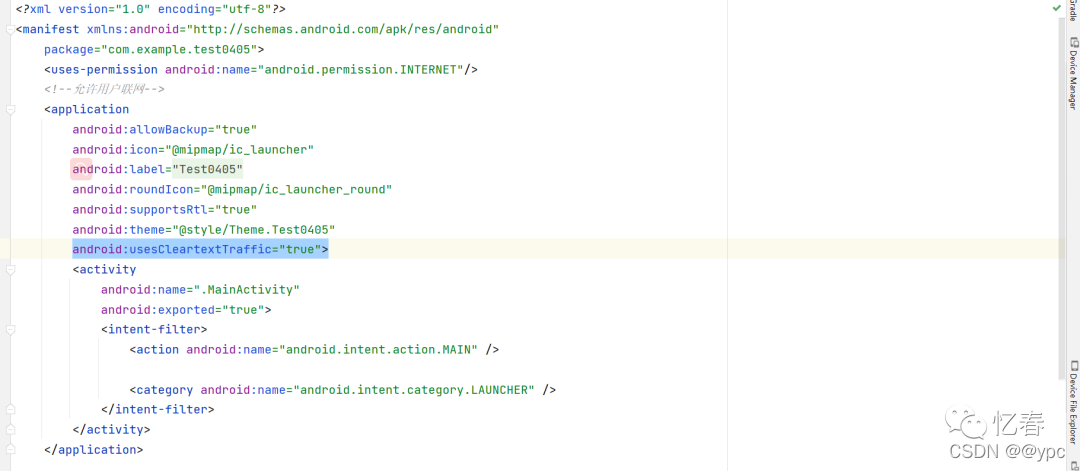
AndroidManifest.xml中添加允许用户联网,并指示应用程序使用明文网络流量
android:usesCleartextTraffic="true" //指示应用程序是否打算使用明文网络流量,
<uses-permission android:name="android.permission.INTERNET"/> //允许用户联网
- 1
- 2
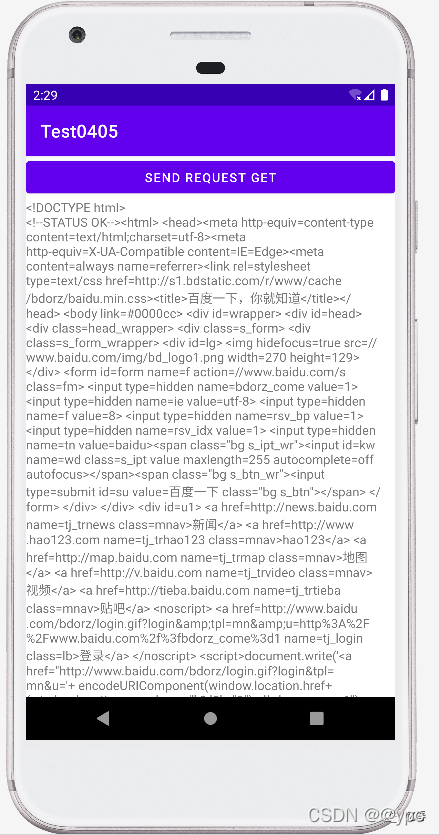
运行程序,并点击Send Request按钮,结果如下图所示。
注意:上述是get请求,如果是post请求,我们需要先构造一个RequestBody对象来存放待提交的参数
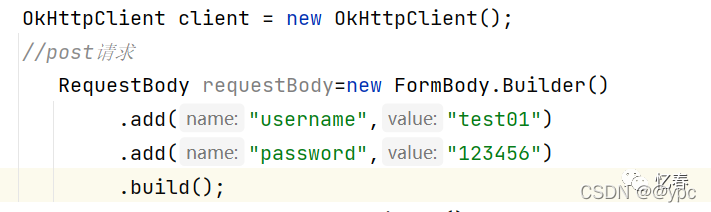
然后在Request.Builder中调用一下post()方法,并将RequestBody对象传入:

接下来的操作就和get请求一样了。
声明:本文内容由网友自发贡献,不代表【wpsshop博客】立场,版权归原作者所有,本站不承担相应法律责任。如您发现有侵权的内容,请联系我们。转载请注明出处:https://www.wpsshop.cn/article/detail/45663
推荐阅读
![Android Termux安装MySQL,并使用cpolar实现公网安全远程连接[内网穿透]](https://img-blog.csdnimg.cn/fabd1c92d58f4f5b8946e9b8f6b49f50.jpeg?x-oss-process=image/resize,m_fixed,h_300,image/format,png)



相关标签

