
热门标签
热门文章
- 1修改docker容器端口映射的方法_如何将docker port绑定成英文
- 2微信小程序的N种页面跳转方式(2024最新)_微信小程序的跳转
- 3自动驾驶仿真软件简介----CARLA&Gazebo&LGSVL&Others_carla 与 lgsvl比较
- 4企业为什么要做数字化转型?_企业管理者为什么要做数字化转型
- 5神经网络与深度学习(二):BP算法_bp算法中前因子
- 6AIGC周报|下一个裁谁?老板:问问AI;OpenAI推出Shap·E;库克:AI仍有不少问题要解决_苹果的 ceo库克认为,aigc(生成式人工智能)几乎可以影响我们所做的一切,影响我们所
- 7最长递增子序列(LIS)_lis 最长递增子序列
- 8vue+element项目启动报错element-variables.scss问题_error in ./src/styles/element-variables.scss
- 9vue cli3中,在vue.config.js文件中怎么引入其他js文件_vue.config.js import
- 10Qt Quick 简介
当前位置: article > 正文
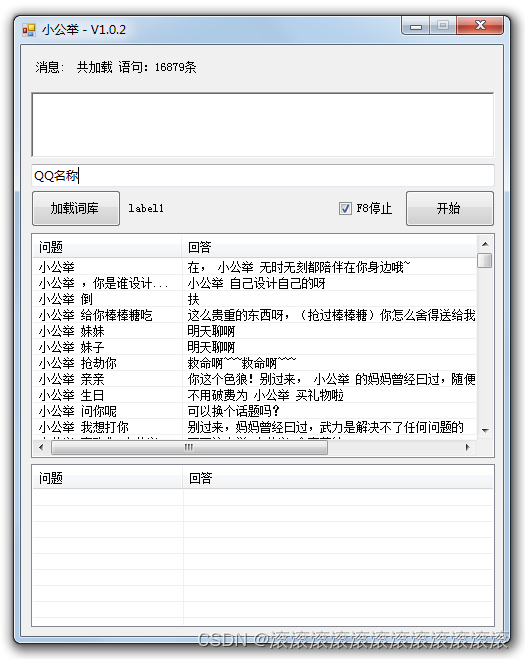
c# winformQQ自动回复机器人,可以自定义回复话术_wpf移自动问答机器人
作者:itdef | 2024-01-29 21:22:12
赞
踩
wpf移自动问答机器人
- using System;
- using System.Collections.Generic;
- using System.ComponentModel;
- using System.Data;
- using System.Drawing;
- using System.IO;
- using System.Runtime.InteropServices;
- using System.Text;
- using System.Threading;
- using System.Windows.Forms;
-
- namespace QQGG
- {
- public partial class Form1 : Form
- {
-
- //import win32api
- //import win32con
- //win32api.keybd_event(17,0,0,0) #ctrl键位码是17
- //win32api.keybd_event(86,0,0,0) #v键位码是86
- //win32api.keybd_event(86,0,win32con.KEYEVENTF_KEYUP,0) #释放按键
- //win32api.keybd_event(17,0,win32con.KEYEVENTF_KEYUP,0)
-
- //附个键位码表:
- //字母和数字键 数字小键盘的键 功能键 其它键
- // 键 键码 键 键码 键 键码 键 键码
- // A 65 0 96 F1 112 Backspace 8
- // B 66 1 97 F2 113 Tab 9
- // C 67 2 98 F3 114 Clear 12
- // D 68 3 99 F4 115 Enter 13
- // E 69 4 100 F5 116 Shift 16
- // F 70 5 101 F6 117 Control 17
- // G 71 6 102 F7 118 Alt 18
- // H 72 7 103 F8 119 Caps Lock 20
- // I 73 8 104 F9 120 Esc 27
- // J 74 9 105 F10 121 Spacebar 32
- // K 75 * 106 F11 122 Page Up 33
- // L 76 + 107 F12 123 Page Down 34
- // M 77 Enter 108 -- -- End 35
- // N 78 - 109 -- -- Home 36
- // O 79 . 110 -- -- Left Arrow 37
- // P 80 / 111 -- -- Up Arrow 38
- // Q 81 -- -- -- -- Right Arrow 39
- // R 82 -- -- -- -- Down Arrow 40
- // S 83 -- -- -- -- Insert 45
- // T 84 -- -- -- -- Delete 46
- // U 85 -- -- -- -- Help 47
- // V 86 -- -- -- -- Num Lock 144
- // W 87
- // X 88
- // Y 89
- // Z 90
- // 0 48
- // 1 49
- // 2 50
- // 3 51
- // 4 52
- // 5 53
- // 6 54
- // 7 55
- // 8 56
- // 9 57
-
- //这个函数在user32.dll这个库文件里面。我们可以在C:\WINDOWS\system32(XP系统)这个目录下找到这个文件,他是系统自带的。 我们以C#直接调用这个文件中的API为例子来说下怎么进行鼠标操作,首先在我们C#中声明引用,如果是一个基于From的程序,这个声明的位置写在你的From class就可以了
- //[System.Runtime.InteropServices.DllImport("user32")]
- //private static extern int mouse_event(int dwFlags, int dx, int dy, int cButtons, int dwExtraInfo);
-
- //参数 意义
- //dwFlags Long,下表中标志之一或它们的组合
- //dx,dy Long,根据MOUSEEVENTF_ABSOLUTE标志,指定x,y方向的绝对位置或相对位置
- //cButtons Long,没有使用
- //dwExtraInfo Long,没有使用
-
- //dwFlags常数 意义
-
- //const int MOUSEEVENTF_MOVE = 0x0001; 移动鼠标
- //const int MOUSEEVENTF_LEFTDOWN = 0x0002; 模拟鼠标左键按下
- //const int MOUSEEVENTF_LEFTUP = 0x0004; 模拟鼠标左键抬起
- //const int MOUSEEVENTF_RIGHTDOWN = 0x0008; 模拟鼠标右键按下
- //const int MOUSEEVENTF_RIGHTUP = 0x0010; 模拟鼠标右键抬起
- //const int MOUSEEVENTF_MIDDLEDOWN = 0x0020; 模拟鼠标中键按下
- //const int MOUSEEVENTF_MIDDLEUP = 0x0040; 模拟鼠标中键抬起
- //const int MOUSEEVENTF_ABSOLUTE = 0x8000; 标示是否采用绝对坐标
-
-
- //程序中我们直接调用mouse_event函数就可以了
- //mouse_event(MOUSEEVENTF_ABSOLUTE | MOUSEEVENTF_MOVE, 500, 500, 0, 0);
-
- //1、这里是鼠标左键按下和松开两个事件的组合即一次单击:
- //mouse_event (MOUSEEVENTF_LEFTDOWN | MOUSEEVENTF_LEFTUP, 0, 0, 0, 0 )
-
- //2、模拟鼠标右键单击事件:
- //mouse_event (MOUSEEVENTF_RIGHTDOWN | MOUSEEVENTF_RIGHTUP, 0, 0, 0, 0 )
-
- //3、两次连续的鼠标左键单击事件 构成一次鼠标双击事件:
- //mouse_event (MOUSEEVENTF_LEFTDOWN | MOUSEEVENTF_LEFTUP, 0, 0, 0, 0 )
- //mouse_event (MOUSEEVENTF_LEFTDOWN | MOUSEEVENTF_LEFTUP, 0, 0, 0, 0 )
-
- //4、使用绝对坐标
- //MOUSEEVENTF_ABSOLUTE | MOUSEEVENTF_MOVE, 500, 500, 0, 0
-
- //需要说明的是,如果没有使用MOUSEEVENTF_ABSOLUTE,函数默认的是相对于鼠标当前位置的点,如果dx,和dy,用0,0表示,这函数认为是当前鼠标所在的点。5、直接设定绝对坐标并单击
- //mouse_event(MOUSEEVENTF_LEFTDOWN, X * 65536 / 1024, Y * 65536 / 768, 0, 0);
- //mouse_event(MOUSEEVENTF_LEFTUP, X * 65536 / 1024, Y * 65536 / 768, 0, 0);
- //其中X,Y分别是你要点击的点的横坐标和纵坐标
-
- //而键盘模拟用 Keybd_event()
-
- //Keybd_event能触发一个按键事 件,也就是说回产生一个WM_KEYDOWN或WM_KEYUP消息。当然也可以用产生这两个消息来模拟按键,但是没有直接用这个函数方便。 Keybd_event共有四个参数,第一个为按键的虚拟键值,如回车键为vk_return, tab键为vk_tab。第二个参数为扫描码,一般不用 设置,用0代替就行。第三个参数为选项标志,如果为keydown则置0即可,如果为keyup则设成“KEYEVENTF_KEYUP”,第四个参数一 般也是置0即可。
-
-
- [DllImport("user32.dll", EntryPoint = "FindWindow")]
- private extern static IntPtr FindWindow(string lpClassName, string lpWindowName);
-
- [DllImport("user32.dll")]
- private static extern int GetWindowText(IntPtr hwnd, StringBuilder lpString, int cch);
-
- [DllImport("user32.dll", EntryPoint = "SetWindowPos", SetLastError = true)]
- private static extern bool SetWindowPos(IntPtr hWnd, int hWndInsertAfter, int x, int y, int cx, int cy, uint uFlags);
-
-
-
- private string className, windowText;
- private IntPtr qqWindowHwnd;
-
-
- public Form1()
- {
- InitializeComponent();
- }
-
- private void Form1_Load(object sender, EventArgs e)
- {
-
- }
-
- public bool IsTargetShow
- {
- get
- {
- qqWindowHwnd = FindWindow(className, windowText);
- if (qqWindowHwnd != IntPtr.Zero) //找到目标窗口
- {
- return true;
- }
- else
- {
- return false;
- }
- }
- }
- /// <summary>
- /// 设置鼠标位置
- /// </summary>
- /// <param name="x"></param>
- /// <param name="y"></param>
- /// <returns></returns>
- [DllImport("user32.dll")]
- static extern bool SetCursorPos(int x, int y);
-
- [DllImport("user32.dll")]
- static extern bool mouse_event(int dwFlags, int dx, int dy, int dwData, UInt64 dwExtraInfo);
-
- [DllImport("user32.dll", EntryPoint = "keybd_event")]
- public static extern void keybd_event(byte bVk, //虚拟键值
- byte bScan,// 一般为0
- int dwFlags, //这里是整数类型 0 为按下,2为释放
- int dwExtraInfo //这里是整数类型 一般情况下设成为0
- );
-
- public void SendDoubleClick(int x, int y)
- {
- SetCursorPos(x, y);
- mouse_event(0x2, 0, 0, 0, 0);
- mouse_event(0x4, 0, 0, 0, 0);
- YanShi.Delay(10);
- mouse_event(0x2, 0, 0, 0, 0);
- mouse_event(0x4, 0, 0, 0, 0);
- }
-
- public void SendClick(int x, int y)
- {
- SetCursorPos(x, y);
- mouse_event(0x2, 0, 0, 0, 0);
- mouse_event(0x4, 0, 0, 0, 0);
- }
-
- public void SendPaste()
- {
- keybd_event(17, 0, 0, 0);
- keybd_event(86, 0, 0, 0);
- keybd_event(86, 0, 2, 0);
- keybd_event(17, 0, 2, 0);
- }
-
- public void SendEnter()
- {
- keybd_event(13, 0, 0, 0);
-
- keybd_event(13, 0, 2, 0);
- }
-
- public void SendDown()
- {
- keybd_event(40, 0, 0, 0);
- keybd_event(40, 0, 2, 0);
- YanShi.Delay(10);
- }
-
- public void SendCtrlEnter()
- {
- keybd_event(17, 0, 0, 0);
- keybd_event(13, 0, 0, 0);
- keybd_event(13, 0, 2, 0);
- keybd_event(17, 0, 2, 0);
- }
- public void SendCtrlA()
- {
- keybd_event(17, 0, 0, 0);
- keybd_event(65, 0, 0, 0);
-
- keybd_event(17, 0, 2, 0);
- keybd_event(65, 0, 2, 0);
- }
- public void SendCtrlC()
- {
- keybd_event(17, 0, 0, 0);
- keybd_event(67, 0, 0, 0);
- keybd_event(17, 0, 2, 0);
- keybd_event(67, 0, 2, 0);
- }
- public void SendAltF4()
- {
- keybd_event(18, 0, 0, 0);
- keybd_event(115, 0, 0, 0);
- keybd_event(115, 0, 2, 0);
- keybd_event(18, 0, 2, 0);
- }
- public bool panduan_start_sotp = true;
- public bool panduan_fasong = true;
- private void BtnBeginSend_Click(object sender, EventArgs e)
- {
- if (checkBox1.Checked)
- {
- timer1.Start();
-
- className = TxtClassName.Text;
- windowText = TxtWindowText.Text;
-
- if (!IsTargetShow)
- {
- //MessageBox.Show("没有找到指定的QQ群窗口。");
- label1.Text = "没有找到【" + TxtWindowText.Text + "】群";
- return;
- }
- SetWindowPos(qqWindowHwnd, 0, 0, 0, 640, 614, 0);
-
- //SendClick(450, 131 + 10); //点选群成员,使其获得输入焦点
-
- //SendEnter();
-
- //SendClick(140, 440); //点选输入框,使其获得输入焦点
- //SendPaste();
-
- SendClick(360, 260); // 点击聊天记录窗口准备获取内容
- YanShi.Delay(100);
- SendCtrlA();
- YanShi.Delay(100);
- SendCtrlC();
- YanShi.Delay(100);
- SendCtrlC();
- //YanShi.Delay(100);
- //SendClick(200, 200); // 点击聊天记录窗口准备获取内容
-
-
- IDataObject iData = Clipboard.GetDataObject();
- if (iData.GetDataPresent(DataFormats.Text))
- {
- try
- {
- richTextBox1.Text = (String)iData.GetData(DataFormats.Text);
-
- richTextBox1.Text = richTextBox1.Lines[richTextBox1.Lines.Length - 2];
-
- if (richTextBox1.Text.IndexOf("#开启") > -1)
- {
- panduan_start_sotp = true;
- }
- if (richTextBox1.Text.IndexOf("#关闭") > -1)
- {
- panduan_start_sotp = false;
- }
-
- this.listView2.Items.Clear();
- foreach (ListViewItem lt in listView1.Items)
- {
- //MessageBox.Show(Convert.ToString(lt.SubItems[0].Text));//记问第行记录的第一个字段值
- if (richTextBox1.Text.IndexOf(lt.SubItems[0].Text) > -1)
- {
- //MessageBox.Show(Convert.ToString(lt.SubItems[1].Text));//记问第行记录的第一个字段值
- this.listView2.Items.Add(lt.SubItems[0].Text).SubItems.Add(lt.SubItems[1].Text);
- }
-
- }
-
-
- Random ran = new Random();
- int RandKey = ran.Next(1, listView2.Items.Count);
- int xuanze = 0;
- foreach (ListViewItem lt in listView2.Items)
- {
-
- xuanze++;
- if (xuanze == RandKey)
- {
- if (panduan_fasong)
- {
- Clipboard.SetText(lt.SubItems[1].Text + "\r\n\r\n");
- SendClick(300, 530); // 点击聊天记录窗口准备获取内容
- YanShi.Delay(100);
- SendPaste();
- SendCtrlEnter();
- break;
- }
- if (panduan_start_sotp)
- {
- panduan_fasong = true;
- }
- else
- {
- panduan_fasong = false;
- }
- }
- }
- }
-
-
- catch (Exception ex)
- { }
- }
- }
- }
-
-
- private void button1_Click(object sender, EventArgs e)
- {
- Read("word.txt");
- // Read_data();
- }
-
- public void Read_data()
- {
- int jiazai_num = 0;
- DataTable dt = Mysql.SelectAccsql("select a1,a2 from word_table");
- for (int i = 0; i < dt.Rows.Count; i++)
- {
- jiazai_num++;
- try
- {
- string a_left = dt.Rows[i]["a1"].ToString();
- string a_right = dt.Rows[i]["a2"].ToString();
- this.listView1.Items.Add(a_left).SubItems.Add(a_right);
- //YanShi.Delay(1);
- label3.Text = "共加载 语句:" + jiazai_num.ToString() + "条";
- }
- catch (Exception ex)
- { }
-
- }
- }
-
-
-
- public void Read(string path)
- {
- StreamReader sr = new StreamReader(path, Encoding.Default);
- String line;
- this.listView1.Items.Clear();
- YanShi.Delay(10);
- this.listView1.Items.Add("正在加载,请稍等...");
- //YanShi.Delay(500);
- this.listView1.Items.Clear();
-
- int i_ok = 0;
- int i_num = 0;
- while ((line = sr.ReadLine()) != null)
- {
- i_num++;
- //Console.WriteLine(line.ToString());
-
- //line = "aaa/bbb";
- //ListViewItem item=new ListViewItem();
- //item.add("第一列的内容").subItems.add("第二列的内容");
- //item.SubItems.Add("第2列,");
- //this.listView1.Items.Add(item);
- //this.listView1.Clear();
- try
- {
- string line_l = line.Substring(0, line.LastIndexOf("/"));
- string line_r = line.Substring(line.LastIndexOf("/") + 1);
-
- if (line_l.Length >= 1 && line_r.Length >= 1)
- {
- try
- {
- //Mysql.SaveAccsql("insert into word_table (a1,a2)values('" + line_l + "','" + line_r + "')");
- i_ok++;
-
- this.listView1.Items.Add(line_l).SubItems.Add(line_r);
- }
- catch (Exception ex)
- {
-
- }
- }
-
-
-
-
- }
- catch(Exception ex)
- {}
-
- //YanShi.Delay(1);
- // this.Text = "共操作数据【" + i_num + "】,成功数据【" + i_ok + "】";
- }
- label3.Text = "共加载 语句:" + i_ok.ToString() + "条";
- }
-
- private void timer1_Tick(object sender, EventArgs e)
- {
-
- RegisterHotKey(Handle, 81, KeyModifiers.None, Keys.F8);
- BtnBeginSend_Click(sender, e);
-
- }
-
-
- #region 定义快捷键
- //===========================================================================================================================
- //如果函数执行成功,返回值不为0。
- //如果函数执行失败,返回值为0。要得到扩展错误信息,调用GetLastError。
- [DllImport("user32.dll", SetLastError = true)]
- public static extern bool RegisterHotKey(
- IntPtr hWnd, //要定义热键的窗口的句柄
- int id, //定义热键ID(不能与其它ID重复)
- KeyModifiers fsModifiers, //标识热键是否在按Alt、Ctrl、Shift、Windows等键时才会生效
- Keys vk //定义热键的内容
- );
- [DllImport("user32.dll", SetLastError = true)]
- public static extern bool UnregisterHotKey(
- IntPtr hWnd, //要取消热键的窗口的句柄
- int id //要取消热键的ID
- );
- //定义了辅助键的名称(将数字转变为字符以便于记忆,也可去除此枚举而直接使用数值)
- [Flags()]
- public enum KeyModifiers
- {
- None = 0,
- Alt = 1,
- Ctrl = 2,
- Shift = 4,
- WindowsKey = 8
- }
- #endregion
- protected override void WndProc(ref Message m)
- {
- const int WM_HOTKEY = 0x0312;
- //按快捷键
- switch (m.Msg)
- {
- case WM_HOTKEY:
- switch (m.WParam.ToInt32())
- {
- case 81:
- //Application.Exit();
- checkBox1.Checked = false;
- break;
- }
- break;
- }
- base.WndProc(ref m);
- }
-
- }
- }

声明:本文内容由网友自发贡献,不代表【wpsshop博客】立场,版权归原作者所有,本站不承担相应法律责任。如您发现有侵权的内容,请联系我们。转载请注明出处:https://www.wpsshop.cn/article/detail/45213
推荐阅读
相关标签

