
热门标签
热门文章
- 1*(p++)与*(++p)区别——学习笔记_*(++p)和*(p++)的区别
- 2微服务学习系列7:开放平台接口鉴权_appid appsecret鉴权 算法
- 3动态规划算法解决背包问题,算法分析与C语言代码实现,时间效率解析_背包动态规划c语言
- 4Can‘t run my Node.js Typescript project TypeError [ERR_UNKNOWN_FILE_EXTENSION]: Unknown file extensi
- 5python -- PyQt5(designer)中文详细教程(四)事件和信号_qt designer 单击事件
- 6解线性方程组python实现迭代法(Jacobi迭代、Gauss-Seidel迭代、松弛迭代)_用高斯塞德尔迭代法求解含有3 未知数的线性方程组的python以及注释
- 7【食品图像识别】Large Scale Visual Food Recognition
- 8【毕业季·进击的技术er】大学生计算机毕业设计应该这样写_毕业设计测试部分怎么写
- 9window bat xcopy用法示例_使用 xcopy windows .bat 将a文件夹中所有以hkd开头的文件夹,递归复制到b文件夹
- 10掌握rm命令:Linux文件删除的艺术与安全指南
当前位置: article > 正文
python实现一个简单的桌面倒计时小程序_桌面倒计时插件怎么编写
作者:程序代码艺术家2 | 2024-01-29 21:02:49
赞
踩
桌面倒计时插件怎么编写
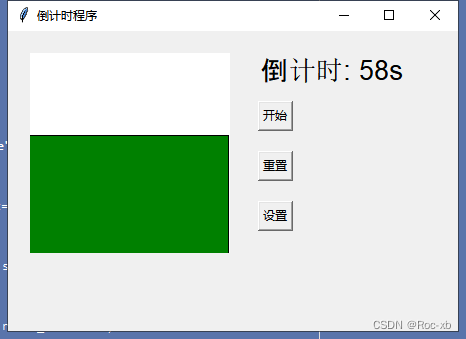
本章内容主要是利用python制作一个简单的桌面倒计时程序,包含开始、重置 、设置功能。
目录
一、效果演示
二、程序代码
- #!/usr/bin/python
- # -*- coding: UTF-8 -*-
- """
- @author: Roc-xb
- """
-
- import tkinter as tk
- from tkinter import simpledialog
- from tkinter import messagebox
-
- class CountdownTimer:
- def __init__(self, root):
- self.root = root
- self.root.title("倒计时程序")
- self.root.geometry("450x300")
-
- self.countdown_value = 60
- self.is_counting = False
-
- self.canvas = tk.Canvas(self.root, width=200, height=200, bg="white")
- self.canvas.place(x=20, y=20)
-
- self.countdown_label = tk.Label(self.root, text="倒计时: 60s", font=("Arial", 20))
- self.countdown_label.place(x=250, y=20)
-
- self.start_button = tk.Button(self.root, text="开始", command=self.start_countdown)
- self.start_button.place(x=250, y=70)
-
- self.reset_button = tk.Button(self.root, text="重置", command=self.reset_countdown)
- self.reset_button.place(x=250, y=120)
-
- self.set_button = tk.Button(self.root, text="设置", command=self.set_countdown)
- self.set_button.place(x=250, y=170)
-
- def start_countdown(self):
- if self.is_counting:
- return
-
- self.is_counting = True
- self.countdown()
-
- def countdown(self):
- if self.countdown_value > 0 and self.is_counting is True:
- self.countdown_value -= 1
- self.countdown_label.config(text="倒计时: " + str(self.countdown_value) + "s")
- self.canvas.delete("all")
- self.canvas.create_rectangle(0, 200 - self.countdown_value * 2, 200, 300, fill="green")
- self.root.after(1000, self.countdown)
- elif self.countdown_value > 0 and self.is_counting is False:
- self.canvas.delete("all")
- self.is_counting = False
- return
- else:
- self.is_counting = False
- messagebox.showinfo("提示", "倒计时结束")
-
- def reset_countdown(self):
- self.is_counting = False
- self.countdown_value = 60
- self.countdown_label.config(text="倒计时: " + str(self.countdown_value) + "s")
- self.canvas.delete("all")
-
- def set_countdown(self):
- if self.is_counting:
- return
-
- value = tk.simpledialog.askinteger("设置倒计时", "请输入倒计时时间(秒):", parent=self.root)
- if value is not None:
- self.countdown_value = value
- self.countdown_label.config(text="倒计时: " + str(self.countdown_value) + "s")
- self.canvas.delete("all")
-
-
- if __name__ == '__main__':
- root = tk.Tk()
- app = CountdownTimer(root)
- root.mainloop()

声明:本文内容由网友自发贡献,版权归原作者所有,本站不承担相应法律责任。如您发现有侵权的内容,请联系我们。转载请注明出处:【wpsshop博客】
推荐阅读


相关标签

