
热门标签
热门文章
- 1Maven
- 2java在线票务系统(选座)Myeclipse开发mysql数据库web结构java编程计算机网页项目
- 3Spring Boot 实战 | Spring Boot整合JPA常见问题解决方案
- 4如何访问openapi_.openapi怎么打开 csdn
- 5字节跳动程序媛教你如何刷算法题:面试手撕代码我就没怕过_手撕代码不会怎么办
- 6微信小程序:fail api scope is not declared in the privacy agreement(授权点击没反应)
- 7Windows本地搭建Emby媒体库服务器并实现远程访问「内网穿透」_emby server
- 8Druid连接池及监控在Spring配置如下:_spring druid监控
- 9PyTorch 最新安装教程
- 10基于Java+SpringBoot+Thymeleaf(校园)点餐/外卖系统设计与实现_校园点餐送餐系统设计
当前位置: article > 正文
【运行Python爬虫脚本示例】
作者:算法创新者 | 2024-01-29 13:37:57
赞
踩
【运行Python爬虫脚本示例】
主要内容:Python中的两个库的使用。
1、requests库:访问和获取网页内容,
2、beautifulsoup4库:解析网页内容。
一 python 爬取数据
1 使用requests库发送GET请求,并使用text属性获取网页内容。
然后可以对获取的网页内容进行解析和处理
import requests

url = "https://www.baidu.com"

# 发送GET请求
response = requests.get(url)

# 获取网页内容
html_content = response.text

# 打印网页内容
print(html_content)
- 1
- 2
- 3
- 4
- 5
- 6
- 7
- 8
- 9
- 10
- 11
- 12
这段代码是一个简单的Python脚本,用于向https://www.baidu.com发送一个HTTP GET请求,并打印返回的HTML内容。这里使用了requests库,它是一个流行的用于发送HTTP请求的Python库。
以下是代码的逐行解释:
import requests: #导入requests库。

url = "https://www.baidu.com": #定义一个字符串变量url,其值为百度主页的URL。

response = requests.get(url):
#使用requests.get()方法向指定的URL发送一个GET请求,并将响应对象存储在response变量中。

html_content = response.text: #从响应对象中提取HTML内容,并将其存储在html_content变量中。

print(html_content): #打印提取的HTML内容。
- 1
- 2
- 3
- 4
- 5
- 6
- 7
- 8
- 9
- 10
- 11
注意:在运行此代码之前,请确保你已经安装了requests库,否则会出现下面错误:import requests ModuleNotFoundError: No module named ‘requests’
2 使用beautifulsoup4库解析网页内容
可以使用Python中的requests库来访问和获取网页内容,同时还需要使用beautifulsoup4库来解析网页内容。
import requests
from bs4 import BeautifulSoup

url = "https://www.baidu.com"

# 发送GET请求
response = requests.get(url)

# 将响应的内容转换成BeautifulSoup对象
soup = BeautifulSoup(response.content, 'html.parser')

# 打印网页标题
print("网页标题:", soup.title.string)
- 1
- 2
- 3
- 4
- 5
- 6
- 7
- 8
- 9
- 10
- 11
- 12
- 13
运行以上代码,即可获取百度网页的标题。你可以根据需要进一步解析和提取网页内容。
注意:在运行此代码之前,请确保你已经安装了BeautifulSoup库,方法和安装requests库相同。
2 no module named requests 处理方式
如图一所示,流程为:右上角设置标志,点开setting,出现setting界面,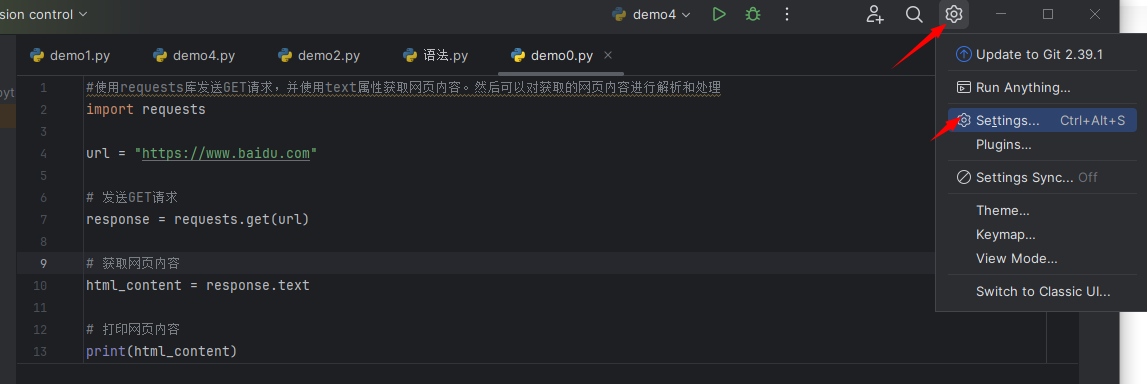
图一
点开setting界面中,如图二,找到自己建立的工程名称,点开python interpreter ,然后点击图上的“+”号:在搜索框搜索requests,点击下面的install package,安装成功即可。
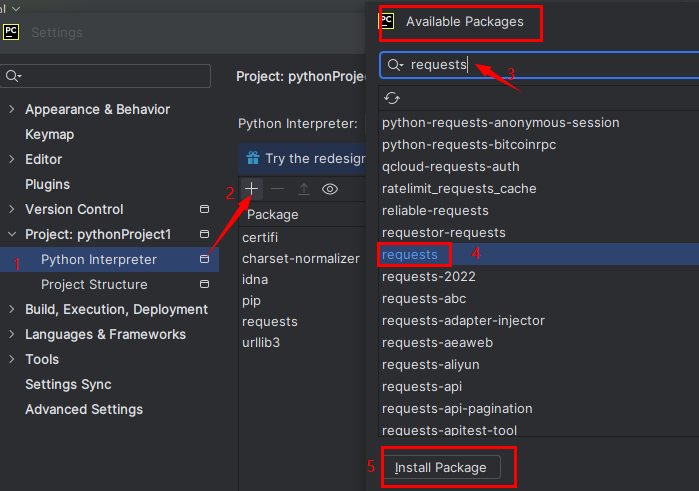
图二
声明:本文内容由网友自发贡献,不代表【wpsshop博客】立场,版权归原作者所有,本站不承担相应法律责任。如您发现有侵权的内容,请联系我们。转载请注明出处:https://www.wpsshop.cn/article/detail/43133
推荐阅读


相关标签

