
热门标签
热门文章
- 1HTTP请求传递参数方式【2024-02-01】
- 2二层接口、三层接口的区别。_二层接口和三层接口的区别
- 3阿里Java开发手册!Java最新实习面试经验总结_阿里java实习面试
- 4Stable Diffusion 模型下载:Samaritan 3d Cartoon(撒玛利亚人 3d 卡通)
- 5鸿蒙系统(HarmonyOS)-- 第2章:鸿蒙Ul框架_end_padding
- 6脚踏实地学习Git_gitub
- 7Kvm服务器网站底层框架虚拟化方案
- 8VUE+ElementUI Table表格实现“指定行“展开并且其他行收起,“指定行”数据重复实现“合并行”_element表格的展开与收起
- 9Hyper-V管理器无法连接到服务器,Hyper-V主机计算服务无法打开,vmcompute.exe应用程序无法正常启动(0xc0000606)的一种解决方法_hyper-v尝试连接服务器出错
- 10当下流行的编程语言
当前位置: article > 正文
go mqtt(嵌入式arm设备)接入物联网平台
作者:程序安全守护者 | 2024-01-29 11:25:08
赞
踩
go mqtt
#1、设备
任意能跑linux的设备。
当前设备:imx6 内存>=128m 容量>=128m
#2、平台
华为云平台
设备接入服务,开发者中心
#3、设备注册
##1、添加产品
 选择添加自定义产品
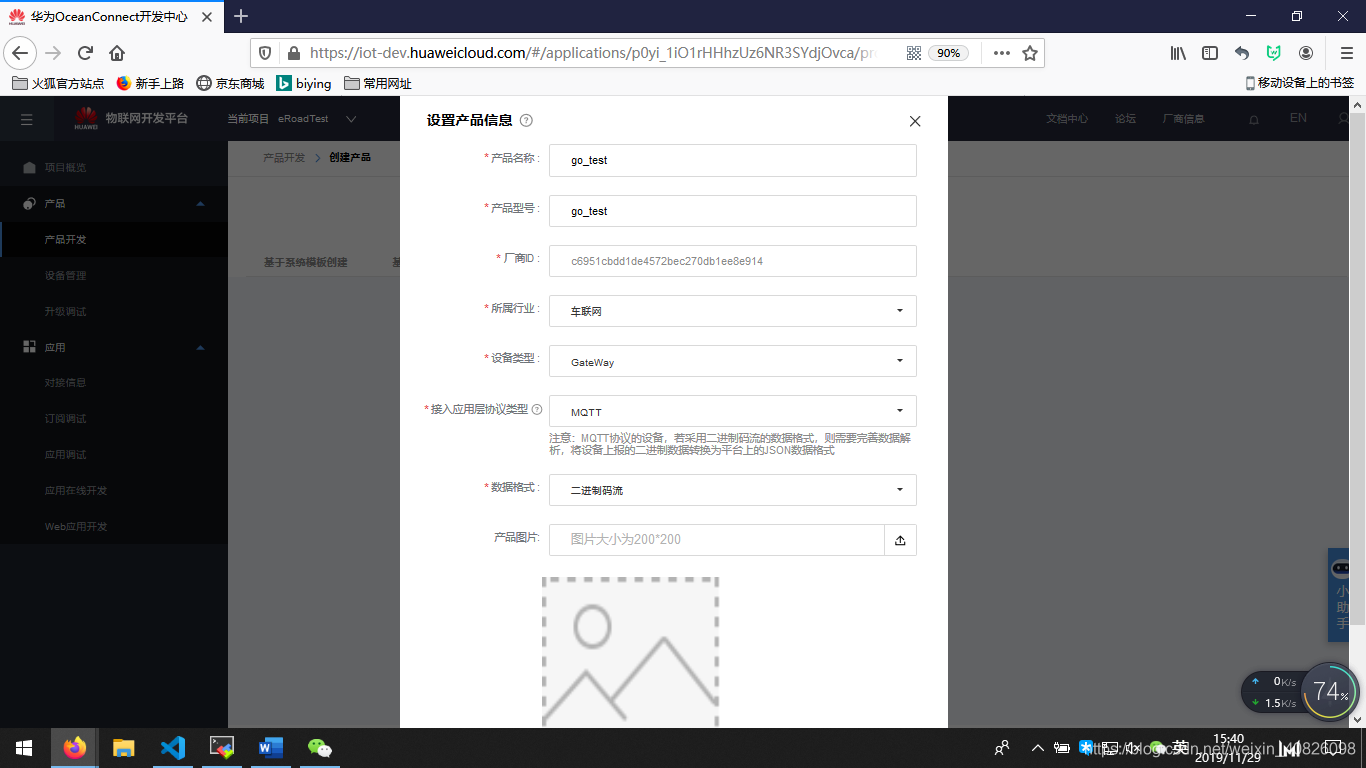
##2、添加profile定义,插件
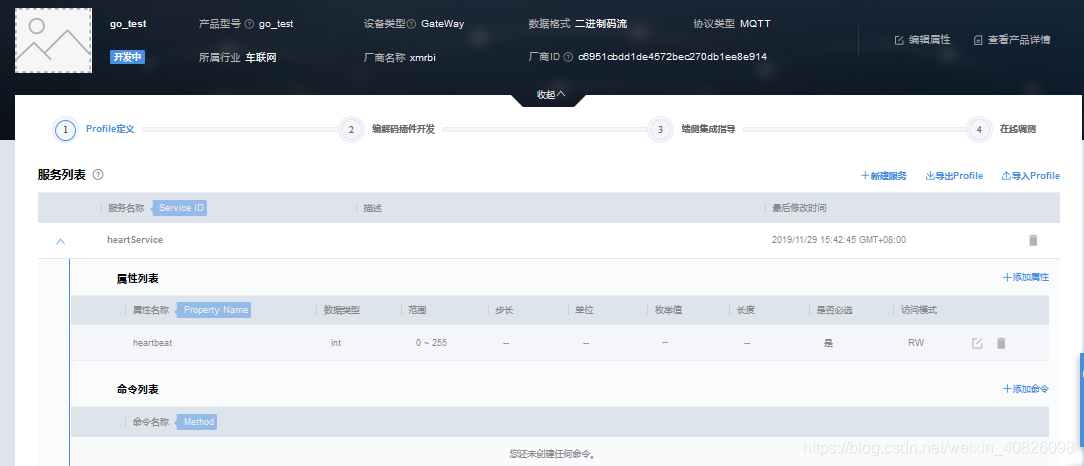
 #4、注册设备
 用官方工具计算出clientid等等连接参数
 #5、编写代码
##5.1、主函数
// main
package main

import (
	"fmt"
	"sync"

	"time"

	"./user_mqtt"
	//"./user_nanomsg"
	"./utils"
	mqtt "github.com/eclipse/paho.mqtt.golang"
)

type ConfigRead struct {
	sslUrl   string //
	clientId string
	userName string
	passWord string
	pemAdd   string //证书地址

	pubAdd string
	subAdd string
}

//初始化一些变量
var readMsg ConfigRead
//var internalCommunication user_nanomsg.Nanomsg = new(user_nanomsg.NanomsgOptions)
var device1 user_mqtt.DeviceMsg = new(user_mqtt.DeviceMsgOptions)

//var handler *user_nanomsg.NanomsgOptions
func onReceived(client mqtt.Client, message mqtt.Message) {
	fmt.Printf("Receive topic: %s,  payload: %x \n", message.Topic(), string(message.Payload()))
	//internalCommunication.PairSocketSend([]byte(message.Payload()))
}

// pub客户端与服务端断连后,触发重连机制
func onPubConnectionLost(client mqtt.Client, err error) {
	fmt.Println("on pub connect lost, try to reconnect")
	user_mqtt.LoopConnect(client)
	client.Subscribe(readMsg.subAdd, 0, onReceived)
}

//读取INI配置文件
func InitConfigRead(o *ConfigRead) bool {
	ini_parser := utils.IniParser{}
	conf_file_name := "/my-demo/mqtt/init.ini"
	if err := ini_parser.Load(conf_file_name); err != nil {
		conf_file_name = "./init.ini"
		if err := ini_parser.Load(conf_file_name); err != nil {
			//fmt.Printf("try load config file[%s] error[%s]\n", conf_file_name, err.Error())
			return false
		}
		//return
	}

	o.sslUrl = ini_parser.GetString("connect_sect", "SslUrl")
	o.clientId = ini_parser.GetString("connect_sect", "ClientId")
	o.userName = ini_parser.GetString("connect_sect", "UserName")
	o.passWord = ini_parser.GetString("connect_sect", "PassWord")
	o.pemAdd = ini_parser.GetString("pem_sect", "Pemaddr")

	o.pubAdd = "/huawei/v1/devices/" + readMsg.userName + "/data/binary"
	o.subAdd = "/huawei/v1/devices/" + readMsg.userName + "/command/binary"
	return true
}

//初始化外部通信
func InitMQTTCommunication() bool {
	var ret bool

	if ret = device1.GetPemTlsConfig(readMsg.pemAdd); ret == false {
		fmt.Println("GetPemTlsConfig is error")
		return false
	}

	device1.SettingConnectMsg(readMsg.sslUrl, readMsg.clientId, readMsg.userName, readMsg.passWord)

	device1.SettingPubaddr(readMsg.pubAdd)
	device1.SettingSubaddr(readMsg.subAdd)

	device1.SettingLostCallback(onPubConnectionLost)
	device1.SettingRecCallback(onReceived)

	if ret = device1.StartConnect(); ret == false {
		fmt.Println("StartConnect is error")
		return false
	}

	return true
}

func main() {

	//初始化配置项
	if InitConfigRead(&readMsg) == false {
		fmt.Println("InitConfigRead is error!")
		return
	}

	if InitMQTTCommunication() == false {
		fmt.Println("InitMQTTCommunication is error!!")
		return
	}

	wait := sync.WaitGroup{}
	wait.Add(1)

	pubmsg := []byte{0x00, 0x01}

	go func() {
		for {
			time.Sleep(10 * time.Second)
			device1.PublishMsg(pubmsg)
			//fmt.Println("PublishMsg:%x!!", pubmsg)
		}
	}()

	wait.Wait()
}

- 1
- 2
- 3
- 4
- 5
- 6
- 7
- 8
- 9
- 10
- 11
- 12
- 13
- 14
- 15
- 16
- 17
- 18
- 19
- 20
- 21
- 22
- 23
- 24
- 25
- 26
- 27
- 28
- 29
- 30
- 31
- 32
- 33
- 34
- 35
- 36
- 37
- 38
- 39
- 40
- 41
- 42
- 43
- 44
- 45
- 46
- 47
- 48
- 49
- 50
- 51
- 52
- 53
- 54
- 55
- 56
- 57
- 58
- 59
- 60
- 61
- 62
- 63
- 64
- 65
- 66
- 67
- 68
- 69
- 70
- 71
- 72
- 73
- 74
- 75
- 76
- 77
- 78
- 79
- 80
- 81
- 82
- 83
- 84
- 85
- 86
- 87
- 88
- 89
- 90
- 91
- 92
- 93
- 94
- 95
- 96
- 97
- 98
- 99
- 100
- 101
- 102
- 103
- 104
- 105
- 106
- 107
- 108
- 109
- 110
- 111
- 112
- 113
- 114
- 115
- 116
- 117
- 118
- 119
- 120
- 121
##5.2、连接模块代码
package user_mqtt

import (
	"crypto/tls"
	"crypto/x509"
	"io/ioutil"
	"time"

	"fmt"
	//"sync"

	mqtt "github.com/eclipse/paho.mqtt.golang"
)

type DeviceMsg interface {
	GetPemTlsConfig(string) bool                      //获取pem加密
	SettingConnectMsg(string, string, string, string) //设置连接的参数
	SettingPubaddr(string)
	SettingSubaddr(string)
	SettingLostCallback(func(mqtt.Client, error))
	SettingRecCallback(func(mqtt.Client, mqtt.Message))

	StartConnect() bool
	PublishMsg(interface{}) bool                      //上报数据到发布的地址
}

type DeviceMsgOptions struct {
	sslUrl   string //
	clientId string
	userName string
	passWord string

	pubAdd string
	subAdd string

	pemAdd string //证书地址

	Tlsconfig    *tls.Config
	Mqtthandler  mqtt.Client
	LostCallback func(mqtt.Client, error)
	RecCallback  func(mqtt.Client, mqtt.Message)
}

//获取pem加密
func (o *DeviceMsgOptions) GetPemTlsConfig(filename string) bool {
	o.pemAdd = filename
	caCert, err := ioutil.ReadFile(o.pemAdd)
	if err != nil {
		return false
	}
	caCertPool := x509.NewCertPool()
	caCertPool.AppendCertsFromPEM(caCert)

	// Create the TLS Config with the CA pool and enable Client certificate validation
	tlsConfig := &tls.Config{
		ClientCAs:  caCertPool,
		ClientAuth: tls.RequireAndVerifyClientCert,
		// 单向认证,client不校验服务端证书
		InsecureSkipVerify: true,
	}
	o.Tlsconfig = tlsConfig
	return true
}

//设置连接需要的参数
func (o *DeviceMsgOptions) SettingConnectMsg(sslurl string, clientId string, userName string, passWord string) {
	o.sslUrl = sslurl
	o.clientId = clientId
	o.userName = userName
	o.passWord = passWord
}

//上报数据到订阅的地址
func (o *DeviceMsgOptions) PublishMsg(payload interface{}) bool {

	if len(o.pubAdd) == 0 {
		return false
	}

	o.Mqtthandler.Publish(o.pubAdd, 0, false, payload)
	return true
}

//设置发布的地址
func (o *DeviceMsgOptions) SettingPubaddr(pubadd string) {
	o.pubAdd = pubadd
}

//设置订阅的地址的地址
func (o *DeviceMsgOptions) SettingSubaddr(subadd string) {
	o.subAdd = subadd
}

//设置断开触发的程序
func (o *DeviceMsgOptions) SettingLostCallback(callback func(mqtt.Client, error)) {
	o.LostCallback = callback
}

//设置接收触发的程序
func (o *DeviceMsgOptions) SettingRecCallback(callback func(mqtt.Client, mqtt.Message)) {
	o.RecCallback = callback
}

//初始化服务器
func (o *DeviceMsgOptions) StartConnect() bool {
	if len(o.sslUrl) == 0 || len(o.clientId) == 0 || len(o.userName) == 0 || len(o.passWord) == 0 {
		return false
	}
	opts := mqtt.NewClientOptions().AddBroker(o.sslUrl)
	opts.SetClientID(o.clientId)
	opts.SetUsername(o.userName)
	opts.SetPassword(o.passWord)
	opts.SetProtocolVersion(4)

	if len(o.pemAdd) == 0 {
		return false
	}

	opts.SetTLSConfig(o.Tlsconfig)

	opts.OnConnect = onConnect
	opts.AutoReconnect = false
	// 回调函数,客户端与服务端断连后立刻被触发
	opts.OnConnectionLost = o.LostCallback
	o.Mqtthandler = mqtt.NewClient(opts)
	LoopConnect(o.Mqtthandler)

	o.Mqtthandler.Subscribe(o.subAdd, 0, o.RecCallback)
	return true
}

//连接成功调用
func onConnect(client mqtt.Client) {
	fmt.Println("on connect")
}

//检查是否连接
func CheckClientToken(token mqtt.Token) (bool, error) {
	if token.Wait() && token.Error() != nil {
		return false, token.Error()
	}
	return true, nil
}

//断开立即调用
func LoopConnect(client mqtt.Client) {
	for {
		token := client.Connect()
		if rs, err := CheckClientToken(token); !rs {
			fmt.Printf("connect error: %s\n", err.Error())
		} else {
			break
		}
		time.Sleep(1 * time.Second)
	}
}
- 1
- 2
- 3
- 4
- 5
- 6
- 7
- 8
- 9
- 10
- 11
- 12
- 13
- 14
- 15
- 16
- 17
- 18
- 19
- 20
- 21
- 22
- 23
- 24
- 25
- 26
- 27
- 28
- 29
- 30
- 31
- 32
- 33
- 34
- 35
- 36
- 37
- 38
- 39
- 40
- 41
- 42
- 43
- 44
- 45
- 46
- 47
- 48
- 49
- 50
- 51
- 52
- 53
- 54
- 55
- 56
- 57
- 58
- 59
- 60
- 61
- 62
- 63
- 64
- 65
- 66
- 67
- 68
- 69
- 70
- 71
- 72
- 73
- 74
- 75
- 76
- 77
- 78
- 79
- 80
- 81
- 82
- 83
- 84
- 85
- 86
- 87
- 88
- 89
- 90
- 91
- 92
- 93
- 94
- 95
- 96
- 97
- 98
- 99
- 100
- 101
- 102
- 103
- 104
- 105
- 106
- 107
- 108
- 109
- 110
- 111
- 112
- 113
- 114
- 115
- 116
- 117
- 118
- 119
- 120
- 121
- 122
- 123
- 124
- 125
- 126
- 127
- 128
- 129
- 130
- 131
- 132
- 133
- 134
- 135
- 136
- 137
- 138
- 139
- 140
- 141
- 142
- 143
- 144
- 145
- 146
- 147
- 148
- 149
- 150
- 151
- 152
- 153
- 154
- 155
- 156
- 157
##5.3、配置文件读取代码
package utils

import (
    "gopkg.in/ini.v1"
)

type IniParser struct {
    conf_reader *ini.File // config reader
}

type IniParserError struct {
    error_info string
}

func (e *IniParserError) Error() string { return e.error_info }

func (this *IniParser) Load(config_file_name string) error {
    conf, err := ini.Load(config_file_name)
    if err != nil {
        this.conf_reader = nil
        return err
    }
    this.conf_reader = conf
    return nil
}

func (this *IniParser) GetString(section string, key string) string {
    if this.conf_reader == nil {
        return ""
    }

    s := this.conf_reader.Section(section)
    if s == nil {
        return ""
    }

    return s.Key(key).String()
}

func (this *IniParser) GetInt32(section string, key string) int32 {
    if this.conf_reader == nil {
        return 0
    }

    s := this.conf_reader.Section(section)
    if s == nil {
        return 0
    }

    value_int, _ := s.Key(key).Int()

    return int32(value_int)
}

func (this *IniParser) GetUint32(section string, key string) uint32 {
    if this.conf_reader == nil {
        return 0
    }

    s := this.conf_reader.Section(section)
    if s == nil {
        return 0
    }

    value_int, _ := s.Key(key).Uint()

    return uint32(value_int)
}

func (this *IniParser) GetInt64(section string, key string) int64 {
    if this.conf_reader == nil {
        return 0
    }

    s := this.conf_reader.Section(section)
    if s == nil {
        return 0
    }

    value_int, _ := s.Key(key).Int64()
    return value_int
}

func (this *IniParser) GetUint64(section string, key string) uint64 {
    if this.conf_reader == nil {
        return 0
    }

    s := this.conf_reader.Section(section)
    if s == nil {
        return 0
    }

    value_int, _ := s.Key(key).Uint64()
    return value_int
}

func (this *IniParser) GetFloat32(section string, key string) float32 {
    if this.conf_reader == nil {
        return 0
    }

    s := this.conf_reader.Section(section)
    if s == nil {
        return 0
    }

    value_float, _ := s.Key(key).Float64()
    return float32(value_float)
}

func (this *IniParser) GetFloat64(section string, key string) float64 {
    if this.conf_reader == nil {
        return 0
    }

    s := this.conf_reader.Section(section)
    if s == nil {
        return 0
    }

    value_float, _ := s.Key(key).Float64()
    return value_float
}
- 1
- 2
- 3
- 4
- 5
- 6
- 7
- 8
- 9
- 10
- 11
- 12
- 13
- 14
- 15
- 16
- 17
- 18
- 19
- 20
- 21
- 22
- 23
- 24
- 25
- 26
- 27
- 28
- 29
- 30
- 31
- 32
- 33
- 34
- 35
- 36
- 37
- 38
- 39
- 40
- 41
- 42
- 43
- 44
- 45
- 46
- 47
- 48
- 49
- 50
- 51
- 52
- 53
- 54
- 55
- 56
- 57
- 58
- 59
- 60
- 61
- 62
- 63
- 64
- 65
- 66
- 67
- 68
- 69
- 70
- 71
- 72
- 73
- 74
- 75
- 76
- 77
- 78
- 79
- 80
- 81
- 82
- 83
- 84
- 85
- 86
- 87
- 88
- 89
- 90
- 91
- 92
- 93
- 94
- 95
- 96
- 97
- 98
- 99
- 100
- 101
- 102
- 103
- 104
- 105
- 106
- 107
- 108
- 109
- 110
- 111
- 112
- 113
- 114
- 115
- 116
- 117
- 118
- 119
- 120
- 121
- 122
- 123
- 124
#6、运行代码


#7、交叉编译
gox -os “linux” -arch arm
传到开发板上运行
声明:本文内容由网友自发贡献,转载请注明出处:【wpsshop博客】
推荐阅读
相关标签

