
热门标签
热门文章
- 1SublimeText调试JS操作方法_sublime text 调试 javascript
- 2AtCoder 注册、如何参加Atcoder的比赛_atcoder注册
- 3C++ 蓝桥杯之 龟兔赛跑预测_c++龟兔赛跑预测
- 4数据结构和算法之排序总结_排序算法的技术要点和设计要求
- 52022年蓝桥杯Python程序设计B组思路和代码分享
- 6uniapp h5发行_uniapp 发布h5
- 7【Godot】学习状态机和行为树的 Godot 网址_godot教程网站
- 8讯飞星火认知大模型 Nodejs SDK & Web使用_讯飞 spark nodejs 部署
- 9华为OD机试真题- 最小的调整次数【2023Q1】【JAVA、Python、C++】_最小调整次数华为od
- 10Python 之 Pandas DataFrame 数据类型的简介、创建的列操作_python pandas dataframe
当前位置: article > 正文
Python用Tkinter实现体育竞技分析_python借鉴实例15的思路,采用篮球规则模拟比赛,分析体育竞技规律。
作者:cm456 | 2024-01-29 09:41:23
赞
踩
python借鉴实例15的思路,采用篮球规则模拟比赛,分析体育竞技规律。
用Tkinter实现体育竞技分析
以下为代码实现:
整体思路比较简单,主要是体育竞技分析tkinter的实现,请读者结合注释观看即可!
- from tkinter import *
- import tkinter as tk
- import random
-
- def tc(): # 退出函数
- quit(0)
-
- root=Tk()
- root.title('乒乓球竞技分析模拟系统')
- root.geometry("600x300+450+150")
- # 球员A
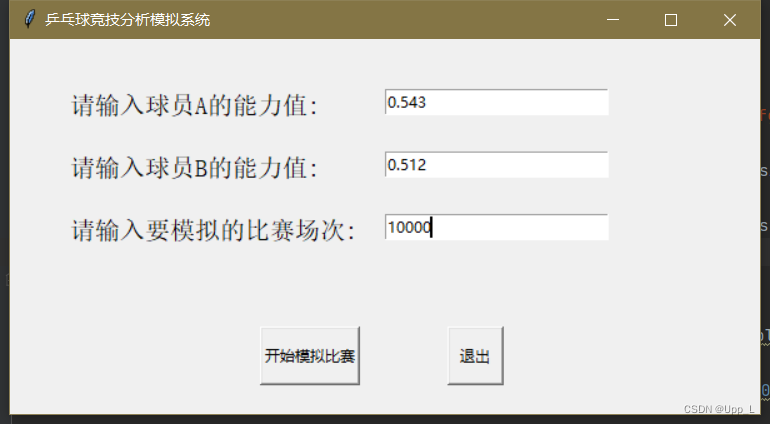
- label=Label(root,text="请输入球员A的能力值:",font=(14),fg="black").place(x=45, y=40)
- entry1 = tk.Entry(root,width=25)
- entry1.place(x=300, y=40)
- # 球员B
- label=Label(root,text="请输入球员B的能力值:",font=(14),fg="black").place(x=45, y=90)
- entry2 = tk.Entry(root,width=25)
- entry2.place(x=300, y=90)
- # 开始比赛
- label =Label(root,text='请输入要模拟的比赛场次:', font=(14),fg="black").place(x= 45,y= 140)
- entry3 = tk.Entry(root,width=25)
- entry3.place(x=300, y=140)
-
- def main():
- aes = entry1.get() # 将输入的数据取出使用
- datea = float(aes)
- azs = entry2.get()
- dateb = float(azs)
- acc = entry3.get()
- n = int(acc)
-
- winsA, winsB = 0, 0 # 初始化AB的胜场数
- for i in range(n):
- scoreA, scoreB = 0, 0 # 初始化AB的得分
- first = random.randint(0, 2) # 随机发球
- while not (scoreA == 11 or scoreB == 11): # 用while循环来执行比赛,先赢够11球胜利
- if first == 0:
- if random.random() < datea: # random() 方法返回随机生成的一个实数,它在[0,1)范围内。
- scoreA += 1 # 用随机数来和能力值比较从而分出胜负
- else:
- first = 1
- else:
- if random.random() < dateb:
- scoreB += 1
- else:
- first = 0
- if scoreA > scoreB: # 先得够11分者赢一局
- winsA += 1
- else:
- winsB += 1
-
- root2=tk.Tk() # 数据在新窗口上打印
- root2.title('比赛结果')
- root2.geometry("500x200+500+200")
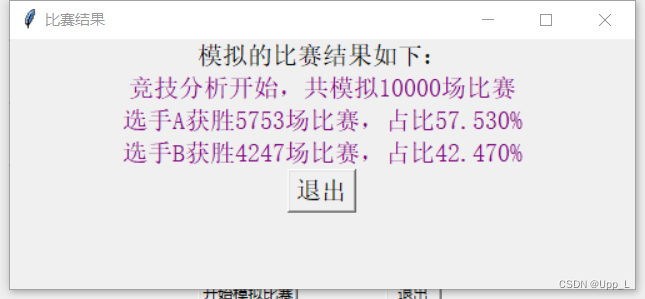
- lable=Label(root2, text='模拟的比赛结果如下:', font=(30))
- lable.pack()
- lable=Label(root2, text='竞技分析开始,共模拟{}场比赛'.format(n),font=(22),fg='purple')
- lable.pack()
- lable=Label(root2, text='选手A获胜{}场比赛,占比{:.3f}%'.format(winsA, winsA / n *100),font=(22),fg='purple')
- lable.pack()
- lable=Label(root2, text='选手B获胜{}场比赛,占比{:.3f}%'.format(winsB, winsB / n *100),font=(22),fg='purple')
- lable.pack()
- tk.Button(root2, text='退出', command=tc, font=(15)).pack()
-
- button = tk.Button(root,text='开始模拟比赛',command=main,width=10,height=2).place(x=200,y=230)
-
- button = tk.Button(root,text='退出',command=tc,width=5,height=2).place(x=350,y=230)
-
- root.mainloop()

由于函数分块导致entry输入的数据只能为‘str’类型,故无法使用相关数据进行计算(也可能是我还没找到比较合适的处理方法),目前找到的对策是在button引用的command函数里可以实现对数据的强制转换,从而实现后面的数据运算。
整体结构不难,由于笔者嫌麻烦就没有再把函数分装了,因为中间把函数分块后发现数据的引用变麻烦了,所以索性把所有功能放在button的引用函数里。也只是课程的一个小实验,故也没有页面美化加图片之类的操作0.0~~
下面是运行结果示意:
声明:本文内容由网友自发贡献,不代表【wpsshop博客】立场,版权归原作者所有,本站不承担相应法律责任。如您发现有侵权的内容,请联系我们。转载请注明出处:https://www.wpsshop.cn/article/detail/42614
推荐阅读


相关标签

