
热门标签
当前位置: article > 正文
uniapp华为上架审核, 权限申请告知目的。_uniappapp在调用终端权限时,同步告知用户申请该权限的目的。
作者:代码架构师 | 2024-01-28 23:11:29
赞
踩
uniappapp在调用终端权限时,同步告知用户申请该权限的目的。
效果图
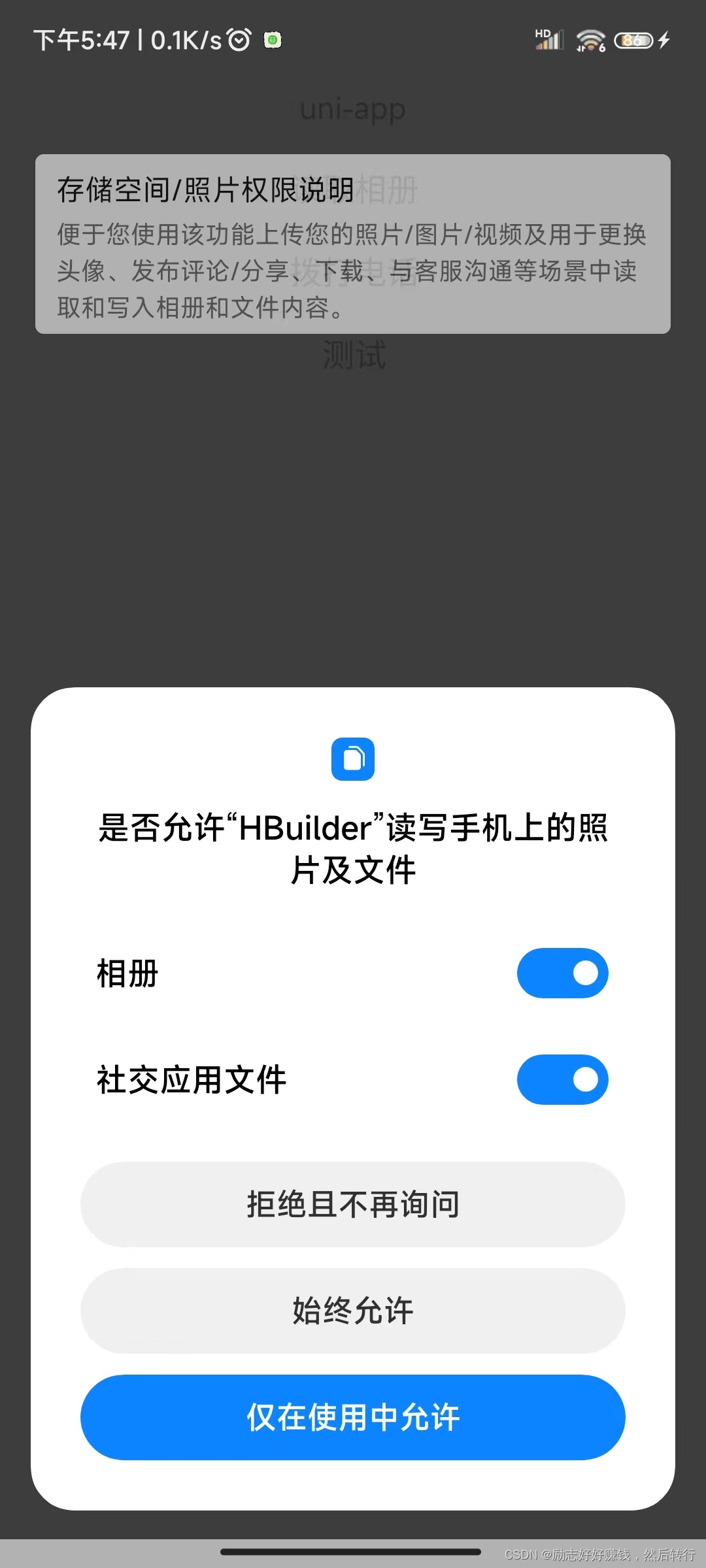
权限告知
第一步vuex里面定义一个模块,专门管理这个的
- const state = {
- WRITE_EXTERNAL_STORAGE: false,
- READ_EXTERNAL_STORAGE: false,
- CALL_PHONE: false,
- /* #ifdef APP-PLUS */
- isIos: plus.os.name == "iOS",
- /* #endif */
- mapping: {
- 'WRITE_EXTERNAL_STORAGE': {
- title: "存储空间/照片权限说明",
- content: "便于您使用该功能上传您的照片/图片/视频及用于更换头像、发布评论/分享、下载、与客服沟通等场景中读取和写入相册和文件内容。",
- methods: 'SET_WRITE_EXTERNAL_STORAGE'
- },
- 'READ_EXTERNAL_STORAGE': {
- title: "存储空间/照片权限说明",
- content: "便于您使用该功能上传您的照片/图片/视频及用于更换头像、发布评论/分享、下载、与客服沟通等场景中读取和写入相册和文件内容。",
- methods: 'SET_READ_EXTERNAL_STORAGE'
- },
- 'CALL_PHONE': {
- title: "拨打/管理电话权限说明",
- content: "便于您使用该功能联系商家或者商家与您联系等场景",
- methods: 'SET_CALL_PHONE'
- }
- }
- }
- const mutations = {
- SET_WRITE_EXTERNAL_STORAGE(state, val) {
- state.WRITE_EXTERNAL_STORAGE = val
- },
- SET_CALL_PHONE(state, val) {
- state.CALL_PHONE = val
- },
- SET_READ_EXTERNAL_STORAGE(state, val) {
- state.READ_EXTERNAL_STORAGE = val
- }
- }
- const actions = {
- //权限获取
- async requestPermissions({
- state,
- dispatch,
- commit
- }, permissionID) {
- try {
- if (!state[permissionID] && !state.isIos) {
- var viewObj = await dispatch('nativeObjView', permissionID);
- viewObj.show();
- }
- console.log('android.permission.' + permissionID, '当前手机权限');
- return new Promise(async (resolve, reject) => {
- //苹果不需要这个
- if(state.isIos){
- resolve(1);
- return
- }
- // Android权限查询
- function requestAndroidPermission(permissionID_) {
- return new Promise((resolve, reject) => {
- plus.android.requestPermissions(
- [
- permissionID_
- ], // 理论上支持多个权限同时查询,但实际上本函数封装只处理了一个权限的情况。有需要的可自行扩展封装
- function (resultObj) {
- var result = 0;
- for (var i = 0; i < resultObj.granted.length; i++) {
- var grantedPermission = resultObj.granted[i];
- console.log('已获取的权限:' + grantedPermission);
- result = 1
- }
- for (var i = 0; i < resultObj.deniedPresent
- .length; i++) {
- var deniedPresentPermission = resultObj
- .deniedPresent[
- i];
- console.log('拒绝本次申请的权限:' + deniedPresentPermission);
- result = 0
- }
- for (var i = 0; i < resultObj.deniedAlways
- .length; i++) {
- var deniedAlwaysPermission = resultObj.deniedAlways[
- i];
- console.log('永久拒绝申请的权限:' + deniedAlwaysPermission);
- result = -1
- }
- resolve(result);
- },
- function (error) {
- console.log('申请权限错误:' + error.code + " = " + error
- .message);
- resolve({
- code: error.code,
- message: error.message
- });
- }
- );
- });
- }
-
- const result = await requestAndroidPermission(
- 'android.permission.' + permissionID
- );
- if (result === 1) {
- //'已获得授权'
- commit(state.mapping[permissionID].methods, true)
- } else if (result === 0) {
- //'未获得授权'
- commit(state.mapping[permissionID].methods, false)
- } else {
- commit(state.mapping[permissionID].methods, true)
- uni.showModal({
- title: '提示',
- content: '操作权限已被拒绝,请手动前往设置',
- confirmText: "立即设置",
- success: (res) => {
- if (res.confirm) {
- dispatch('gotoAppPermissionSetting')
- }
- }
- })
- }
- if (viewObj) viewObj.close()
- resolve(result);
- });
- } catch (error) {
- console.log(error);
- reject(error);
- }
- },
- //提示框
- nativeObjView({
- state
- }, permissionID) {
- const systemInfo = uni.getSystemInfoSync();
- const statusBarHeight = systemInfo.statusBarHeight;
- const navigationBarHeight = systemInfo.platform === 'android' ? 48 :
- 44; // Set the navigation bar height based on the platform
- const totalHeight = statusBarHeight + navigationBarHeight;
- let view = new plus.nativeObj.View('per-modal', {
- top: '0px',
- left: '0px',
- width: '100%',
- backgroundColor: '#444',
- //opacity: .5;
- })
- view.drawRect({
- color: '#fff',
- radius: '5px'
- }, {
- top: totalHeight + 'px',
- left: '5%',
- width: '90%',
- height: "100px",
- })
- view.drawText(state.mapping[permissionID].title, {
- top: totalHeight + 5 + 'px',
- left: "8%",
- height: "30px"
- }, {
- align: "left",
- color: "#000",
- }, {
- onClick: function (e) {
- console.log(e);
- }
- })
- view.drawText(state.mapping[permissionID].content, {
- top: totalHeight + 35 + 'px',
- height: "60px",
- left: "8%",
- width: "84%"
- }, {
- whiteSpace: 'normal',
- size: "14px",
- align: "left",
- color: "#656563"
- })
-
- function show() {
- view = plus.nativeObj.View.getViewById('per-modal');
- view.show()
- view = null//展示的时候也得清空,不然影响下次的关闭,不知道为啥
- }
-
- function close() {
- view = plus.nativeObj.View.getViewById('per-modal');
- view.close();
- view = null
- }
- return {
- show,
- close
- }
- },
-
- // 跳转到**应用**的权限页面
- gotoAppPermissionSetting({
- state
- }) {
- if (state.isIos) {
- var UIApplication = plus.ios.import("UIApplication");
- var application2 = UIApplication.sharedApplication();
- var NSURL2 = plus.ios.import("NSURL");
- // var setting2 = NSURL2.URLWithString("prefs:root=LOCATION_SERVICES");
- var setting2 = NSURL2.URLWithString("app-settings:");
- application2.openURL(setting2);
-
- plus.ios.deleteObject(setting2);
- plus.ios.deleteObject(NSURL2);
- plus.ios.deleteObject(application2);
- } else {
- // console.log(plus.device.vendor);
- var Intent = plus.android.importClass("android.content.Intent");
- var Settings = plus.android.importClass("android.provider.Settings");
- var Uri = plus.android.importClass("android.net.Uri");
- var mainActivity = plus.android.runtimeMainActivity();
- var intent = new Intent();
- intent.setAction(Settings.ACTION_APPLICATION_DETAILS_SETTINGS);
- var uri = Uri.fromParts("package", mainActivity.getPackageName(), null);
- intent.setData(uri);
- mainActivity.startActivity(intent);
- }
- }
- }
- export default {
- namespaced: true,
- state,
- mutations,
- actions
- };

另外:看到有人使用 这个检测权限,我没试过,有兴趣的可以自己试一下
plus.navigator.checkPermission('android.permission.CAMERA') 第二步直接引用,在原来基础上加就好了
- <template>
- <view>
- <button type="default" @click="save">读取相册</button>
- </view>
- </template>
- <script>
- export default {
- data() {
- return {
- }
- },
- methods: {
- async save() {
- /* #ifdef APP-PLUS */
- let result = await this.$store.dispatch("app/requestPermissions",
- 'WRITE_EXTERNAL_STORAGE')
- if (result !== 1) return
- /* #endif */
- uni.saveImageToPhotosAlbum({
- filePath: "",
- success: function(res) {
- uni.showToast({
- title: '保存成功',
- icon:"success"
- });
- },
- fail: function(res) {
- uni.showToast({
- title: '保存失败',
- icon:"fail"
- });
- },
- })
- }
- }
- }
- </script>
最后说明:借鉴了好几个大佬的代码,自己整合了一下。还有就是因为plus.android.requestPermissions只有点击才有回调,如果权限弹框出来了,跳转设置页面的时候,再回来,自己要在show里面在判断一下。我反正没搞,我觉得可以混过审核了
声明:本文内容由网友自发贡献,版权归原作者所有,本站不承担相应法律责任。如您发现有侵权的内容,请联系我们。转载请注明出处:【wpsshop博客】
推荐阅读

相关标签

