
热门标签
热门文章
- 1带权重的随机算法-告诉你游戏抽奖原理-代码+示例_随机抽奖算法
- 26款换脸软件下载推荐!_face swap booth
- 3JAVA集成ElasticSearch、Java集成es
- 4bootstrap框架中的data-toggle属性值之下拉菜单
- 5设计模式之接口型设计模式_接口设计
- 6大数据深度学习卷积神经网络CNN:CNN结构、训练与优化一文全解
- 7VScode配置prettier和eslint_mac 设置vscode 保存校验 prettierc和eslint
- 8记录docker-compose遇到的坑_docker compose up 卡主了
- 9〖Docker指南③〗Docker镜像的深度解析_docker深度好文
- 10Object.assign() 的用法_object.assign()的用法
当前位置: article > 正文
学生网上选课管理系统_JAVA课程设计_开发日志_学生选课管理系统
作者:lpred | 2024-01-19 20:03:47
赞
踩
学生选课管理系统
一、设计方案:
设计目标:
通过此次开发建立一个学生网上选课管理系统,实现对课程的基本信息维护以及学生选课、教师查看上课信息,管理员管理系统数据等。
从而通过本选课系统达到实际应用目的,为高校管理学生网上选课等方面提供极大便利。
流程目的图:
功能拆分:
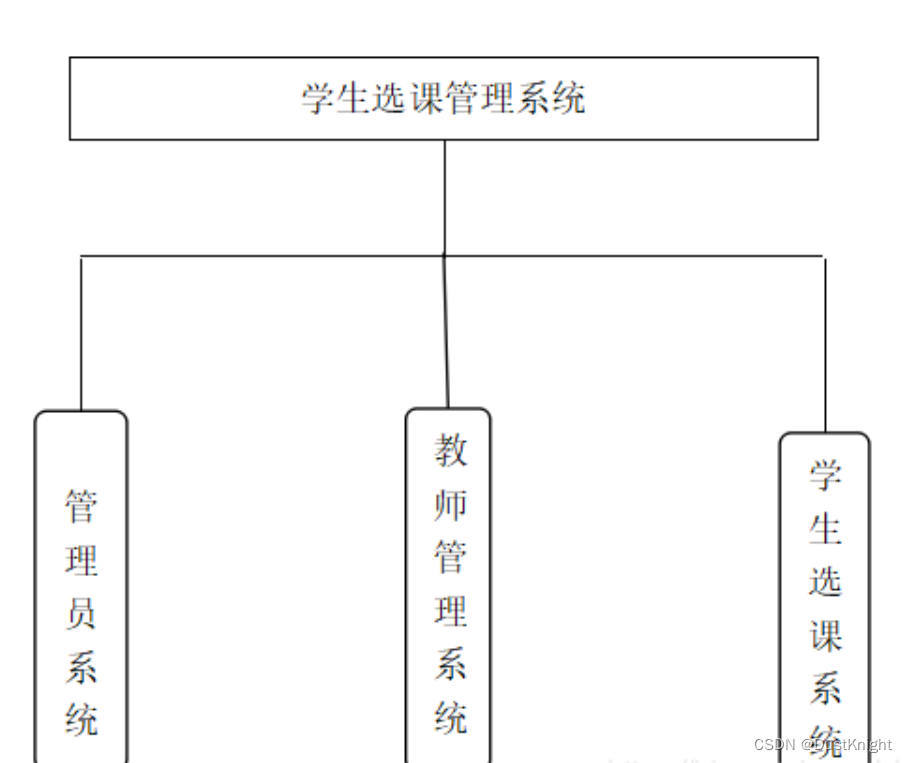
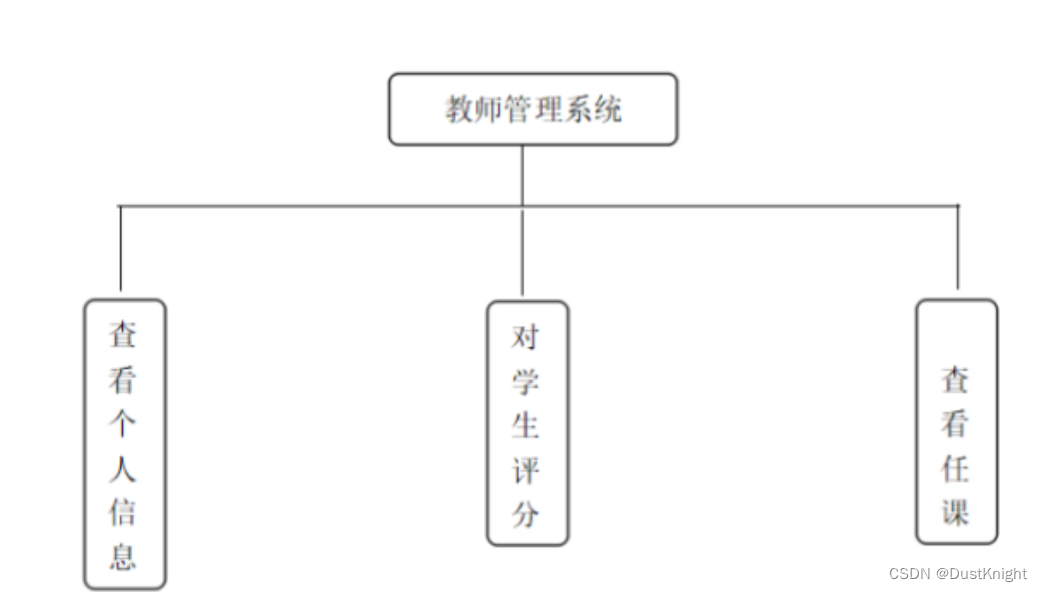
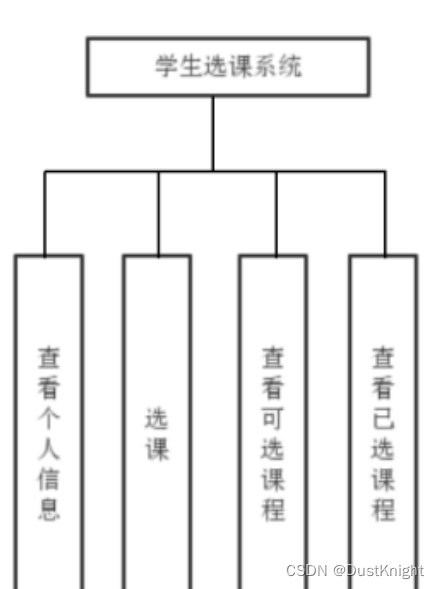
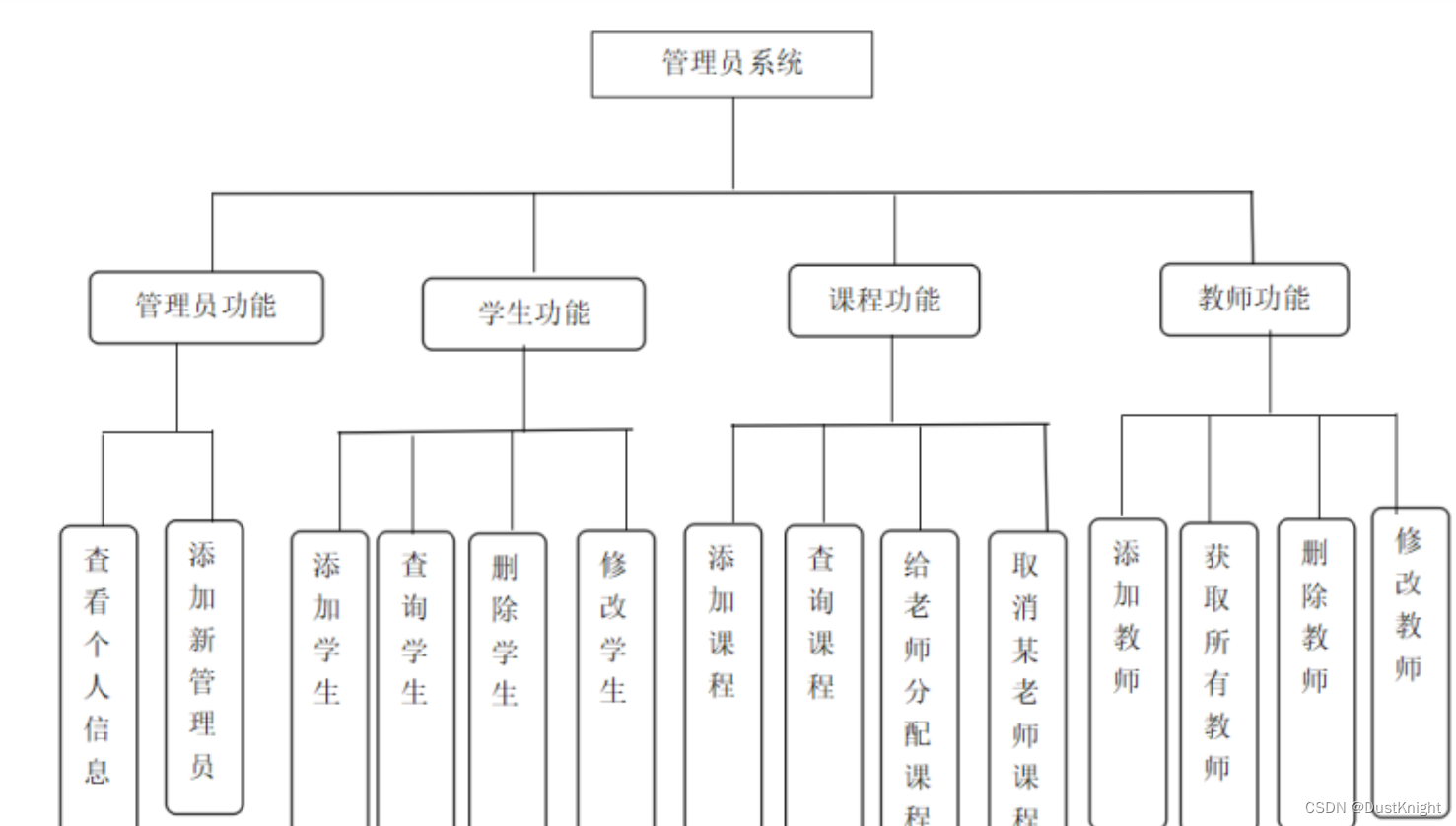
ER图:
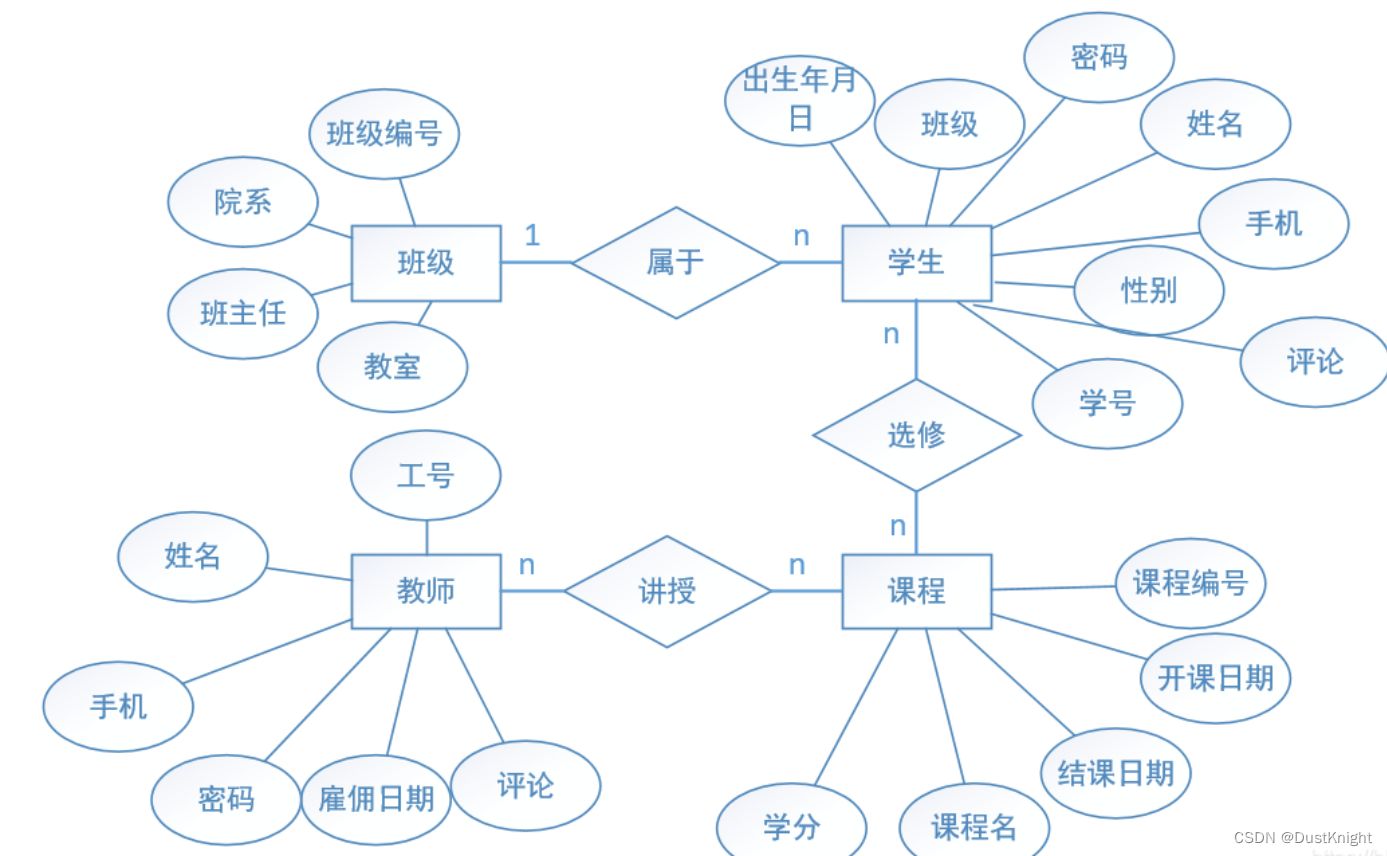
变量名称标准:
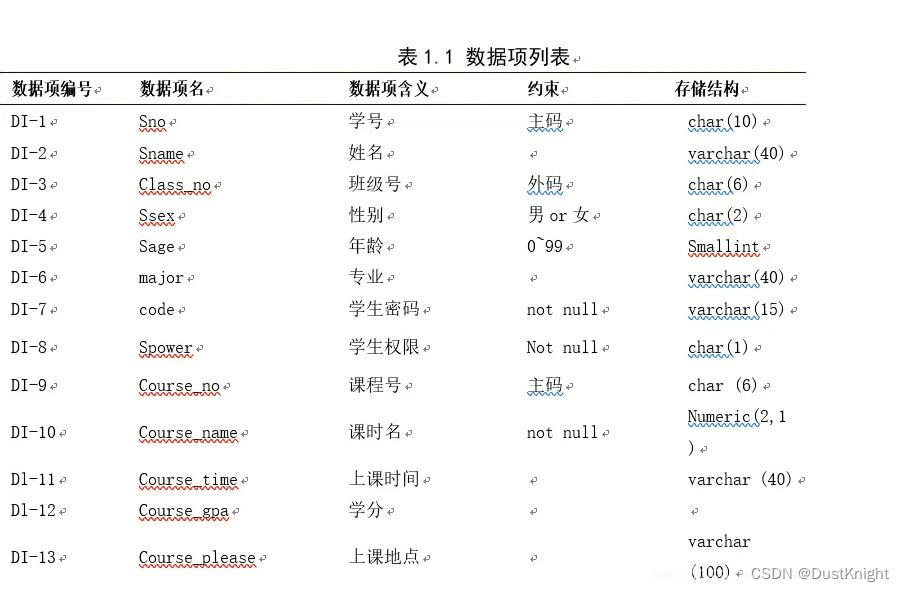

管理员相关变量:Mno:管理员号码, Mname:管理员姓名, Maccount:管理员账号, Mtelephone:管理员电话, Mage:管理员年龄, Msex:性别, code:密码, Mpower:权限
二、源代码开发部分:
1、数据库数据的导入:
使用sql语言创建:
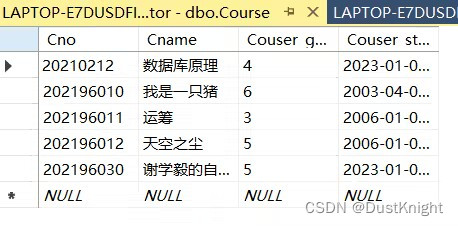


此处不过多赘述。详情数据库数据可私信。
2、sql server java建立 代码部分:
check course:
- import java.sql.Connection;
- public class CheckCourse {
- public static void CheckCourse(User user) throws Exception{
- System.out.println("已选择的课程有:");
- user.sql = "select * from myCourseInfo";
- user.count = user.statement.executeQuery(user.sql);
- while(user.count.next()) {
- System.out.println(user.count.getString("Cno")
- + user.count.getString("Grade") + user.count.getString("Sno"));
- }
- }
- }
TC:
- import java.util.Scanner;
-
- public class TC {
- static private Scanner scanner = new Scanner(System.in);
- static private String Course_no;
- static private int count;
- //分配课程
- public static boolean Assignment(User user) throws Exception{
- System.out.println("请输入教师号:");
- String Tno ="'"+ scanner.next()+"\'";
- user.sql = "select Tno from Teacher where Tno = "+Tno;
- user.count=user.statement.executeQuery(user.sql);
- if(!user.count.next()){
- System.out.println("教师查询失败");
- return false;
- }
- System.out.println("请输入课程号:");
- Course_no ="\'"+ scanner.next()+"\'";
- user.sql="select Couser_no from Couser where Couser_no="+Course_no;
- user.count = user.statement.executeQuery(user.sql);
- if(!user.count.next()){
- System.out.println("课程查询失败");
- return false;
- }
- user.sql="insert into TC values("+Tno+","+Course_no+")";
- count=user.statement.executeUpdate(user.sql);
- if(count==1) System.out.println("分配成功。");
- else{
- System.out.println("分配失败。");
- return false;
- }
- return true;
- }
- //删除课程
- public static boolean Delete(User user) throws Exception{
- System.out.println("请输入教师号:");
- String Tno ="'"+ scanner.next()+"\'";
- user.sql = "select Tno from TC where Tno = "+Tno;
- user.count=user.statement.executeQuery(user.sql);
- if(!user.count.next()){
- System.out.println("教师查询失败");
- return false;
- }
- System.out.println("请输入课程号:");
- Course_no ="\'"+ scanner.next()+"\'";
- user.sql="select Cno from TC where Cno="+Course_no;
- user.count = user.statement.executeQuery(user.sql);
- if(!user.count.next()){
- System.out.println("课程查询失败");
- return false;
- }
- user.sql="delete TC where Tno="+Tno+" and Cno="+Course_no;
- System.out.println(user.sql);
- count=user.statement.executeUpdate(user.sql);
- if(count==1) System.out.println("删除成功");
- else{
- System.out.println("删除失败");
- return false;
- }
- return true;
- }
- }
studentsystem:
- import java.util.Scanner;
- public class StudentSystem {
- public static void QueryStudentInfor(String id,User user) throws Exception{
-
- user.sql = "select * from scoreinfo where id=" + id;
- user.count = user.statement.executeQuery(user.sql);
- while(user.count.next()) {
- System.out.println(user.count.getString("name")
- + " " + user.count.getString("score")
- + " " + user.count.getString("Sno")
- + " " + user.count.getString("age")
- + " " + user.count.getString("grade"));
- }
- }
- }
courseFunction:
- import java.util.Scanner;
-
- public class CourseFunction {
- static private String Course_no;
- static private String Course_name;
- static private int Course_gpa;
- static private String Course_stratyear;
- static private int count;
- static private Scanner scanner = new Scanner(System.in);
-
- public static boolean Insert(User user) throws Exception {
- System.out.println("请输入课程号:");
- Course_no = "\'" + scanner.next() + "\',";
- System.out.println("请输入课程名:");
- Course_name = "\'" + scanner.next() + "\',";
- System.out.println("请输入课程的学分:");
- Course_gpa = scanner.nextInt();
- System.out.println("请输入课程的开设学年:");
- Course_stratyear = ",\'" + scanner.next() + "\'";
- user.sql = "insert into Couser values( " + Course_no + Course_name + Course_gpa + Course_stratyear + ")";
- count = user.statement.executeUpdate(user.sql);
- if (count == 1) {
- System.out.println("插入成功。");
- } else {
- System.out.println("插入失败。");
- return false;
- }
- return true;
- }
-
- public static boolean Select(User user) throws Exception {
- System.out.println("请输入课程号:");
- Course_no = "\'" + scanner.next() + "\'";
- user.sql = "select * from Couser where Couser_no = " + Course_no;
- user.count = user.statement.executeQuery(user.sql);
- if (user.count.next()) System.out.println(user.count.getString("Couser_name") +
- " 学分:" + user.count.getString("Couser_gpa") +
- " 开设学年:" + user.count.getString("Couser_stratyear"));
- else {
- System.out.println("查询失败");
- return false;
- }
- return true;
- }
- //删除课程
- public static boolean Delete(User user) throws Exception {
- System.out.println("请输入课程号:");
- Course_no = "\'" + scanner.next() + "\'";
- user.sql = "delete Couser where Couser_no=" + Course_no;
- System.out.println(user.sql);
- count = user.statement.executeUpdate(user.sql);
- if (count == 1) System.out.println("删除成功");
- else {
- System.out.println("删除失败");
- return false;
- }
- return true;
- }
- //修改课程
- public static boolean Alter(User user) throws Exception {
- System.out.println("请输入课程号:");
- String Course_nofirst = "'" + scanner.next() + "'";
- user.sql = "select * from Couser where Couser_no =" + Course_nofirst;
- try {
- user.count = user.statement.executeQuery(user.sql);
- } catch (Exception e) {
- System.out.println("查询失败。");
- return false;
- }
- if (user.count.next()) {
- Course_no = "\'" + user.count.getString("Couser_no") + "\',";
- Course_name = "\'" + user.count.getString("Couser_name") + "\',";
- Course_gpa = user.count.getInt("Couser_gpa");
- Course_stratyear = "\'" + user.count.getString("Couser_stratyear") + "\'";
- }
- boolean n = true;
- while (n) {
- System.out.println("请输入你要修改的信息的选项\n" +
- "1.课程号\n2.课程名\n3.学分\n4.开设学年\n5.完成退出");
- int choice = scanner.nextInt();
- switch (choice) {
- case (1):
- Course_no = "\'" + scanner.next() + "\',";
- break;
- case (2):
- Course_name = "\'" + scanner.next() + "\',";
- break;
- case (3):
- Course_gpa = scanner.nextInt();
- break;
- case (4):
- Course_stratyear = "\'" + scanner.next() + "\'";
- break;
- case (5):
- n = false;
- break;
- default:
- System.out.println("请输入正确的选项号。");
- }
- }
- user.sql = "update Couser set Couser_no = " + Course_no + " Couser_name = " + Course_name +
- " Couser_gpa=" + Course_gpa + ", Couser_stratyear=" + Course_stratyear +
- " where Couser_no = " + Course_nofirst;
- System.out.println(user.sql);
- if (user.statement.executeUpdate(user.sql) == 1) {
- System.out.println("修改成功。");
- } else {
- System.out.println("修改失败。");
- return false;
- }
- return true;
- }
- }
ManagerFunction:
- import java.util.Scanner;
-
- public class ManagerFunction {
- static private String Mno;
- static private String Mname;
- static private String Maccount;
- static private String Mtelephone;
- static private String Mage;
- static private String Msex;
- static private String code;
- static private String Mpower;
- static private Scanner scanner = new Scanner(System.in);
-
- public static boolean Select(User user) throws Exception {
- System.out.println("请选择以下选项:\n1.选择全部管理员的信息。\n2.指定查询管理员的信息。");
- int n = scanner.nextInt();
- if (n == 1) user.sql = "select * from Student";
- else {
- System.out.println("请输入要查询管理员的姓名。");
- String m = scanner.next();
- user.sql = "select * from Administrators where Sname =\'" + m + "\'";
- }
- try {
- user.count = user.statement.executeQuery(user.sql);
- } catch (Exception e) {
- System.out.println("查询失败");
- return false;
- }
- while (user.count.next()) {
- System.out.println("管理员编号:" + user.count.getString("Mno") + " "
- + user.count.getString("Mname") +
- " " + user.count.getString("Mage") + " "
- + user.count.getString("Msex")
- + user.count.getString("Mpower") +
- " 管理员账户号:" + user.count.getString("Maccount")
- + " 密码:" + user.count.getString("code") +
- " 电话:" + user.count.getString("Mtelephone"));
- }
- return true;
- }
- //添加新的管理员
- public static boolean Insert(User user) throws Exception {
- System.out.println("请输入你要插入的管理员编号:");
- while (true) {
- Mno = "\'"+scanner.next()+"\',";
- if (Mno.compareTo("\'\',")==0) System.out.println("管理员号不能为空!");
- else break;
- }
- System.out.println("请输入管理员姓名:");
- while (true) {
- Mname ="\'"+ scanner.next() + "\',";
- if (Mname.compareTo("\'\',")==0) System.out.println("管理员名字不能为空!");
- else break;
- }
- System.out.println("请输入管理员年龄:");
- while(true){
- Mage ="\'"+ scanner.next()+"\',";
- if(Mage.compareTo("\'\',") ==0) System.out.println("管理员年龄不能为空!");
- else break;
- }
- System.out.println("请输入管理员性别:");
- while(true){
- Msex ="\'"+ scanner.next()+"\',";
- if(Msex.compareTo("\'男\',")==0 || Msex.compareTo("\'女\',")==0) break;
- else System.out.println("性别必须为男或者女!");
- }
- System.out.println("请输入管理员的权限:");
- Mpower ="\'"+ scanner.next()+"\',";
-
- System.out.println("请输入管理员账户:");
- Maccount ="\'"+ scanner.next()+"\'";
-
- System.out.println("请输入管理员密码:");
- while(true){
- code ="\'"+ scanner.next()+"\',";
- if(code.compareTo("\'\',")==0) System.out.println("密码不能为空!");
- else break;
- }
- System.out.println("请输入管理员电话:");
- Mtelephone="\'"+ scanner.next()+"\'";
-
- user.sql = "insert into Administrators values ("+Mno+ Mname+Mage+Msex+Mpower+Maccount+code+Mtelephone+")";
- int count = user.statement.executeUpdate(user.sql);
- if(count == 1) System.out.println("插入成功。");
- else {
- System.out.println("插入失败。");
- return false;
- }
- return true;
- }
-
- }
-
-
TeacherFunction:
- import java.util.Scanner;
-
- public class TeacherFunction {
- static private String Tno;
- static private String Tname;
- static private String Tage;
- static private String Tsex;
- static private String Tdatatime;
- static private String code;
- static private String Telephone;
- static private Scanner scanner = new Scanner(System.in);
-
-
- //以上代码实验的是选择功能。
- public static boolean Select(User user) throws Exception {
- System.out.println("请选择以下选项:\n1.选择全部教师的信息。\n2.指定查询教师信息。");
- int n = scanner.nextInt();
- if (n == 1) user.sql = "select * from Teacher";
- else {
- System.out.println("请输入要查询教师的姓名。");
- String m = scanner.next();
- user.sql = "select * from Teacher where Tname =\'" + m + "\'";
- }
- try {
- user.count = user.statement.executeQuery(user.sql);
- } catch (Exception e) {
- System.out.println("查询失败");
- return false;
- }
- while(user.count.next()) {
- System.out.println("教师号:" + user.count.getString("Tno") + " " + user.count.getString("Tname") +
- " " + user.count.getString("Tage") + " " + user.count.getString("Tsex") +
- " 出生日期:" + user.count.getString("Tdatatime") + " 密码:" + user.count.getString("code") +
- " 电话:" + user.count.getString("Telephone"));
- }
- return true;
- }
-
- //以下代码实现的是插入功能。
- public static boolean Insert(User user) throws Exception {
- System.out.println("请输入你要插入的教师号:");
- while (true) {
- Tno = "\'"+scanner.next()+"\',";
- if (Tno.compareTo("\'\',")==0) System.out.println("教师号不能为空!");
- else break;
- }
- System.out.println("请输入教师姓名:");
- while (true) {
- Tname ="\'"+ scanner.next() + "\',";
- if (Tname.compareTo("\'\',")==0) System.out.println("教师名字不能为空!");
- else break;
- }
- System.out.println("请输入教师年龄:");
- while(true){
- Tage ="\'"+ scanner.next()+"\',";
- if(Tage.compareTo("\'\',") ==0) System.out.println("教师年龄不能为空!");
- else break;
- }
- System.out.println("请输入教师性别:");
- while(true){
- Tsex ="\'"+ scanner.next()+"\',";
- if(Tsex.compareTo("\'男\',")==0 || Tsex.compareTo("\'女\',")==0) break;
- else System.out.println("性别必须为男或者女!");
- }
- System.out.println("请输入教师的出生日期(输入格式:20030419:");
- Tdatatime ="\'"+ scanner.next()+"\',";
- System.out.println("请输入教师密码:");
- while(true){
- code ="\'"+ scanner.next()+"\',";
- if(code.compareTo("\'\',")==0) System.out.println("密码不能为空!");
- else break;
- }
- System.out.println("请输入教师电话:");
- Telephone ="\'"+ scanner.next()+"\'";
- user.sql = "insert into Teacher values ("+Tno+ Tname+Tage+Tsex+Tdatatime+code+Telephone+")";
- int count = user.statement.executeUpdate(user.sql);
- if(count == 1) System.out.println("插入成功。");
- else {
- System.out.println("插入失败。");
- return false;
- }
- return true;
- }
- //删除教师功能
- public static boolean Delete(User user) throws Exception{
- System.out.println("请提供要删除的教师的教师号。");
- Tno ="\'" + scanner.next()+"\'";
- user.sql = "delete Teacher where Tno ="+Tno;
- int count = user.statement.executeUpdate(user.sql);
- if(count == 1) {
- System.out.println("删除成功。");
- }else{
- System.out.println("删除失败。");
- return false;
- }
- return true;
- }
- //修改教师信息功能
- public static boolean Alter(User user) throws Exception{
- System.out.println("请输入你要修改教师的教师号");
- String Tnofrist ="\'"+scanner.next()+"\'";
- user.sql = "select * from Teacher where Tno =" + Tnofrist;
- try{
- user.count=user.statement.executeQuery(user.sql);
- }catch(Exception e){
- System.out.println("查询失败。");
- return false;
- }
- if(user.count.next()){
- Tno = "\'"+user.count.getString("Tno")+"\',";
- Tname = "\'"+user.count.getString("Tname")+"\',";
- Tage = "\'"+user.count.getString("Tage")+"\',";
- Tsex = "\'"+user.count.getString("Tsex")+"\',";
- Tdatatime = "\'"+user.count.getString("Tdatatime")+"\',";
- code = "\'"+user.count.getString("code")+"\',";
- Telephone = "\'"+user.count.getString("Telephone")+"\'";
- }
-
- boolean n = true;//case(8)处用来跳出循环
- while (n) {
- System.out.println("请输入你要修改的信息的选项\n" +
- "1.教师号\n2.教师姓名\n3.教师年龄\n4.教师性别\n5.出生日期\n6.密码\n7.电话\n8.完成退出");
- int choice = scanner.nextInt();
- switch (choice){
- case(1): Tno ="\'"+ scanner.next()+"\',"; break;
- case(2): Tname ="\'"+ scanner.next()+"\',";break;
- case(3): Tage = "\'"+scanner.next()+"\',";break;
- case(4): Tsex = "\'"+scanner.next()+"\',";break;
- case(5): Tdatatime = "\'"+scanner.next()+"\',";break;
- case(6): code = "\'"+scanner.next()+"\',";break;
- case(7): Telephone= "\'"+scanner.next()+"\'";break;
- case(8): n=false;break;
- default: System.out.println("请输入正确的选项号。");
- }
- }
- user.sql="update Teacher set Tno = "+Tno+" Tname = "+Tname +
- " Tage="+Tage+" Tsex="+Tsex+
- " Tdatatime="+Tdatatime+" code="+code+
- " Telephone="+Telephone+" where Tno = "+Tnofrist;
- System.out.println(user.sql);
- if(user.statement.executeUpdate(user.sql)==1){
- System.out.println("修改成功。");
- }else{
- System.out.println("修改失败。");
- return false;
- }
- return true;
- }
- }
2、数据库建立连接代码部分:
- import java.sql.Connection;
- import java.sql.DriverManager;
- import java.sql.SQLException;
- import java.sql.Statement;
- import java.sql.ResultSet;
- public class User {
- public String user = "user=zhang;";
- public String password = "password=123456;";
- public String databasename = "databaseName=administartor;";
- public String encrypt = "encrypt=false;";
- String connectionUrl = "jdbc:sqlserver://localhost:1433;" + databasename + user + password + encrypt;
- Statement statement;
- Connection connection;
- String sql ="";
- ResultSet count;
- public User() {
- Connection();
- try {
- statement = connection.createStatement();
- System.out.println("statement对象创建成功");
- }catch(Exception e) {
- System.out.println("statement对象创建失败");
- }
- }
- public boolean Connection() {
- try {
- connection = DriverManager.getConnection(connectionUrl);
- System.out.println("连接成功");
- }
- catch (SQLException e) {
- System.out.println("连接失败");
- return false;
- }
- return true;
- }
- public boolean Close() {
- try {
- statement.close();
- connection.close();
- System.out.println("关闭成功");
- }catch(Exception e){
- System.out.println("关闭失败");
- return false;
- }
- return true;
- }
- }
3、Java开发部分:
系统测试:(终端):
- import java.util.Scanner;
-
- public class Test4 {
- public static void Test(String Tno) throws Exception
- {
- Scanner scanner = new Scanner(System.in);
- User user = new User();
- System.out.println("欢迎来到学生选课系统");
- // System.out.println("请你先输入姓名和密码登陆系统:");
- // System.out.print("请输入你的id:");
- // String id = scanner.next();
- // System.out.print("请输入你的password:");
- // String code = scanner.next();
- System.out.println("###########################");
- System.out.println(" 1.");
- System.out.println(" 2.");
- System.out.println(" 3.");
- System.out.println(" 4.");
- System.out.println(" 5.");
- System.out.println("###########################");
- System.out.println("请选择你要的服务:");
- String select = scanner.next();
- while(select != "6")
- {
- if(select.equals("1")){
- System.out.println("--------------------------");
- caozuo m1 = new caozuo();
- m1.Query();
- System.out.println("--------------------------");
- }
- else if(select.equals("2")){
- System.out.println("--------------------------");
- caozuo m1 = new caozuo();
- m1.QuerybyTno(Tno);
- System.out.println("--------------------------");
- }
- if(select.equals("3")){
- System.out.println("--------------------------");
- caozuo m1 = new caozuo();
- m1.chaxunrenke();
- System.out.println("--------------------------");
- }
- else if(select.equals("4")){
- System.out.println("--------------------------");
- caozuo m1 = new caozuo();
- m1.findByTno(Tno);
- System.out.println("--------------------------");
- }
- else if(select.equals("5")){
- System.out.println("--------------------------");
- caozuo m1 = new caozuo();
- m1.pingfen();
- System.out.println("--------------------------");
- }
- else if(select.equals("6")){
- break;
- }
- else {
- System.out.println("输入错误,请重新输入");
- }
-
- System.out.println("请选择你要的服务:");
- select = scanner.next();
- }
- System.out.println("--------------------------");
- System.out.println("成功退出系统,欢迎再次光临!");
- System.out.println("--------------------------");
- }
- }
4、gui设计部分:
总页面:(登陆页面):
- import java.awt.*;
- import java.util.Random;
- import java.util.Scanner;
-
- public class kk {
- public static void main(String args[]) throws Exception {
- User user=new User(); /*
- Scanner scanner=new Scanner(System.in);
- System.out.println("欢迎来到学生选课系统");
- System.out.println("即将进入登陆界面,请按提示操作");
- System.out.println("请选择您的身份:");
- System.out.println("1、管理员");
- System.out.println("2、学生");
- System.out.println("3、教师");
- System.out.println("0、退出服务");
- int n=scanner.nextInt();
- System.out.print("请输入你的id:");
- String id = scanner.next();
- System.out.println("请输入你的密码:");
- String code = scanner.next();
- switch (n){
- case(1):
- if(Log(user,n,id,code));
- Monitor monitor = new Monitor(user);
- monitor.Interface();
- break;
- case(2):
- if(Log(user,n,id,code));
- Ztest.StudentInterface();
- break;
- case(3):
- if(Log(user,n,id,code));
- Test1 teacher= new Test1();
- teacher.MonitorInterface();
- break;
- case(0):
- return;
- }
- user.Close();
- System.out.println("--------------------------");
- System.out.println("成功退出系统,欢迎再次光临!");
- System.out.println("--------------------------");*/
- LogIn login = new LogIn();
- login.log();
-
- }
- public static boolean Log(User user,int n,String id,String code) throws Exception{
- switch (n){
- case(1):
- user.sql="select * from administrators where Sno ='"+id+"' and code = '"+code+"'";
- user.count=user.statement.executeQuery(user.sql);
- if(user.count.next()) {
- System.out.println("登入成功。");
- return true;
- }
- else {
- System.out.println("登入失败。");
- return false;
- }
- case(2):
- user.sql="select * from Student where Sno ='"+id+"' and code = '"+code+"'";
- user.count=user.statement.executeQuery(user.sql);
- if(user.count.next()) {
- System.out.println("登入成功。");
- return true;
- }
- else {
- System.out.println("登入失败。");
- return false;
- }
- case(3):
- user.sql="select * from Teacher where Tno ='"+id+"' and code = '"+code+"'";
- user.count=user.statement.executeQuery(user.sql);
- if(user.count.next()) {
- System.out.println("登入成功。");
- return true;
- }
- else {
- System.out.println("登入失败。");
- return false;
- }
- }
- return false;
- }
- }
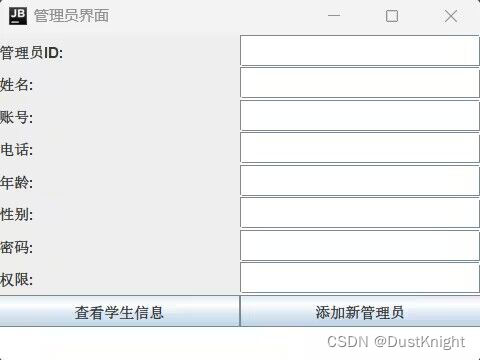
管理系统页面:
- import java.awt.*;
- import java.util.Random;
- import java.util.Scanner;
-
- public class kk {
- public static void main(String args[]) throws Exception {
- User user=new User(); /*
- Scanner scanner=new Scanner(System.in);
- System.out.println("欢迎来到学生选课系统");
- System.out.println("即将进入登陆界面,请按提示操作");
- System.out.println("请选择您的身份:");
- System.out.println("1、管理员");
- System.out.println("2、学生");
- System.out.println("3、教师");
- System.out.println("0、退出服务");
- int n=scanner.nextInt();
- System.out.print("请输入你的id:");
- String id = scanner.next();
- System.out.println("请输入你的密码:");
- String code = scanner.next();
- switch (n){
- case(1):
- if(Log(user,n,id,code));
- Monitor monitor = new Monitor(user);
- monitor.Interface();
- break;
- case(2):
- if(Log(user,n,id,code));
- Ztest.StudentInterface();
- break;
- case(3):
- if(Log(user,n,id,code));
- Test1 teacher= new Test1();
- teacher.MonitorInterface();
- break;
- case(0):
- return;
- }
- user.Close();
- System.out.println("--------------------------");
- System.out.println("成功退出系统,欢迎再次光临!");
- System.out.println("--------------------------");*/
- LogIn login = new LogIn();
- login.log();
-
- }
- public static boolean Log(User user,int n,String id,String code) throws Exception{
- switch (n){
- case(1):
- user.sql="select * from administrators where Sno ='"+id+"' and code = '"+code+"'";
- user.count=user.statement.executeQuery(user.sql);
- if(user.count.next()) {
- System.out.println("登入成功。");
- return true;
- }
- else {
- System.out.println("登入失败。");
- return false;
- }
- case(2):
- user.sql="select * from Student where Sno ='"+id+"' and code = '"+code+"'";
- user.count=user.statement.executeQuery(user.sql);
- if(user.count.next()) {
- System.out.println("登入成功。");
- return true;
- }
- else {
- System.out.println("登入失败。");
- return false;
- }
- case(3):
- user.sql="select * from Teacher where Tno ='"+id+"' and code = '"+code+"'";
- user.count=user.statement.executeQuery(user.sql);
- if(user.count.next()) {
- System.out.println("登入成功。");
- return true;
- }
- else {
- System.out.println("登入失败。");
- return false;
- }
- }
- return false;
- }
- }
管理员页面:
- import javax.swing.*;
- import java.awt.*;
- import java.awt.event.ActionEvent;
- import java.awt.event.ActionListener;
-
- public class AdminGUI {
- private JFrame frame;
- private JTextField adminIdField;
- private JTextField nameField;
- private JTextField accountField;
- private JTextField phoneField;
- private JTextField ageField;
- private JTextField genderField;
- private JPasswordField passwordField;
- private JTextField permissionField;
- private JTextArea outputTextArea;
-
- public AdminGUI() {
- frame = new JFrame("管理员界面");
- frame.setDefaultCloseOperation(JFrame.EXIT_ON_CLOSE);
- frame.setSize(400, 300);
- frame.setLayout(new BorderLayout());
-
- JPanel inputPanel = new JPanel(new GridLayout(9, 2));
- inputPanel.add(new JLabel("管理员ID:"));
- adminIdField = new JTextField();
- inputPanel.add(adminIdField);
-
- inputPanel.add(new JLabel("姓名:"));
- nameField = new JTextField();
- inputPanel.add(nameField);
-
- inputPanel.add(new JLabel("账号:"));
- accountField = new JTextField();
- inputPanel.add(accountField);
-
- inputPanel.add(new JLabel("电话:"));
- phoneField = new JTextField();
- inputPanel.add(phoneField);
-
- inputPanel.add(new JLabel("年龄:"));
- ageField = new JTextField();
- inputPanel.add(ageField);
-
- inputPanel.add(new JLabel("性别:"));
- genderField = new JTextField();
- inputPanel.add(genderField);
-
- inputPanel.add(new JLabel("密码:"));
- passwordField = new JPasswordField();
- inputPanel.add(passwordField);
-
- inputPanel.add(new JLabel("权限:"));
- permissionField = new JTextField();
- inputPanel.add(permissionField);
-
- JButton viewInfoButton = new JButton("查看学生信息");
- viewInfoButton.addActionListener(new ActionListener() {
- public void actionPerformed(ActionEvent e) {
- // 在此处编写查看学生信息的逻辑
- outputTextArea.setText("学生信息:");
- }
- });
- inputPanel.add(viewInfoButton);
-
- JButton addAdminButton = new JButton("添加新管理员");
- addAdminButton.addActionListener(new ActionListener() {
- public void actionPerformed(ActionEvent e) {
- // 在此处编写添加新管理员的逻辑
- outputTextArea.setText("已添加新管理员:" + nameField.getText());
- }
- });
- inputPanel.add(addAdminButton);
-
- frame.add(inputPanel, BorderLayout.NORTH);
-
- outputTextArea = new JTextArea();
- frame.add(outputTextArea, BorderLayout.CENTER);
-
- frame.setVisible(true);
- }
-
- public static void main(String[] args) {
- SwingUtilities.invokeLater(new Runnable() {
- public void run() {
- new AdminGUI();
- }
- });
- }
- }
课程管理页面:
- import javax.swing.*;
- import java.awt.*;
- import java.awt.event.ActionEvent;
- import java.awt.event.ActionListener;
- import java.util.ArrayList;
- import java.util.List;
-
- public class CourseGUI {
- public JFrame frame;
- private JTextField idTextField;
- private JTextField nameTextField;
- private JTextField creditTextField;
- private JTextField yearTextField;
- private JTextArea outputTextArea;
- private List<Course> courseList;
-
- public static void main(String[] args) {
- EventQueue.invokeLater(() -> {
- try {
- CourseGUI window = new CourseGUI();
- window.frame.setVisible(true);
- } catch (Exception e) {
- e.printStackTrace();
- }
- });
-
- }
-
- public CourseGUI() {
- initialize();
- courseList = new ArrayList<>();
-
- }
-
- private void initialize() {
- frame = new JFrame();
- frame.setBounds(100, 100, 450, 300);
- frame.setDefaultCloseOperation(JFrame.EXIT_ON_CLOSE);
- frame.getContentPane().setLayout(null);
-
- JLabel lblNewLabel = new JLabel("课程ID:");
- lblNewLabel.setBounds(10, 11, 64, 14);
- frame.getContentPane().add(lblNewLabel);
-
- idTextField = new JTextField();
- idTextField.setBounds(84, 8, 86, 20);
- frame.getContentPane().add(idTextField);
- idTextField.setColumns(10);
-
- JLabel lblNewLabel_1 = new JLabel("名称:");
- lblNewLabel_1.setBounds(10, 36, 64, 14);
- frame.getContentPane().add(lblNewLabel_1);
-
- nameTextField = new JTextField();
- nameTextField.setBounds(84, 33, 86, 20);
- frame.getContentPane().add(nameTextField);
- nameTextField.setColumns(10);
-
- JLabel lblNewLabel_2 = new JLabel("学分:");
- lblNewLabel_2.setBounds(10, 61, 64, 14);
- frame.getContentPane().add(lblNewLabel_2);
-
- creditTextField = new JTextField();
- creditTextField.setBounds(84, 58, 86, 20);
- frame.getContentPane().add(creditTextField);
- creditTextField.setColumns(10);
-
- JLabel lblNewLabel_3 = new JLabel("开设学年:");
- lblNewLabel_3.setBounds(10, 86, 64, 14);
- frame.getContentPane().add(lblNewLabel_3);
-
- yearTextField = new JTextField();
- yearTextField.setBounds(84, 83, 86, 20);
- frame.getContentPane().add(yearTextField);
- yearTextField.setColumns(10);
-
- JButton addButton = new JButton("添加课程");
- addButton.addActionListener(new ActionListener() {
- public void actionPerformed(ActionEvent e) {
- addCourse();
- }
- });
- addButton.setBounds(10, 116, 120, 23);
- frame.getContentPane().add(addButton);
-
- JButton queryButton = new JButton("查询课程");
- queryButton.addActionListener(new ActionListener() {
- public void actionPerformed(ActionEvent e) {
- queryCourse();
- }
- });
- queryButton.setBounds(140, 116, 120, 23);
- frame.getContentPane().add(queryButton);
-
- JButton assignButton = new JButton("分配课程给教师");
- assignButton.addActionListener(new ActionListener() {
- public void actionPerformed(ActionEvent e) {
- assignCourse();
- }
- });
- assignButton.setBounds(10, 150, 150, 23);
- frame.getContentPane().add(assignButton);
-
- JButton cancelButton = new JButton("取消教师的课程");
- cancelButton.addActionListener(new ActionListener() {
- public void actionPerformed(ActionEvent e) {
- cancelCourse();
- }
- });
- cancelButton.setBounds(170, 150, 150, 23);
- frame.getContentPane().add(cancelButton);
-
- JScrollPane scrollPane = new JScrollPane();
- scrollPane.setBounds(240, 8, 184, 242);
- frame.getContentPane().add(scrollPane);
-
- outputTextArea = new JTextArea();
- scrollPane.setViewportView(outputTextArea);
- }
-
- private void addCourse() {
- String id = idTextField.getText();
- String name = nameTextField.getText();
- int credit = Integer.parseInt(creditTextField.getText());
- int year = Integer.parseInt(yearTextField.getText());
-
- Course course = new Course(id, name, credit, year);
- courseList.add(course);
-
- outputTextArea.append("课程已添加:" + course.toString() + "\n");
- clearFields();
- }
-
- private void queryCourse() {
- String id = idTextField.getText();
- String name = nameTextField.getText();
- boolean courseFound = false;
-
- for (Course course : courseList) {
- if (course.getId().equals(id) || course.getName().equals(name)) {
- outputTextArea.append("查询到课程:" + course.toString() + "\n");
- courseFound = true;
- }
- }
-
- if (!courseFound) {
- outputTextArea.append("找不到指定课程。\n");
- }
-
- clearFields();
- }
-
- private void assignCourse() {
- String id = idTextField.getText();
- String name = nameTextField.getText();
- boolean courseAssigned = false;
-
- for (Course course : courseList) {
- if (course.getId().equals(id) || course.getName().equals(name)) {
- // Perform teacher assignment logic here
- outputTextArea.append("已将课程分配给教师:" + course.toString() + "\n");
- courseAssigned = true;
- }
- }
-
- if (!courseAssigned) {
- outputTextArea.append("找不到指定课程。\n");
- }
-
- clearFields();
- }
-
- private void cancelCourse() {
- String id = idTextField.getText();
- String name = nameTextField.getText();
- boolean courseCanceled = false;
-
- for (Course course : courseList) {
- if (course.getId().equals(id) || course.getName().equals(name)) {
- // Perform cancellation logic here
- outputTextArea.append("已取消教师的课程:" + course.toString() + "\n");
- courseCanceled = true;
- }
- }
-
- if (!courseCanceled) {
- outputTextArea.append("找不到指定课程。\n");
- }
-
- clearFields();
- }
-
- private void clearFields() {
- idTextField.setText("");
- nameTextField.setText("");
- creditTextField.setText("");
- yearTextField.setText("");
- }
- }
-
- class Course {
- private String id;
- private String name;
- private int credit;
- private int year;
-
- public Course(String id, String name, int credit, int year) {
- this.id = id;
- this.name = name;
- this.credit = credit;
- this.year = year;
- }
-
- public String getId() {
- return id;
- }
-
- public String getName() {
- return name;
- }
-
- public int getCredit() {
- return credit;
- }
-
- public int getYear() {
- return year;
- }
-
- @Override
- public String toString() {
- return "课程ID: " + id + ", 名称: " + name + ", 学分: " + credit + ", 开设学年: " + year;
- }
- }
学生管理页面:
- import javax.swing.*;
- import java.awt.*;
- import java.awt.event.ActionEvent;
- import java.awt.event.ActionListener;
- import java.util.ArrayList;
- import java.util.List;
-
- public class StudentManagementGUI extends JFrame {
- private JButton addStudentButton;
- private JButton searchStudentButton;
- private JButton deleteStudentButton;
- private JButton updateStudentButton;
-
- private List<Student> studentList;
-
- public StudentManagementGUI() {
- // 设置窗口标题
- setTitle("Student Management System");
-
- // 创建界面组件
- addStudentButton = new JButton("Add Student");
- searchStudentButton = new JButton("Search Student");
- deleteStudentButton = new JButton("Delete Student");
- updateStudentButton = new JButton("Update Student");
-
- // 设置布局管理器
- setLayout(new GridLayout(4, 1));
-
- // 添加组件到界面
- add(addStudentButton);
- add(searchStudentButton);
- add(deleteStudentButton);
- add(updateStudentButton);
-
- // 初始化学生列表
- studentList = new ArrayList<>();
-
- // 添加添加学生按钮的事件监听器
- addStudentButton.addActionListener(new ActionListener() {
- @Override
- public void actionPerformed(ActionEvent e) {
- AddStudentDialog dialog = new AddStudentDialog(StudentManagementGUI.this);
- dialog.setVisible(true);
- }
- });
-
- // 添加查询学生按钮的事件监听器
- searchStudentButton.addActionListener(new ActionListener() {
- @Override
- public void actionPerformed(ActionEvent e) {
- String input = JOptionPane.showInputDialog(StudentManagementGUI.this,
- "Enter student ID or name:",
- "Search Student",
- JOptionPane.PLAIN_MESSAGE);
- if (input != null && !input.isEmpty()) {
- List<Student> searchResults = new ArrayList<>();
- for (Student student : studentList) {
- if (student.getId().equals(input) || student.getName().equals(input)) {
- searchResults.add(student);
- }
- }
- if (!searchResults.isEmpty()) {
- StringBuilder result = new StringBuilder();
- for (Student student : searchResults) {
- result.append(student).append("\n");
- }
- JOptionPane.showMessageDialog(StudentManagementGUI.this,
- result.toString(),
- "Search Results",
- JOptionPane.INFORMATION_MESSAGE);
- } else {
- JOptionPane.showMessageDialog(StudentManagementGUI.this,
- "No matching students found.",
- "Search Results",
- JOptionPane.INFORMATION_MESSAGE);
- }
- }
- }
- });
-
- // 添加删除学生按钮的事件监听器
- deleteStudentButton.addActionListener(new ActionListener() {
- @Override
- public void actionPerformed(ActionEvent e) {
- String id = JOptionPane.showInputDialog(StudentManagementGUI.this,
- "Enter student ID:",
- "Delete Student",
- JOptionPane.PLAIN_MESSAGE);
- String name = JOptionPane.showInputDialog(StudentManagementGUI.this,
- "Enter student name:",
- "Delete Student",
- JOptionPane.PLAIN_MESSAGE);
- if (id != null && !id.isEmpty() && name != null && !name.isEmpty()) {
- boolean deleted = false;
- for (int i = 0; i < studentList.size(); i++) {
- Student student = studentList.get(i);
- if (student.getId().equals(id) && student.getName().equals(name)) {
- studentList.remove(i);
- deleted = true;
- break;
- }
- }
- if (deleted) {
- JOptionPane.showMessageDialog(StudentManagementGUI.this,
- "Student deleted successfully.",
- "Delete Student",
- JOptionPane.INFORMATION_MESSAGE);
- } else {
- JOptionPane.showMessageDialog(StudentManagementGUI.this,
- "Student not found.",
- "Delete Student",
- JOptionPane.ERROR_MESSAGE);
- }
- }
- }
- });
-
- // 添加修改学生按钮的事件监听器
- updateStudentButton.addActionListener(new ActionListener() {
- @Override
- public void actionPerformed(ActionEvent e) {
- String id = JOptionPane.showInputDialog(StudentManagementGUI.this,
- "Enter student ID or name:",
- "Update Student",
- JOptionPane.PLAIN_MESSAGE);
- if (id != null && !id.isEmpty()) {
- Student studentToUpdate = null;
- for (Student student : studentList) {
- if (student.getId().equals(id) || student.getName().equals(id)) {
- studentToUpdate = student;
- break;
- }
- }
- if (studentToUpdate != null) {
- UpdateStudentDialog dialog = new UpdateStudentDialog(StudentManagementGUI.this, studentToUpdate);
- dialog.setVisible(true);
- } else {
- JOptionPane.showMessageDialog(StudentManagementGUI.this,
- "Student not found.",
- "Update Student",
- JOptionPane.ERROR_MESSAGE);
- }
- }
- }
- });
-
- // 设置窗口大小、可见性和关闭操作
- pack();
- setVisible(true);
- setDefaultCloseOperation(JFrame.EXIT_ON_CLOSE);
- }
-
- // 添加学生对话框
- private class AddStudentDialog extends JDialog {
- private JTextField idField;
- private JPasswordField passwordField;
- private JTextField nameField;
- private JTextField phoneField;
- private JTextField genderField;
- private JTextField dobField;
- private JTextField classField;
- private JButton addButton;
-
- public AddStudentDialog(JFrame parent) {
- super(parent, "Add Student", true);
-
- // 创建对话框组件
- idField = new JTextField(20);
- passwordField = new JPasswordField(20);
- nameField = new JTextField(20);
- phoneField = new JTextField(20);
- genderField = new JTextField(20);
- dobField = new JTextField(20);
- classField = new JTextField(20);
- addButton = new JButton("Add");
-
- // 设置布局管理器
- setLayout(new GridLayout(8, 2));
-
- // 添加组件到对话框
- add(new JLabel("ID:"));
- add(idField);
- add(new JLabel("Password:"));
- add(passwordField);
- add(new JLabel("Name:"));
- add(nameField);
- add(new JLabel("Phone:"));
- add(phoneField);
- add(new JLabel("Gender:"));
- add(genderField);
- add(new JLabel("DOB:"));
- add(dobField);
- add(new JLabel("Class:"));
- add(classField);
- add(new JLabel());
- add(addButton);
-
- // 添加添加按钮的事件监听器
- addButton.addActionListener(new ActionListener() {
- @Override
- public void actionPerformed(ActionEvent e) {
- // 从输入框获取学生信息
- String id = idField.getText();
- String password = new String(passwordField.getPassword());
- String name = nameField.getText();
- String phone = phoneField.getText();
- String gender = genderField.getText();
- String dob = dobField.getText();
- String className = classField.getText();
-
- // 创建学生对象并添加到学生列表
- Student newStudent = new Student(id, password, name, phone, gender, dob, className);
- studentList.add(newStudent);
-
- // 清空输入框
- idField.setText("");
- passwordField.setText("");
- nameField.setText("");
- phoneField.setText("");
- genderField.setText("");
- dobField.setText("");
- classField.setText("");
-
- // 关闭对话框
- dispose();
-
- JOptionPane.showMessageDialog(StudentManagementGUI.this,
- "Student added successfully.",
- "Add Student",
- JOptionPane.INFORMATION_MESSAGE);
- }
- });
-
- // 设置对话框大小、可见性和关闭操作
- pack();
- setDefaultCloseOperation(JFrame.DISPOSE_ON_CLOSE);
- setLocationRelativeTo(parent);
- }
- }
-
- // 修改学生对话框
- private class UpdateStudentDialog extends JDialog {
- private JTextField idField;
- private JTextField passwordField;
- private JTextField nameField;
- private JTextField phoneField;
- private JTextField genderField;
- private JTextField dobField;
- private JTextField classField;
- private JButton updateButton;
-
- public UpdateStudentDialog(JFrame parent, Student student) {
- super(parent, "Update Student", true);
-
- // 创建对话框组件
- idField = new JTextField(student.getId(), 20);
- passwordField = new JTextField(student.getPassword(), 20);
- nameField = new JTextField(student.getName(), 20);
- phoneField = new JTextField(student.getPhone(), 20);
- genderField = new JTextField(student.getGender(), 20);
- dobField = new JTextField(student.getDob(), 20);
- classField = new JTextField(student.getClassName(), 20);
- updateButton = new JButton("Update");
-
- // 设置布局管理器
- setLayout(new GridLayout(8, 2));
-
- // 添加组件到对话框
- add(new JLabel("ID:"));
- add(idField);
- add(new JLabel("Password:"));
- add(passwordField);
- add(new JLabel("Name:"));
- add(nameField);
- add(new JLabel("Phone:"));
- add(phoneField);
- add(new JLabel("Gender:"));
- add(genderField);
- add(new JLabel("DOB:"));
- add(dobField);
- add(new JLabel("Class:"));
- add(classField);
- add(new JLabel());
- add(updateButton);
-
- // 添加更新按钮的事件监听器
- updateButton.addActionListener(new ActionListener() {
- @Override
- public void actionPerformed(ActionEvent e) {
- // 获取修改后的学生信息
- String id = idField.getText();
- String password = passwordField.getText();
- String name = nameField.getText();
- String phone = phoneField.getText();
- String gender = genderField.getText();
- String dob = dobField.getText();
- String className = classField.getText();
-
- // 更新学生信息
- student.setId(id);
- student.setPassword(password);
- student.setName(name);
- student.setPhone(phone);
- student.setGender(gender);
- student.setDob(dob);
- student.setClassName(className);
-
- // 关闭对话框
- dispose();
-
- JOptionPane.showMessageDialog(StudentManagementGUI.this,
- "Student updated successfully.",
- "Update Student",
- JOptionPane.INFORMATION_MESSAGE);
- }
- });
-
- // 设置对话框大小、可见性和关闭操作
- pack();
- setDefaultCloseOperation(JFrame.DISPOSE_ON_CLOSE);
- setLocationRelativeTo(parent);
- }
- }
-
- public static void main(String[] args) {
- SwingUtilities.invokeLater(new Runnable() {
- @Override
- public void run() {
- new StudentManagementGUI();
- }
- });
- }
- }
-
- // 学生类
- class Student {
- private String id;
- private String password;
- private String name;
- private String phone;
- private String gender;
- private String dob;
- private String className;
-
- public Student(String id, String password, String name, String phone, String gender, String dob, String className) {
- this.id = id;
- this.password = password;
- this.name = name;
- this.phone = phone;
- this.gender = gender;
- this.dob = dob;
- this.className = className;
- }
-
- // Getter和Setter方法
-
- public String getId() {
- return id;
- }
-
- public void setId(String id) {
- this.id = id;
- }
-
- public String getPassword() {
- return password;
- }
-
- public void setPassword(String password) {
- this.password = password;
- }
-
- public String getName() {
- return name;
- }
-
- public void setName(String name) {
- this.name = name;
- }
-
- public String getPhone() {
- return phone;
- }
-
- public void setPhone(String phone) {
- this.phone = phone;
- }
-
- public String getGender() {
- return gender;
- }
-
- public void setGender(String gender) {
- this.gender = gender;
- }
-
- public String getDob() {
- return dob;
- }
-
- public void setDob(String dob) {
- this.dob = dob;
- }
-
- public String getClassName() {
- return className;
- }
-
- public void setClassName(String className) {
- this.className = className;
- }
-
- // 重写toString()方法,用于显示学生信息
- @Override
- public String toString() {
- return "Student{" +
- "id='" + id + '\'' +
- ", password='" + password + '\'' +
- ", name='" + name + '\'' +
- ", phone='" + phone + '\'' +
- ", gender='" + gender + '\'' +
- ", dob='" + dob + '\'' +
- ", className='" + className + '\'' +
- '}';
- }
- }
教师管理页面:
- import javax.swing.*;
- import java.awt.*;
- import java.awt.event.ActionEvent;
- import java.awt.event.ActionListener;
- import java.util.ArrayList;
- import java.util.List;
-
- public class TeacherGUI {
- public JFrame frame;
- private JTextField idTextField;
- private JTextField nameTextField;
- private JTextField passwordTextField;
- private JTextField phoneTextField;
- private JTextArea outputTextArea;
- private List<Teacher> teacherList;
-
- public static void main(String[] args) {
- EventQueue.invokeLater(() -> {
- try {
- TeacherGUI window = new TeacherGUI();
- window.frame.setVisible(true);
- } catch (Exception e) {
- e.printStackTrace();
- }
- });
- }
-
- public TeacherGUI() {
- initialize();
- teacherList = new ArrayList<>();
- }
-
- private void initialize() {
- frame = new JFrame();
- frame.setBounds(100, 100, 450, 300);
- frame.setDefaultCloseOperation(JFrame.EXIT_ON_CLOSE);
- frame.getContentPane().setLayout(null);
-
- JLabel lblNewLabel = new JLabel("教师ID:");
- lblNewLabel.setBounds(10, 11, 64, 14);
- frame.getContentPane().add(lblNewLabel);
-
- idTextField = new JTextField();
- idTextField.setBounds(84, 8, 86, 20);
- frame.getContentPane().add(idTextField);
- idTextField.setColumns(10);
-
- JLabel lblNewLabel_1 = new JLabel("姓名:");
- lblNewLabel_1.setBounds(10, 36, 64, 14);
- frame.getContentPane().add(lblNewLabel_1);
-
- nameTextField = new JTextField();
- nameTextField.setBounds(84, 33, 86, 20);
- frame.getContentPane().add(nameTextField);
- nameTextField.setColumns(10);
-
- JLabel lblNewLabel_2 = new JLabel("密码:");
- lblNewLabel_2.setBounds(10, 61, 64, 14);
- frame.getContentPane().add(lblNewLabel_2);
-
- passwordTextField = new JTextField();
- passwordTextField.setBounds(84, 58, 86, 20);
- frame.getContentPane().add(passwordTextField);
- passwordTextField.setColumns(10);
-
- JLabel lblNewLabel_3 = new JLabel("电话:");
- lblNewLabel_3.setBounds(10, 86, 64, 14);
- frame.getContentPane().add(lblNewLabel_3);
-
- phoneTextField = new JTextField();
- phoneTextField.setBounds(84, 83, 86, 20);
- frame.getContentPane().add(phoneTextField);
- phoneTextField.setColumns(10);
-
- JButton addButton = new JButton("添加教师");
- addButton.addActionListener(new ActionListener() {
- public void actionPerformed(ActionEvent e) {
- addTeacher();
- }
- });
- addButton.setBounds(10, 116, 120, 23);
- frame.getContentPane().add(addButton);
-
- JButton getAllButton = new JButton("获取所有教师信息");
- getAllButton.addActionListener(new ActionListener() {
- public void actionPerformed(ActionEvent e) {
- getAllTeachers();
- }
- });
- getAllButton.setBounds(140, 116, 150, 23);
- frame.getContentPane().add(getAllButton);
-
- JButton deleteButton = new JButton("删除指定教师信息");
- deleteButton.addActionListener(new ActionListener() {
- public void actionPerformed(ActionEvent e) {
- deleteTeacher();
- }
- });
- deleteButton.setBounds(10, 150, 150, 23);
- frame.getContentPane().add(deleteButton);
-
- JButton updateButton = new JButton("修改指定教师信息");
- updateButton.addActionListener(new ActionListener() {
- public void actionPerformed(ActionEvent e) {
- updateTeacher();
- }
- });
- updateButton.setBounds(170, 150, 150, 23);
- frame.getContentPane().add(updateButton);
-
- JScrollPane scrollPane = new JScrollPane();
- scrollPane.setBounds(240, 8, 184, 242);
- frame.getContentPane().add(scrollPane);
-
- outputTextArea = new JTextArea();
- scrollPane.setViewportView(outputTextArea);
- }
-
- private void addTeacher() {
- String id = idTextField.getText();
- String name = nameTextField.getText();
- String password = passwordTextField.getText();
- String phone = phoneTextField.getText();
-
- Teacher teacher = new Teacher(id, name, password, phone);
- teacherList.add(teacher);
-
- outputTextArea.append("教师已添加:" + teacher.toString() + "\n");
- clearFields();
- }
-
- private void getAllTeachers() {
- if (teacherList.isEmpty()) {
- outputTextArea.setText("没有教师信息。\n");
- } else {
- outputTextArea.setText("所有教师信息:\n");
- for (Teacher teacher : teacherList) {
- outputTextArea.append(teacher.toString() + "\n");
- }
- }
- }
-
- private void deleteTeacher() {
- String id = idTextField.getText();
- boolean teacherRemoved = false;
-
- for (Teacher teacher : teacherList) {
- if (teacher.getId().equals(id)) {
- teacherList.remove(teacher);
- outputTextArea.append("教师已删除:" + teacher.toString() + "\n");
- teacherRemoved = true;
- break;
- }
- }
-
- if (!teacherRemoved) {
- outputTextArea.append("找不到指定教师。\n");
- }
-
- clearFields();
- }
-
- private void updateTeacher() {
- String id = idTextField.getText();
- String name = nameTextField.getText();
- String password = passwordTextField.getText();
- String phone = phoneTextField.getText();
- boolean teacherUpdated = false;
-
- for (Teacher teacher : teacherList) {
- if (teacher.getId().equals(id)) {
- teacher.setName(name);
- teacher.setPassword(password);
- teacher.setPhone(phone);
- outputTextArea.append("教师已更新:" + teacher.toString() + "\n");
- teacherUpdated = true;
- break;
- }
- }
-
- if (!teacherUpdated) {
- outputTextArea.append("找不到指定教师。\n");
- }
-
- clearFields();
- }
-
- private void clearFields() {
- idTextField.setText("");
- nameTextField.setText("");
- passwordTextField.setText("");
- phoneTextField.setText("");
- }
- }
-
- class Teacher {
- private String id;
- private String name;
- private String password;
- private String phone;
-
- public Teacher(String id, String name, String password, String phone) {
- this.id = id;
- this.name = name;
- this.password = password;
- this.phone = phone;
- }
-
- public String getId() {
- return id;
- }
-
- public String getName() {
- return name;
- }
-
- public void setName(String name) {
- this.name = name;
- }
-
- public String getPassword() {
- return password;
- }
-
- public void setPassword(String password) {
- this.password = password;
- }
-
- public String getPhone() {
- return phone;
- }
-
- public void setPhone(String phone) {
- this.phone = phone;
- }
-
- @Override
- public String toString() {
- return "教师ID: " + id + ", 姓名: " + name + ", 密码: " + password + ", 电话: " + phone;
- }
- }
等等页面我们都已开发。后续代码可以私聊我们领取。
5、数据库数据导入部分:
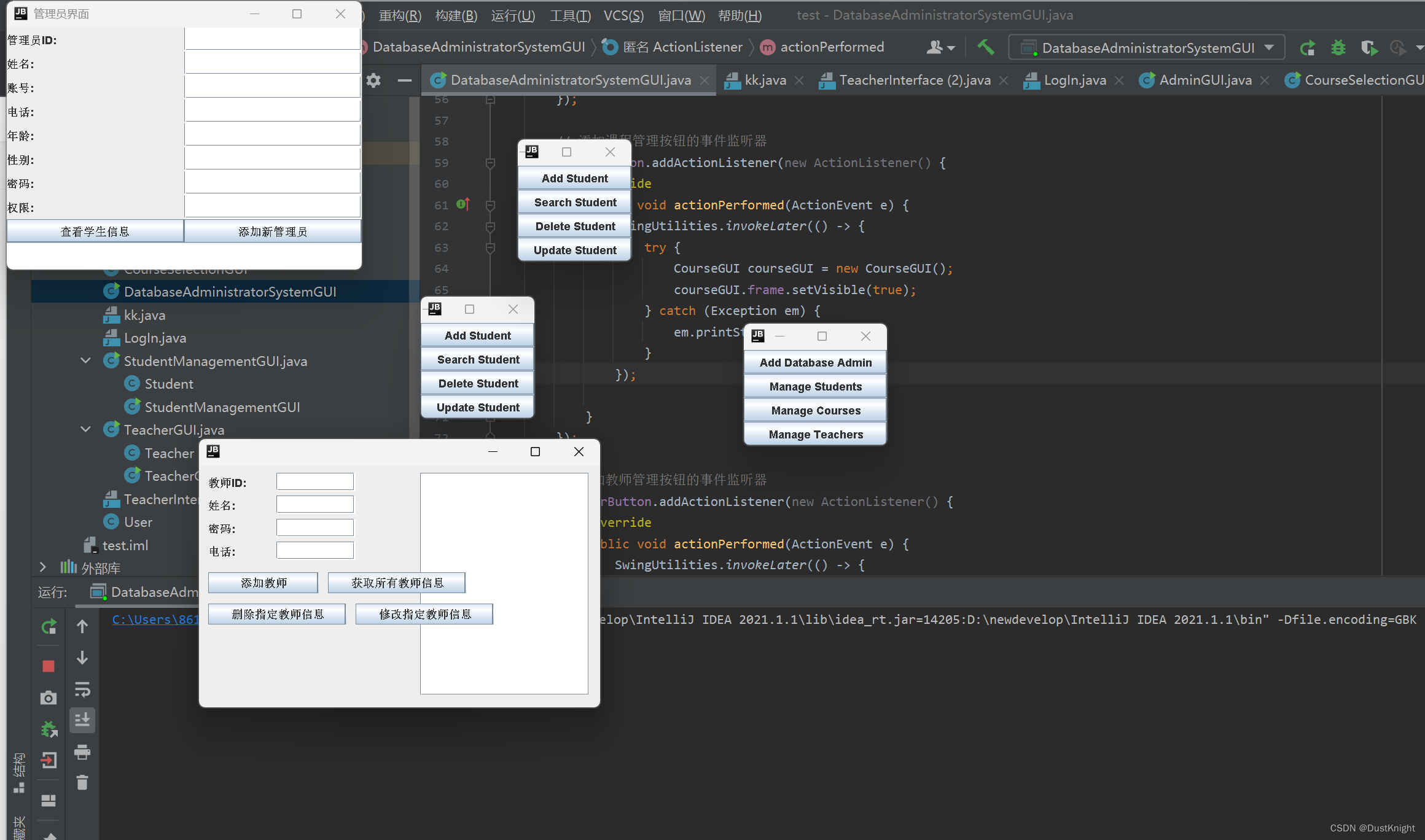
三、结果演示
答:
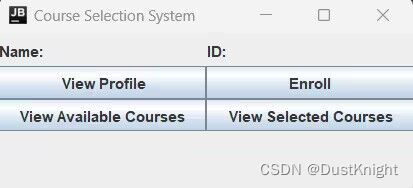
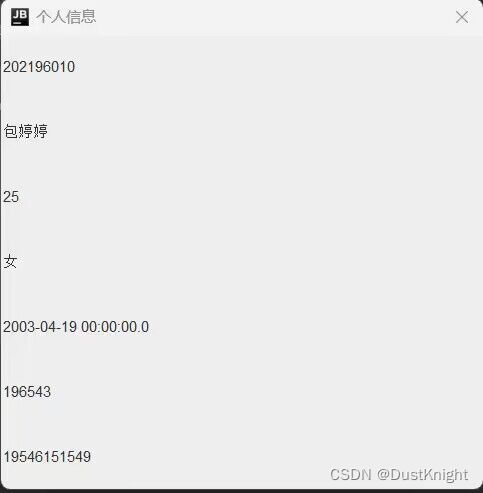
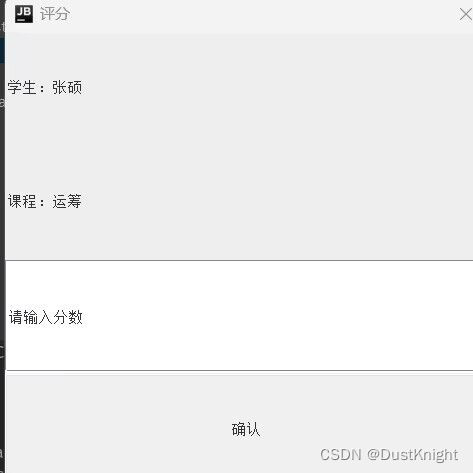
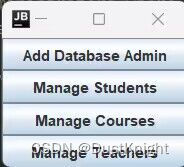
图一:管理系统界面的展示




推荐阅读
![[ 云计算 | AWS 实践 ] 使用 Java 更新现有 Amazon S3 对象](https://img-blog.csdnimg.cn/direct/f6b4b45ef01445aa9a147e7c5f1a8f15.png?x-oss-process=image/resize,m_fixed,h_300,image/format,png)



相关标签

