
热门标签
热门文章
- 1【Ruff学习1】Ruff是一个物联网的操作系统,可以让开发者使用JS高效且迅速地开发物联网应用_ruff js
- 2C#使用RabbitMQ-3_发布订阅模式(扇形交换机)
- 3数据库阿里连接池 druid配置详解_maxopenpreparedstatements
- 4Android开发基础(二)
- 5C/C++学习笔记:变量的作用域和变量的引用_vs的length如何引用
- 6MySQL数据库连接池 :Druid_mysql druid
- 7数据结构与算法-003.双向链表和循环链表_构造void addbefore(t data,node
succ) 怎么调用 - 8面向对象三大特性---继承_面向对象程序设计继承性
- 9微信小程序在线儿童有声读物系统设计与实现
- 10Codeforces Round 919 (Div. 2)C同余的同余
当前位置: article > 正文
使用AzureAI做关键词提取并构建可交互应用_azure open ai 提词
作者:二进制舞者 | 2024-01-17 14:15:49
赞
踩
azure open ai 提词
引言
在进行了云计算课程学习时候,老师要求对国内外的PAAS级别的云产品进行试用,我试用了国内Microsoft AZure产品中AI和机器学习模块的text analysis的接口,感觉性能不错,但是json的解析需要花费心思。但是感觉在解析方面积累了小小的经验。
下面是效果图
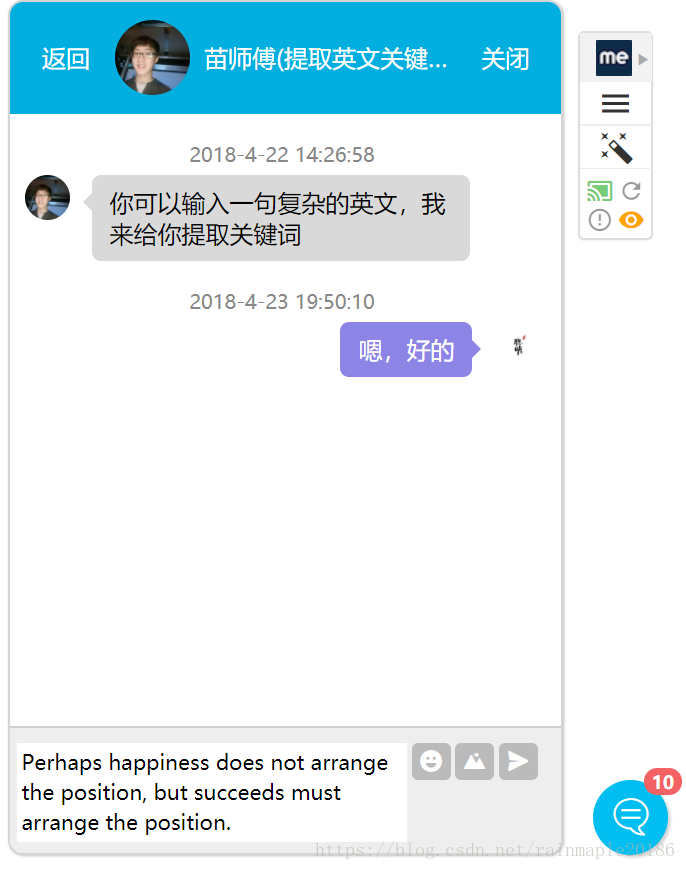
演示部分
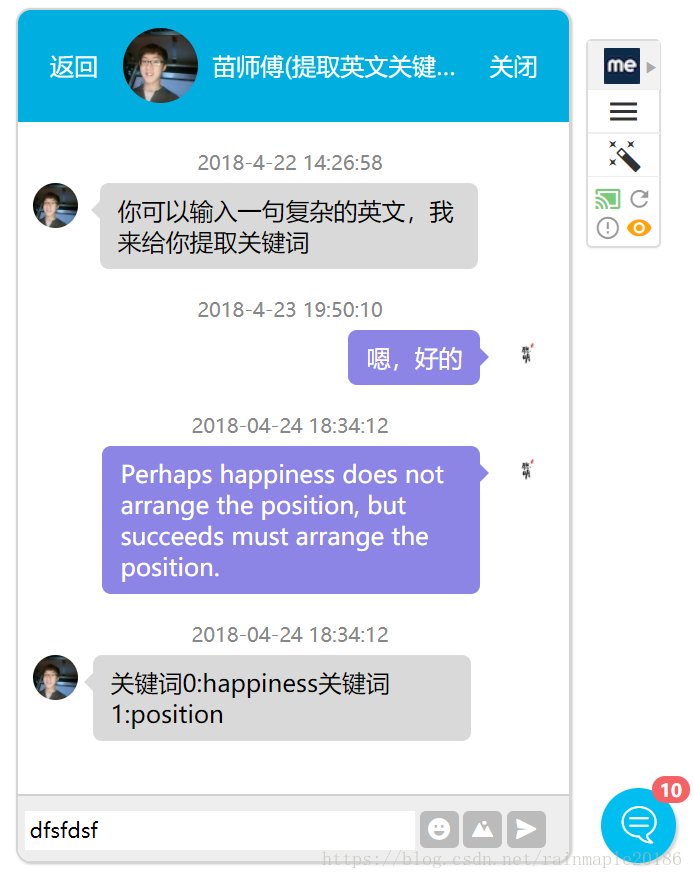
前台的构建采用了jQuery-chat的构建方式,然后使用ajax进行传值,无须刷新页面下面给出前台传值的代码
 $("#chat-fasong").click(function () {
        var textContent = $(".div-textarea").html().replace(/[\n\r]/g, '<br>')
        alert(textContent);
        var time1 = new Date().format("yyyy-MM-dd hh:mm:ss");
        var parm = {
				news :textContent
			};
                 $.ajax(
                 {
                      url: "Process",
                        type: "POST",
                        contentType: "application/x-www-form-urlencoded",
                        data: parm ,
                        success: function (data) {
                        alert(data);

                        $("<div class='clearfloat'><div class='author-name'><small class='chat-date'>"+time1+"</small></div><div class='left'><div class='chat-avatars'><img src='img/icon2.jpg' alt='头像'/></div><div class='chat-message'>"+data+"</div></div></div>").appendTo($("#chatBox-content-demo"));
                 },
                        error: function (xhr, status, p3, p4) {
                        var err = "Error " + " " + status + " " + p3;
                        if (xhr.responseText && xhr.responseText[0] == "{")
                            err = JSON.parse(xhr.responseText).message;
                            alert(err);
                        }
                });

        if (textContent != "") {
            $(".chatBox-content-demo").append("<div class=\"clearfloat\">" +
                "<div class=\"author-name\"><small class=\"chat-date\">"+time1+"</small> </div> " +
                "<div class=\"right\"> <div class=\"chat-message\"> " + textContent + " </div> " +
                "<div class=\"chat-avatars\"><img src=\"img/icon1.jpg\" alt=\"头像\" /></div> </div> </div>");
            //发送后清空输入框
            $(".div-textarea").html("");

            //聊天框默认最底部
            $(document).ready(function () {
                $("#chatBox-content-demo").scrollTop($("#chatBox-content-demo")[0].scrollHeight);
            });
        }
    });

- 1
- 2
- 3
- 4
- 5
- 6
- 7
- 8
- 9
- 10
- 11
- 12
- 13
- 14
- 15
- 16
- 17
- 18
- 19
- 20
- 21
- 22
- 23
- 24
- 25
- 26
- 27
- 28
- 29
- 30
- 31
- 32
- 33
- 34
- 35
- 36
- 37
- 38
- 39
- 40
后台还是使用servlet进行传值并且来调用接口
主要是接口的调用部分
先说说那个api 的调用方式吧
这是一个 api官方文档入口 官方是一元免费试用三十天,还是很人性化的
下面给出接口的调用java实现
import java.io.BufferedReader;
import java.io.DataOutputStream;
import java.io.IOException;
import java.io.InputStreamReader;
import java.io.PrintWriter;
import java.net.URL;
import java.util.ArrayList;
import java.util.List;

import javax.net.ssl.HttpsURLConnection;
import javax.servlet.ServletException;
import javax.servlet.http.HttpServlet;
import javax.servlet.http.HttpServletRequest;
import javax.servlet.http.HttpServletResponse;

import com.google.gson.Gson;
import com.google.gson.GsonBuilder;
import com.google.gson.JsonObject;
import com.google.gson.JsonParser;

import net.sf.json.JSONArray;
import net.sf.json.JSONObject;

class Document {
    public String id, language, text;
    public Document(String id, String language, String text){
        this.id = id;
        this.language = language;
        this.text = text;
    }
}

class Documents {
    public List<Document> documents;

    public Documents() {
        this.documents = new ArrayList<Document>();
    }
    public void add(String id, String language, String text) {
        this.documents.add (new Document (id, language, text));
    }
}

public class Process extends HttpServlet {
		private static final long serialVersionUID = 1L;
		static String accessKey = "你的api access key";
	    static String host = "https://westcentralus.api.cognitive.microsoft.com";
	    static String path = "/text/analytics/v2.0/keyPhrases";

	    public static String GetKeyPhrases (Documents documents) throws Exception {
	        String text = new Gson().toJson(documents);
	        byte[] encoded_text = text.getBytes("UTF-8");

	        URL url = new URL(host+path);
	        HttpsURLConnection connection = (HttpsURLConnection) url.openConnection();
	        connection.setRequestMethod("POST");
	        connection.setRequestProperty("Content-Type", "text/json");
	        connection.setRequestProperty("Ocp-Apim-Subscription-Key", accessKey);
	        connection.setDoOutput(true);

	        DataOutputStream wr = new DataOutputStream(connection.getOutputStream());
	        wr.write(encoded_text, 0, encoded_text.length);
	        wr.flush();
	        wr.close();

	        StringBuilder response = new StringBuilder ();
	        BufferedReader in = new BufferedReader(
	        new InputStreamReader(connection.getInputStream()));
	        String line;
	        while ((line = in.readLine()) != null) {
	            response.append(line);
	        }
	        in.close();

	        return response.toString();
	    }

	    public static String prettify(String json_text) {
	        JsonParser parser = new JsonParser();
	        JsonObject json = parser.parse(json_text).getAsJsonObject();
	        Gson gson = new GsonBuilder().setPrettyPrinting().create();
	        return gson.toJson(json);
	    }
- 1
- 2
- 3
- 4
- 5
- 6
- 7
- 8
- 9
- 10
- 11
- 12
- 13
- 14
- 15
- 16
- 17
- 18
- 19
- 20
- 21
- 22
- 23
- 24
- 25
- 26
- 27
- 28
- 29
- 30
- 31
- 32
- 33
- 34
- 35
- 36
- 37
- 38
- 39
- 40
- 41
- 42
- 43
- 44
- 45
- 46
- 47
- 48
- 49
- 50
- 51
- 52
- 53
- 54
- 55
- 56
- 57
- 58
- 59
- 60
- 61
- 62
- 63
- 64
- 65
- 66
- 67
- 68
- 69
- 70
- 71
- 72
- 73
- 74
- 75
- 76
- 77
- 78
- 79
- 80
- 81
- 82
- 83
- 84
其中在调用进行前后台交互的时候还是遇到甚多坑的,比如说编码问题,其中外国的api回送给调用方的字符编码总是喜欢使用ISO-8859-1编码,在不知情的情况下,我编写了测试api回送的消息编码类
	public static String getEncoding(String str) {
	       String encode = "GB2312";
	      try {
	          if (str.equals(new String(str.getBytes(encode), encode))) {
	               String s = encode;
	              return s;
	           }
	       } catch (Exception exception) {
	       }

	       encode = "UTF-8";
	      try {
	          if (str.equals(new String(str.getBytes(encode), encode))) {
	               String s2 = encode;
	              return s2;
	           }
	       } catch (Exception exception2) {
	       }
	       	       encode = "ISO-8859-1";
	      try {
	          if (str.equals(new String(str.getBytes(encode), encode))) {
	               String s1 = encode;
	              return s1;
	           }
	       } catch (Exception exception1) {
	       }
	       encode = "GBK";
	      try {
	          if (str.equals(new String(str.getBytes(encode), encode))) {
	               String s3 = encode;
	              return s3;
	           }
	       } catch (Exception exception3) {
	       }
	      return "";
	   }
- 1
- 2
- 3
- 4
- 5
- 6
- 7
- 8
- 9
- 10
- 11
- 12
- 13
- 14
- 15
- 16
- 17
- 18
- 19
- 20
- 21
- 22
- 23
- 24
- 25
- 26
- 27
- 28
- 29
- 30
- 31
- 32
- 33
- 34
- 35
- 36
经过测试,果不其然 encode = “ISO-8859-1”
我也尝试过测试这个api能否解析中文,但是不得不说还是外国的东西于中国水土不服,我大中国的汉字还是很难解析的,哈哈!
其中重点关于字符编码的转换
- 先将请求域中的编码设定为
request.setCharacterEncoding(“UTF-8”);
- 再将api回送的字符编码转换成utf-8
String str1 = new String(str.getBytes(“ISO-8859-1”), “UTF-8”);
response.setContentType(“text/html;charset=utf-8”);
这样前台用utf-8解析就不会出现乱码的错误
下面给出servlet部分的传值方法
	public void doPost(HttpServletRequest request, HttpServletResponse response) throws ServletException, IOException {

		response.setContentType("text/html;charset=utf-8");
		request.setCharacterEncoding("UTF-8");

		String json = request.getParameter("news");
		String language=null;
		if(isChinese(json)){
			language="zh_chs";
			System.out.println("此时的语言是"+language);
		}else{
			language="en";

		}
		System.out.println(json);
		PrintWriter out = response.getWriter();
		try {
            Documents documents = new Documents ();
            documents.add ("1", language, json);
           // documents.add ("2", "es", "Si usted quiere comunicarse con Carlos, usted debe de llamarlo a su telefono movil. Carlos es muy responsable, pero necesita recibir una notificacion si hay algun problema.");
            //documents.add ("3", "en", "The Grand Hotel is a new hotel in the center of Seattle. It earned 5 stars in my review, and has the classiest decor I've ever seen.");
            String wresponse = GetKeyPhrases (documents);
            JSONObject  myJson = JSONObject.fromObject(wresponse);
            JSONArray nn= myJson.getJSONArray("documents");
            JSONObject row = (JSONObject) nn.get(0);
            JSONArray ja= (JSONArray) row.get("keyPhrases");
            response.setCharacterEncoding("UTF-8");
            for (int i = 0; i < ja.size(); i++) {
                //提取出ja中的所有
                String str = (String) ja.get(i);
               // String encode=getEncoding(str);
               // System.out.println(encode+"***************");
                String str1 = new String(str.getBytes("ISO-8859-1"), "UTF-8");
                System.out.println("关键词"+i+":"+str1);
                out.print("关键词"+i+":"+str1);
            }
        }
        catch (Exception e) {
            System.out.println (e);
        }
		out.flush();
		out.close();
	}
}
- 1
- 2
- 3
- 4
- 5
- 6
- 7
- 8
- 9
- 10
- 11
- 12
- 13
- 14
- 15
- 16
- 17
- 18
- 19
- 20
- 21
- 22
- 23
- 24
- 25
- 26
- 27
- 28
- 29
- 30
- 31
- 32
- 33
- 34
- 35
- 36
- 37
- 38
- 39
- 40
- 41
- 42
- 43
- 44
后台的解析结果

关于源码已经上传到我的GitHub Rainmaple
声明:本文内容由网友自发贡献,不代表【wpsshop博客】立场,版权归原作者所有,本站不承担相应法律责任。如您发现有侵权的内容,请联系我们。转载请注明出处:https://www.wpsshop.cn/article/detail/40963
推荐阅读

相关标签

