
- 1C语言之实现贪吃蛇小游戏篇(2)
- 2基于ensp大学网络规划与设计(完整文档+ensp拓扑图)_大学网络设计
- 3Windows 安装 MySQL 8.1 (图文教程)_windows mysql 8.1
- 4前端量子纠缠 效果炸裂 multipleWindow3dScene
- 5【web安全】——逻辑漏洞之越权漏洞
- 6【JavaScript】使用 scrollIntoView 实现描点跳转定位
- 7人工智能(AI)中的一些常见名词-九五小庞
- 8仿真机器人-深度学习CV和激光雷达感知(项目2)day01【环境搭建】
- 9一张图看懂 USDT三种类型地址 Omni、ERC20、TRC20的区别_usdt地址
- 10粉丝提问:区块链与大数据开发读研方向怎么选?_区块链研究方向
CentOS安装k8s单机/集群及一些命令
赞
踩
目录
前言
只针对1.24版本以前的k8s, 1.24版本以后删除了内置dockershim插件,原生不再支持docker运行时,需要使用第三方cri接口cri-docker
1. 安装docker
看我上一篇博客
CentOS安装docker及一些命令 https://blog.csdn.net/o_CanDou6/article/details/135505341
2. 安装要求
- 内存大于等于2G,CPU大于等于2核,硬盘大于等于30G。
- 禁止swap分区。
3.准备网络(如果只装单机版可跳过此部)
新安装的Centos服务器需要配置静态网络:
打开网络配置文件:
vi /etc/sysconfig/network-scripts/ifcfg-enp0s3 将以下内容添加进去,其中BOOTPROTO="static"表示静态网络,NAME和DEVICE填网卡驱动如果没有驱动需要手动安装即可;下面添加IP、子网掩码以及网关、DNS等内容。
- TYPE=Ethernet
- PROXY_METHOD=none
- BROWSER_ONLY=no
- BOOTPROTO=static #需要修改
- DEFROUTE=yes
- IPV4_FAILURE_FATAL=no
- IPV6INIT=yes
- IPV6_AUTOCONF=yes
- IPV6_DEFROUTE=yes
- IPV6_FAILURE_FATAL=no
- NAME=enp0s3
- UUID=5c84522d-4102-4260-9a23-4121bd510252
- DEVICE=enp0s3
- ONBOOT=yes
- IPADDR=192.168.2.159 #修改固定ip
- NETMASK=255.255.255.0 #同步修改
- GATEWAY=192.168.2.1 #同步修改
- DNS1=192.168.2.1 #同步修改

准备了两个虚拟机当做演示ip地址如下(按自己的ip为准)
| 角色 | 名称 | IP |
|---|---|---|
| 主节点 | master | 192.168.2.159 |
| 子节点 | node1 | 192.168.2.64 |
4. 准备工作
- #永久关闭防火墙
- systemctl stop firewalld
- systemctl disable firewalld
-
- #永久关闭swap
- sed -ri 's/.*swap.*/#&/' /etc/fstab
-
- # 单机可以不执行如下命令
- ## 二台服务器设置主机名
- hostnamectl set-hostname <hostname>
-
- ## 修改hosts
- vi /etc/hosts
-
- # 加入如下数据 按自己ip增加
- 192.168.2.159 master
- 192.168.2.64 node1
5. 安装
5.1. 配置阿里云yum k8s源
- vi /etc/yum.repos.d/kubernetes.repo
-
- [kubernetes]
- name=Kubernetes
- baseurl=https://mirrors.aliyun.com/kubernetes/yum/repos/kubernetes-el7-x86_64
- enabled=1
- gpgcheck=1
- repo_gpgcheck=1
- gpgkey=https://mirrors.aliyun.com/kubernetes/yum/doc/yum-key.gpg https://mirrors.aliyun.com/kubernetes/yum/doc/rpm-package-key.gpg
可查看k8s版本信息
yum list kubelet --showduplicates | sort -r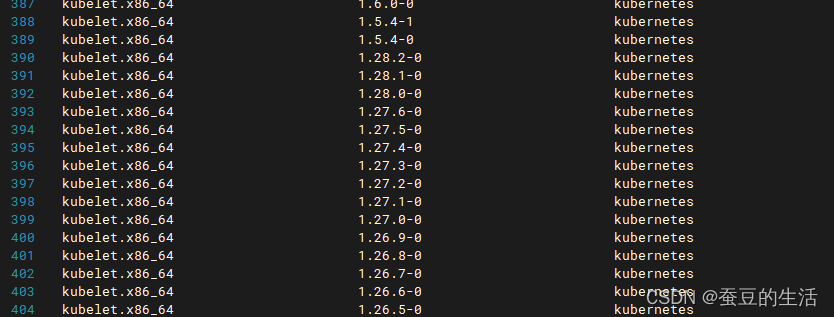
我们以1.21.0版本为例 (注意k8s版本需要对于特定的docker版本,不然安装不成功)
以下是一些常见的k8s与Docker版本对应关系:
- k8s v1.22.x 对应 Docker 20.10.x
- k8s v1.21.x 对应 Docker 20.10.x
- k8s v1.20.x 对应 Docker 19.03.x
5.2 安装kubeadm、kubectl和kubelet
- yum install -y kubelet-1.21.0 kubeadm-1.21.0 kubectl-1.21.0
-
- systemctl enable kubelet
5.3 初始化,只在master执行,子节点不要执行
- # --apiserver-advertise-address=本机ip
- kubeadm init --kubernetes-version=1.21.0 --pod-network-cidr=10.244.0.0/16 --apiserver-advertise-address=[本机ip] --ignore-preflight-errors=all --image-repository=registry.aliyuncs.com/google_containers
5.3.1 一些错误(没有错误直接忽略)
[WARNING FileExisting-tc]: tc not found in system path 错误
- # 解决方法
- yum install iproute-tc -y
[WARNING ImagePull]: failed to pull image registry.aliyuncs.com/google_containers/coredns/coredns:v1.8.0: output: Error response from daemon: pull access denied for registry.aliyuncs.com/google_containers/coredns/coredns, repository does not exist or may require 'docker login': denied: requested access to the resource is denied
, error: exit status 1
- # 解决方法
- docker pull coredns/coredns:latest
- docker tag coredns/coredns:latest registry.aliyuncs.com/google_containers/coredns/coredns:v1.8.0
5.4 使用kubectl工具
执行完毕后会出现如下内容红框内容在master(本机)上执行,蓝框的在子节点上执行加入集群

- mkdir -p $HOME/.kube
- sudo cp -i /etc/kubernetes/admin.conf $HOME/.kube/config
- sudo chown $(id -u):$(id -g) $HOME/.kube/config
执行完可以查看节点了
kubectl get nodes
现在只有自己
5.5 子节点加入(单机版可忽略)
子节点不需要执行5.3 初始化的内容,只执行master输出的 kubeadm join 命令加入集群即可
# 执行自己的输出内容不要复制内容不同
kubeadm join 192.168.2.159:6443 --token e5doub.g27604rf65vj02yr \
--discovery-token-ca-cert-hash sha256:2521d2d4ee37750feba14a00ef0de0dfc390b1141f7abda81b0e259ce01870af

子节点执行完后再次查看节点

子节点加入进来了但是这时候子节点还不能使用,需要把master服务器/etc/kubernetes/admin.conf复制到子节点的/etc/kubernetes/文件夹中
然后再子节点中执行
- mkdir -p $HOME/.kube
- sudo cp -i /etc/kubernetes/admin.conf $HOME/.kube/config
- sudo chown $(id -u):$(id -g) $HOME/.kube/config
现在子节点可以正常使用了
5.6 部署CNI网络插件
kubectl apply -f https://raw.githubusercontent.com/coreos/flannel/master/Documentation/kube-flannel.yml访问不到的可以复制如下内容自己创建文件 使用 kubectl apply -f 执行
- ---
- kind: Namespace
- apiVersion: v1
- metadata:
- name: kube-flannel
- labels:
- k8s-app: flannel
- pod-security.kubernetes.io/enforce: privileged
- ---
- kind: ClusterRole
- apiVersion: rbac.authorization.k8s.io/v1
- metadata:
- labels:
- k8s-app: flannel
- name: flannel
- rules:
- - apiGroups:
- - ""
- resources:
- - pods
- verbs:
- - get
- - apiGroups:
- - ""
- resources:
- - nodes
- verbs:
- - get
- - list
- - watch
- - apiGroups:
- - ""
- resources:
- - nodes/status
- verbs:
- - patch
- - apiGroups:
- - networking.k8s.io
- resources:
- - clustercidrs
- verbs:
- - list
- - watch
- ---
- kind: ClusterRoleBinding
- apiVersion: rbac.authorization.k8s.io/v1
- metadata:
- labels:
- k8s-app: flannel
- name: flannel
- roleRef:
- apiGroup: rbac.authorization.k8s.io
- kind: ClusterRole
- name: flannel
- subjects:
- - kind: ServiceAccount
- name: flannel
- namespace: kube-flannel
- ---
- apiVersion: v1
- kind: ServiceAccount
- metadata:
- labels:
- k8s-app: flannel
- name: flannel
- namespace: kube-flannel
- ---
- kind: ConfigMap
- apiVersion: v1
- metadata:
- name: kube-flannel-cfg
- namespace: kube-flannel
- labels:
- tier: node
- k8s-app: flannel
- app: flannel
- data:
- cni-conf.json: |
- {
- "name": "cbr0",
- "cniVersion": "0.3.1",
- "plugins": [
- {
- "type": "flannel",
- "delegate": {
- "hairpinMode": true,
- "isDefaultGateway": true
- }
- },
- {
- "type": "portmap",
- "capabilities": {
- "portMappings": true
- }
- }
- ]
- }
- net-conf.json: |
- {
- "Network": "10.244.0.0/16",
- "Backend": {
- "Type": "vxlan"
- }
- }
- ---
- apiVersion: apps/v1
- kind: DaemonSet
- metadata:
- name: kube-flannel-ds
- namespace: kube-flannel
- labels:
- tier: node
- app: flannel
- k8s-app: flannel
- spec:
- selector:
- matchLabels:
- app: flannel
- template:
- metadata:
- labels:
- tier: node
- app: flannel
- spec:
- affinity:
- nodeAffinity:
- requiredDuringSchedulingIgnoredDuringExecution:
- nodeSelectorTerms:
- - matchExpressions:
- - key: kubernetes.io/os
- operator: In
- values:
- - linux
- hostNetwork: true
- priorityClassName: system-node-critical
- tolerations:
- - operator: Exists
- effect: NoSchedule
- serviceAccountName: flannel
- initContainers:
- - name: install-cni-plugin
- image: docker.io/flannel/flannel-cni-plugin:v1.2.0
- command:
- - cp
- args:
- - -f
- - /flannel
- - /opt/cni/bin/flannel
- volumeMounts:
- - name: cni-plugin
- mountPath: /opt/cni/bin
- - name: install-cni
- image: docker.io/flannel/flannel:v0.24.0
- command:
- - cp
- args:
- - -f
- - /etc/kube-flannel/cni-conf.json
- - /etc/cni/net.d/10-flannel.conflist
- volumeMounts:
- - name: cni
- mountPath: /etc/cni/net.d
- - name: flannel-cfg
- mountPath: /etc/kube-flannel/
- containers:
- - name: kube-flannel
- image: docker.io/flannel/flannel:v0.24.0
- command:
- - /opt/bin/flanneld
- args:
- - --ip-masq
- - --kube-subnet-mgr
- resources:
- requests:
- cpu: "100m"
- memory: "50Mi"
- securityContext:
- privileged: false
- capabilities:
- add: ["NET_ADMIN", "NET_RAW"]
- env:
- - name: POD_NAME
- valueFrom:
- fieldRef:
- fieldPath: metadata.name
- - name: POD_NAMESPACE
- valueFrom:
- fieldRef:
- fieldPath: metadata.namespace
- - name: EVENT_QUEUE_DEPTH
- value: "5000"
- volumeMounts:
- - name: run
- mountPath: /run/flannel
- - name: flannel-cfg
- mountPath: /etc/kube-flannel/
- - name: xtables-lock
- mountPath: /run/xtables.lock
- volumes:
- - name: run
- hostPath:
- path: /run/flannel
- - name: cni-plugin
- hostPath:
- path: /opt/cni/bin
- - name: cni
- hostPath:
- path: /etc/cni/net.d
- - name: flannel-cfg
- configMap:
- name: kube-flannel-cfg
- - name: xtables-lock
- hostPath:
- path: /run/xtables.lock
- type: FileOrCreate
6. 扩展
在master安装 recommended.yaml 和 dashboard-adminuser.yml 使用图形界面查看 (这两个文件在下方)
- kubectl apply -f recommended.yaml
- kubectl apply -f dashboard-adminuser.yml
安装完成后可以用火狐访问 https://[ip地址]:32508/#/login 如我的为 https://192.168.2.159:32508/#/login
注意不要用高版本Chrome或者edge登录https没有证书访问不了https://[ip地址]:32508/#/login 如我的为
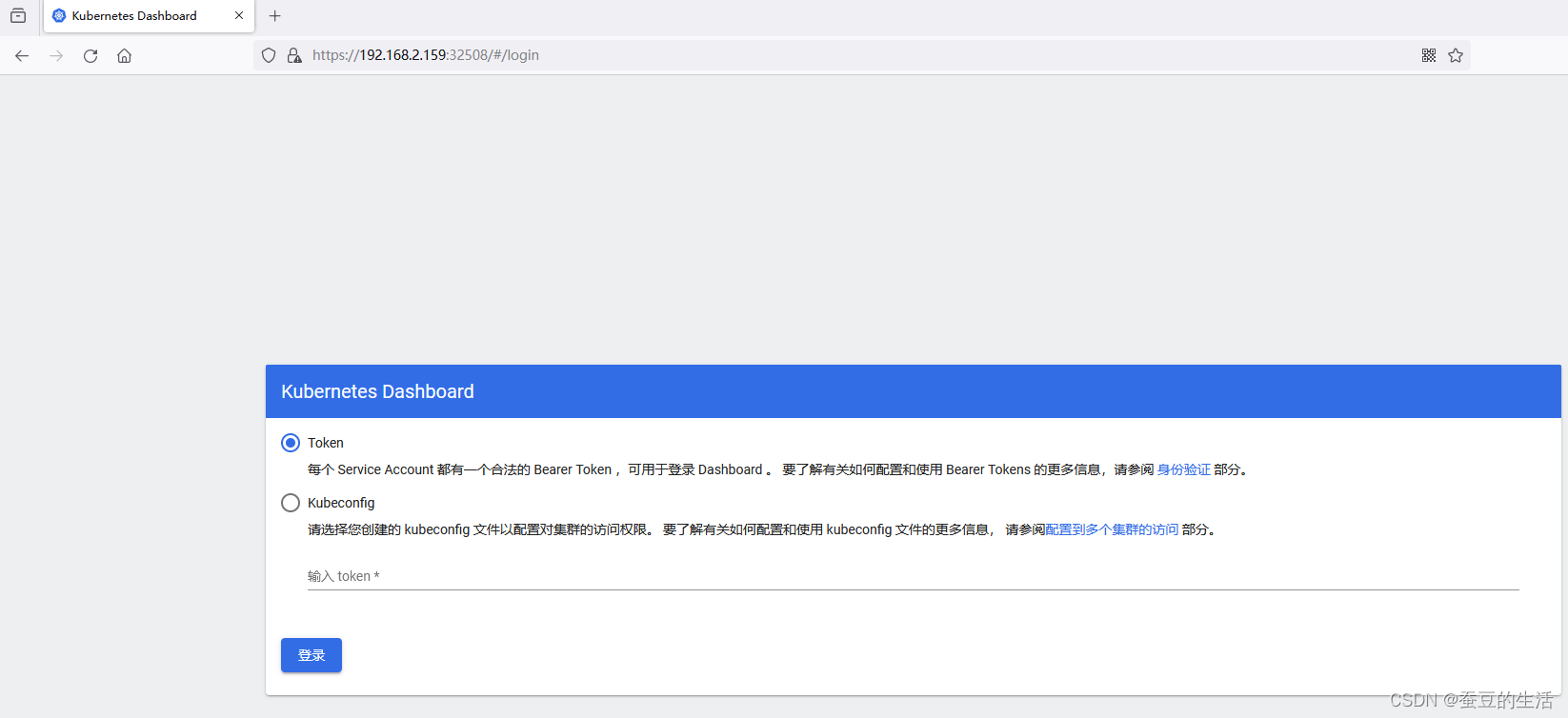
这里需要token执行下面命令获取token
- # 获取登录凭证
- kubectl -n kube-system describe secret $(kubectl -n kube-system get secret | grep admin | awk '{print $1}')

粘贴后进入
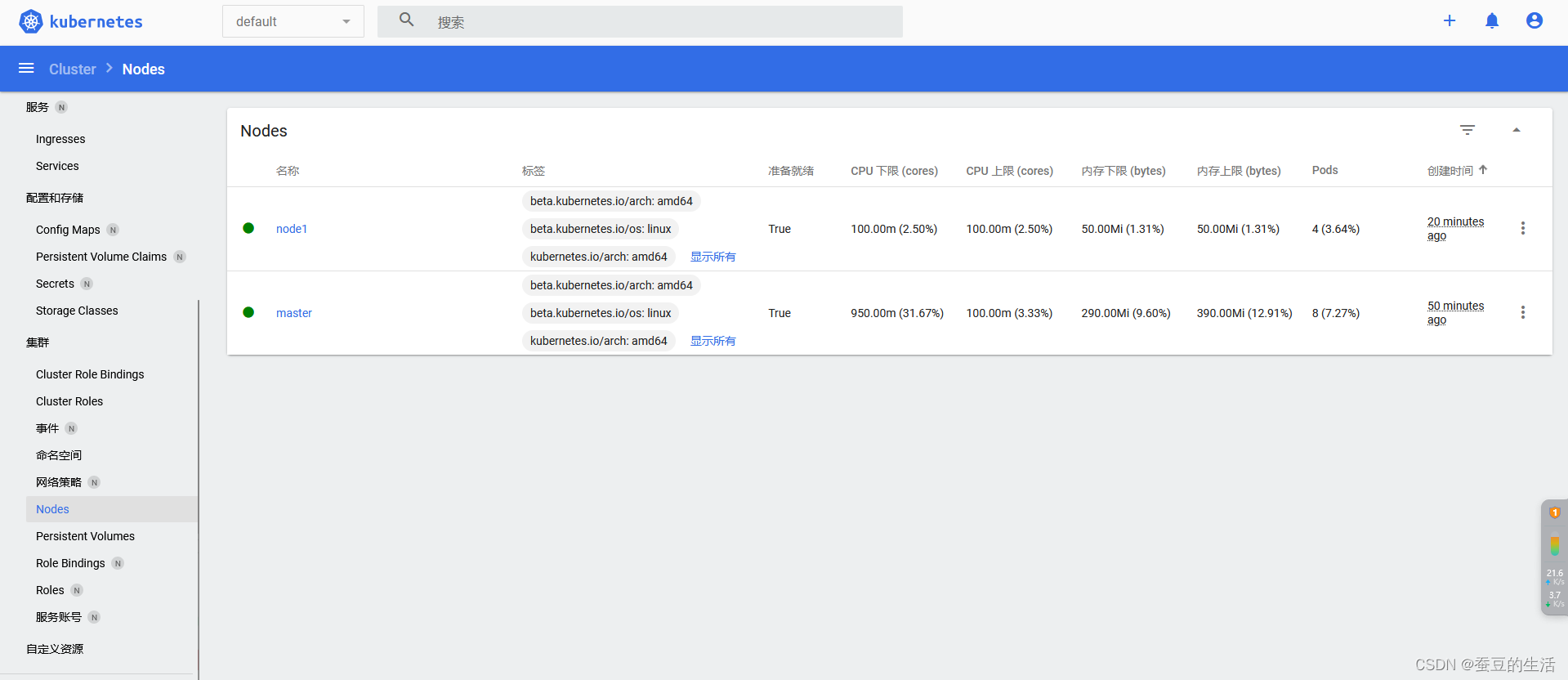
recommended.yaml:
- # Copyright 2017 The Kubernetes Authors.
- #
- # Licensed under the Apache License, Version 2.0 (the "License");
- # you may not use this file except in compliance with the License.
- # You may obtain a copy of the License at
- #
- # http://www.apache.org/licenses/LICENSE-2.0
- #
- # Unless required by applicable law or agreed to in writing, software
- # distributed under the License is distributed on an "AS IS" BASIS,
- # WITHOUT WARRANTIES OR CONDITIONS OF ANY KIND, either express or implied.
- # See the License for the specific language governing permissions and
- # limitations under the License.
-
- apiVersion: v1
- kind: Namespace
- metadata:
- name: kubernetes-dashboard
-
- ---
-
- apiVersion: v1
- kind: ServiceAccount
- metadata:
- labels:
- k8s-app: kubernetes-dashboard
- name: kubernetes-dashboard
- namespace: kubernetes-dashboard
-
- ---
-
- kind: Service
- apiVersion: v1
- metadata:
- labels:
- k8s-app: kubernetes-dashboard
- name: kubernetes-dashboard
- namespace: kubernetes-dashboard
- spec:
- type: NodePort
- ports:
- - port: 443
- targetPort: 8443
- nodePort: 32508
- selector:
- k8s-app: kubernetes-dashboard
-
- ---
-
- apiVersion: v1
- kind: Secret
- metadata:
- labels:
- k8s-app: kubernetes-dashboard
- name: kubernetes-dashboard-certs
- namespace: kubernetes-dashboard
- type: Opaque
-
- ---
-
- apiVersion: v1
- kind: Secret
- metadata:
- labels:
- k8s-app: kubernetes-dashboard
- name: kubernetes-dashboard-csrf
- namespace: kubernetes-dashboard
- type: Opaque
- data:
- csrf: ""
-
- ---
-
- apiVersion: v1
- kind: Secret
- metadata:
- labels:
- k8s-app: kubernetes-dashboard
- name: kubernetes-dashboard-key-holder
- namespace: kubernetes-dashboard
- type: Opaque
-
- ---
-
- kind: ConfigMap
- apiVersion: v1
- metadata:
- labels:
- k8s-app: kubernetes-dashboard
- name: kubernetes-dashboard-settings
- namespace: kubernetes-dashboard
-
- ---
-
- kind: Role
- apiVersion: rbac.authorization.k8s.io/v1
- metadata:
- labels:
- k8s-app: kubernetes-dashboard
- name: kubernetes-dashboard
- namespace: kubernetes-dashboard
- rules:
- # Allow Dashboard to get, update and delete Dashboard exclusive secrets.
- - apiGroups: [""]
- resources: ["secrets"]
- resourceNames: ["kubernetes-dashboard-key-holder", "kubernetes-dashboard-certs", "kubernetes-dashboard-csrf"]
- verbs: ["get", "update", "delete"]
- # Allow Dashboard to get and update 'kubernetes-dashboard-settings' config map.
- - apiGroups: [""]
- resources: ["configmaps"]
- resourceNames: ["kubernetes-dashboard-settings"]
- verbs: ["get", "update"]
- # Allow Dashboard to get metrics.
- - apiGroups: [""]
- resources: ["services"]
- resourceNames: ["heapster", "dashboard-metrics-scraper"]
- verbs: ["proxy"]
- - apiGroups: [""]
- resources: ["services/proxy"]
- resourceNames: ["heapster", "http:heapster:", "https:heapster:", "dashboard-metrics-scraper", "http:dashboard-metrics-scraper"]
- verbs: ["get"]
-
- ---
-
- kind: ClusterRole
- apiVersion: rbac.authorization.k8s.io/v1
- metadata:
- labels:
- k8s-app: kubernetes-dashboard
- name: kubernetes-dashboard
- rules:
- # Allow Metrics Scraper to get metrics from the Metrics server
- - apiGroups: ["metrics.k8s.io"]
- resources: ["pods", "nodes"]
- verbs: ["get", "list", "watch"]
-
- ---
-
- apiVersion: rbac.authorization.k8s.io/v1
- kind: RoleBinding
- metadata:
- labels:
- k8s-app: kubernetes-dashboard
- name: kubernetes-dashboard
- namespace: kubernetes-dashboard
- roleRef:
- apiGroup: rbac.authorization.k8s.io
- kind: Role
- name: kubernetes-dashboard
- subjects:
- - kind: ServiceAccount
- name: kubernetes-dashboard
- namespace: kubernetes-dashboard
-
- ---
-
- apiVersion: rbac.authorization.k8s.io/v1
- kind: ClusterRoleBinding
- metadata:
- name: kubernetes-dashboard
- roleRef:
- apiGroup: rbac.authorization.k8s.io
- kind: ClusterRole
- name: kubernetes-dashboard
- subjects:
- - kind: ServiceAccount
- name: kubernetes-dashboard
- namespace: kubernetes-dashboard
-
- ---
-
- kind: Deployment
- apiVersion: apps/v1
- metadata:
- labels:
- k8s-app: kubernetes-dashboard
- name: kubernetes-dashboard
- namespace: kubernetes-dashboard
- spec:
- replicas: 1
- revisionHistoryLimit: 10
- selector:
- matchLabels:
- k8s-app: kubernetes-dashboard
- template:
- metadata:
- labels:
- k8s-app: kubernetes-dashboard
- spec:
- securityContext:
- seccompProfile:
- type: RuntimeDefault
- containers:
- - name: kubernetes-dashboard
- image: kubernetesui/dashboard:v2.5.1
- imagePullPolicy: Always
- ports:
- - containerPort: 8443
- protocol: TCP
- args:
- - --auto-generate-certificates
- - --namespace=kubernetes-dashboard
- # Uncomment the following line to manually specify Kubernetes API server Host
- # If not specified, Dashboard will attempt to auto discover the API server and connect
- # to it. Uncomment only if the default does not work.
- # - --apiserver-host=http://my-address:port
- volumeMounts:
- - name: kubernetes-dashboard-certs
- mountPath: /certs
- # Create on-disk volume to store exec logs
- - mountPath: /tmp
- name: tmp-volume
- livenessProbe:
- httpGet:
- scheme: HTTPS
- path: /
- port: 8443
- initialDelaySeconds: 30
- timeoutSeconds: 30
- securityContext:
- allowPrivilegeEscalation: false
- readOnlyRootFilesystem: true
- runAsUser: 1001
- runAsGroup: 2001
- volumes:
- - name: kubernetes-dashboard-certs
- secret:
- secretName: kubernetes-dashboard-certs
- - name: tmp-volume
- emptyDir: {}
- serviceAccountName: kubernetes-dashboard
- nodeSelector:
- "kubernetes.io/os": linux
- # Comment the following tolerations if Dashboard must not be deployed on master
- tolerations:
- - key: node-role.kubernetes.io/master
- effect: NoSchedule
-
- ---
-
- kind: Service
- apiVersion: v1
- metadata:
- labels:
- k8s-app: dashboard-metrics-scraper
- name: dashboard-metrics-scraper
- namespace: kubernetes-dashboard
- spec:
- ports:
- - port: 8000
- targetPort: 8000
- selector:
- k8s-app: dashboard-metrics-scraper
-
- ---
-
- kind: Deployment
- apiVersion: apps/v1
- metadata:
- labels:
- k8s-app: dashboard-metrics-scraper
- name: dashboard-metrics-scraper
- namespace: kubernetes-dashboard
- spec:
- replicas: 1
- revisionHistoryLimit: 10
- selector:
- matchLabels:
- k8s-app: dashboard-metrics-scraper
- template:
- metadata:
- labels:
- k8s-app: dashboard-metrics-scraper
- spec:
- securityContext:
- seccompProfile:
- type: RuntimeDefault
- containers:
- - name: dashboard-metrics-scraper
- image: kubernetesui/metrics-scraper:v1.0.7
- ports:
- - containerPort: 8000
- protocol: TCP
- livenessProbe:
- httpGet:
- scheme: HTTP
- path: /
- port: 8000
- initialDelaySeconds: 30
- timeoutSeconds: 30
- volumeMounts:
- - mountPath: /tmp
- name: tmp-volume
- securityContext:
- allowPrivilegeEscalation: false
- readOnlyRootFilesystem: true
- runAsUser: 1001
- runAsGroup: 2001
- serviceAccountName: kubernetes-dashboard
- nodeSelector:
- "kubernetes.io/os": linux
- # Comment the following tolerations if Dashboard must not be deployed on master
- tolerations:
- - key: node-role.kubernetes.io/master
- effect: NoSchedule
- volumes:
- - name: tmp-volume
- emptyDir: {}
dashboard-adminuser.yml:
- apiVersion: v1
- kind: ServiceAccount
- metadata:
- name: admin-user
- namespace: kube-system
- ---
- apiVersion: rbac.authorization.k8s.io/v1
- kind: ClusterRoleBinding
- metadata:
- name: admin-user
- annotations:
- rbac.authorization.kubernetes.io/autoupdate: "true"
- roleRef:
- apiGroup: rbac.authorization.k8s.io
- kind: ClusterRole
- name: cluster-admin
- subjects:
- - kind: ServiceAccount
- name: admin-user
- namespace: kube-system

