- 1在无GUI环境下(headless模式)配置并使用Python+selenium+chromium/firefox的流程_selenium+headless firefox 需要下载firefox吗?
- 2ONLYOFFICE:兼顾协作与安全的开源办公套件
- 3[Python从零到壹] 五十九.图像增强及运算篇之图像锐化Scharr、Canny、LOG实现边缘检测_图像使用canny使得增强后的图像
- 4微信小程序---缓慢展开和收起效果(不需要wx:if控制实现)_微信小程序点击展开效果动画
- 5*++p、++*p、(*p)++、*(p++)、*p++的区别
- 6Spring Boot 笔记 012 创建接口_添加文章分类
- 7sklearn中的聚类算法K-Means_sklearn kmeans
- 8midjourney指令笔记+踩坑日记+gpt论文润色指令_mj 提示:--stylize must be between 1250 and 5000 with
- 9EXCEL数据分析的基本知识_excel画图叫什么分析
- 10基于nodejs+vue地方特色的风景文化宣传网站vscode_前端地区宣传网页
基于GMap.NET库实现的Windows桌面地图工具软件分享
赞
踩
0 前言
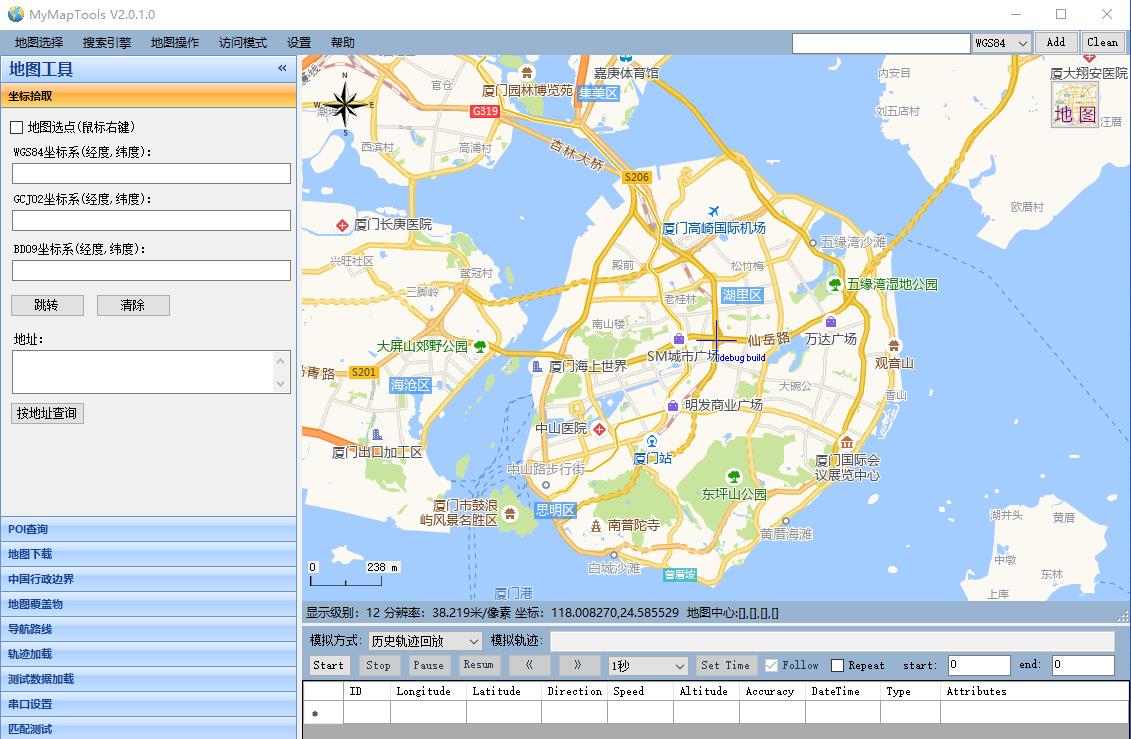
由于工作中经常和地图、GPS坐标转换、GPS轨迹查看等内容相关,经常要借助一些在线网站和工具来查看地图和位置等,在一次偶然的机会中了解到一个GMap.NET开源的桌面地图库和基于GMap.NET实现的MapDownloader地图下载工具,于是也想实现一个自己的地图相关工具,包含以下功能:
- 多种地图切换:Baidu(百度), Amap(高德), Tencent(腾讯), Tianditu(天地图), Ship, Google, Bing, OpenStreetMap, ArcGIS, Here(Nokia)等;
- 坐标拾取和坐标转换:GPS(WGS84)、火星坐标(GCJ02)、百度坐标(BD09)等相互转换,地理编码和反地理编码等;
- POI查询:通过百度地图、高德地图、腾讯地图等WebAPI搜索、保存POI数据;
- 地图下载、拼接:通过矩形、多边形、行政区划等方式下载、缓存地图数据或者拼接成大图;
- 导航路线搜索、导出:通过百度地图、高德地图、腾讯地图等WebAPI搜索、保存导航路线数据;
- 历史轨迹加载、回放:加载不同格式(csv/excel/nmea)轨迹数据,并可以回放、测试等;
- 实时轨迹显示:通过串口接收GPS信息显示在地图上;
项目地址:https://github.com/luotengyuan/MyMapTools、https://gitee.com/luotengyuan/MyMapTools
程序下载:https://download.csdn.net/download/loutengyuan/86507941
声明:本软件仅供个人学习与科研使用,所下载的数据版权归各个地图服务商所有,任何组织或个人因数据使用不当造成的问题,软件作者不负责任。
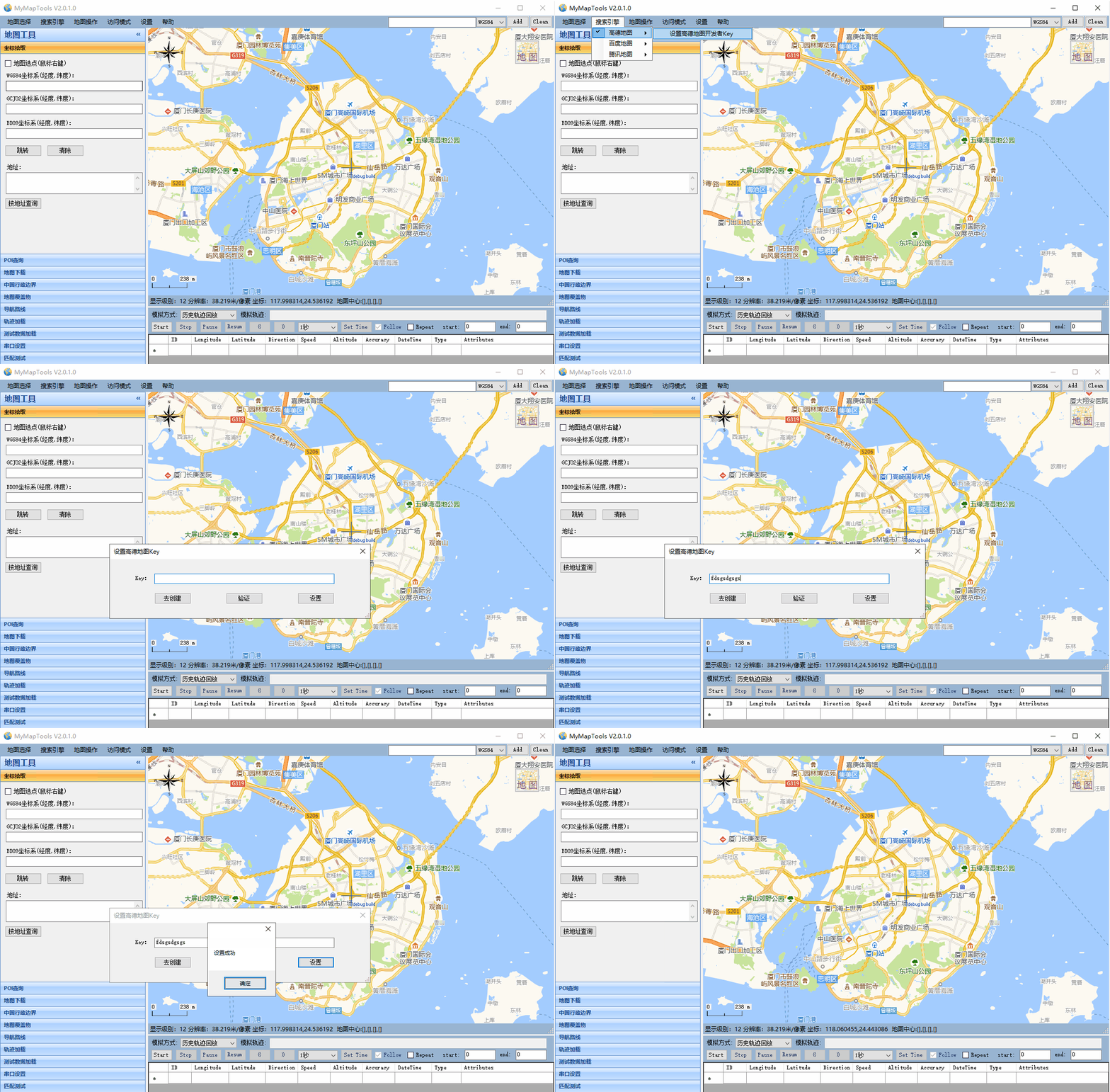
PS: 请替换自己的API Key!
https://lbs.qq.com/webservice_v1/index.html
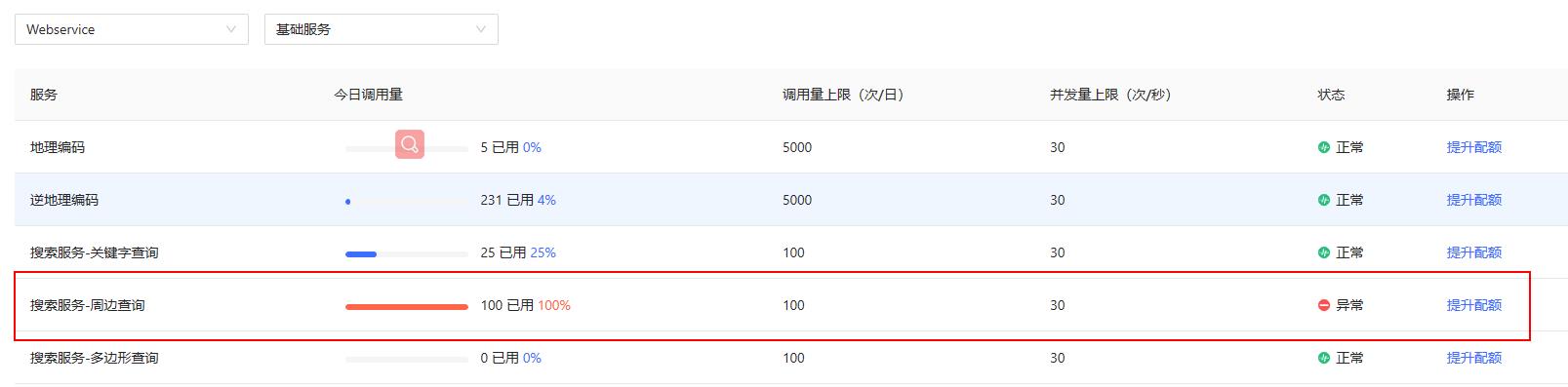
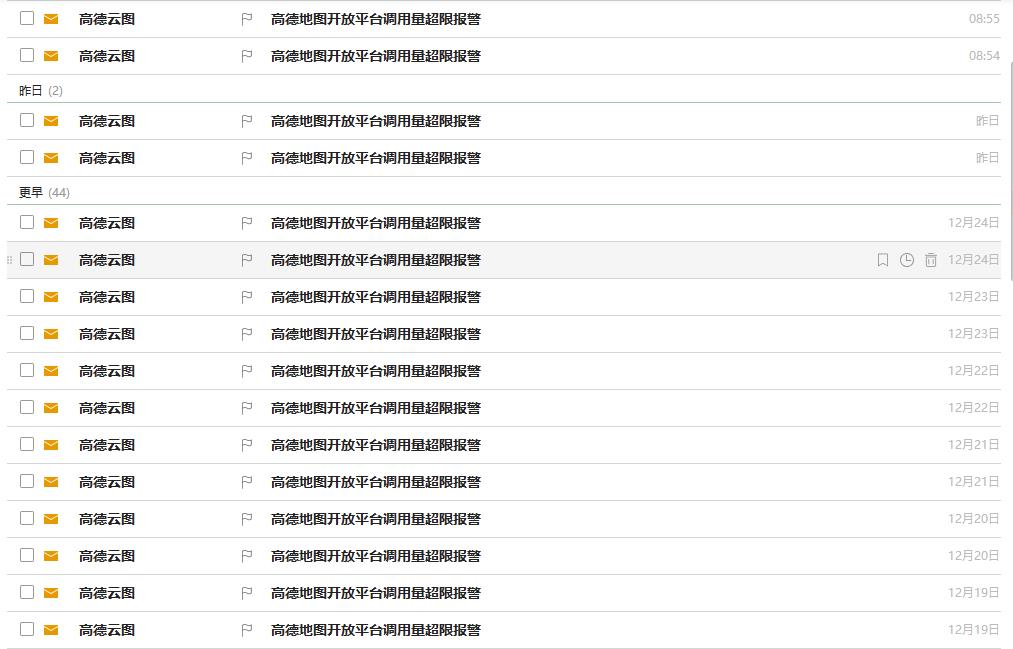
最近有人使用我在工程中配置的key去请求搜索服务,我的也是个人开发账号,配额才100,导致我天天收到短信和邮件提示,所以需要使用的朋友还是自己申请一下key,谢谢!
1 功能介绍
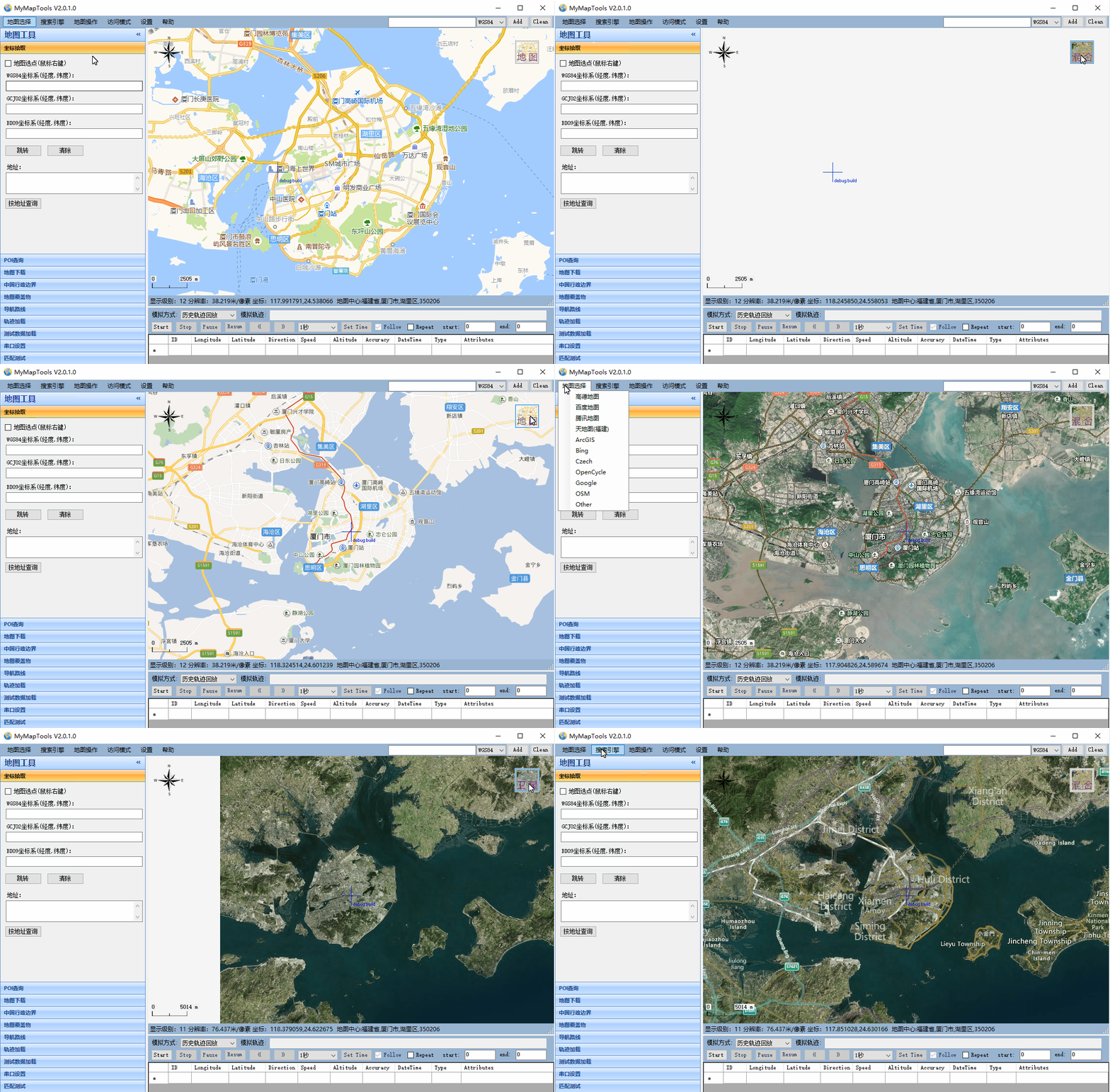
1.1 多种在线地图切换
- 可以根据自己的需要切换不同的地图提供商(例如:百度、高德)或者不同的地图类型(例如:普通地图、卫星地图、混合地图)
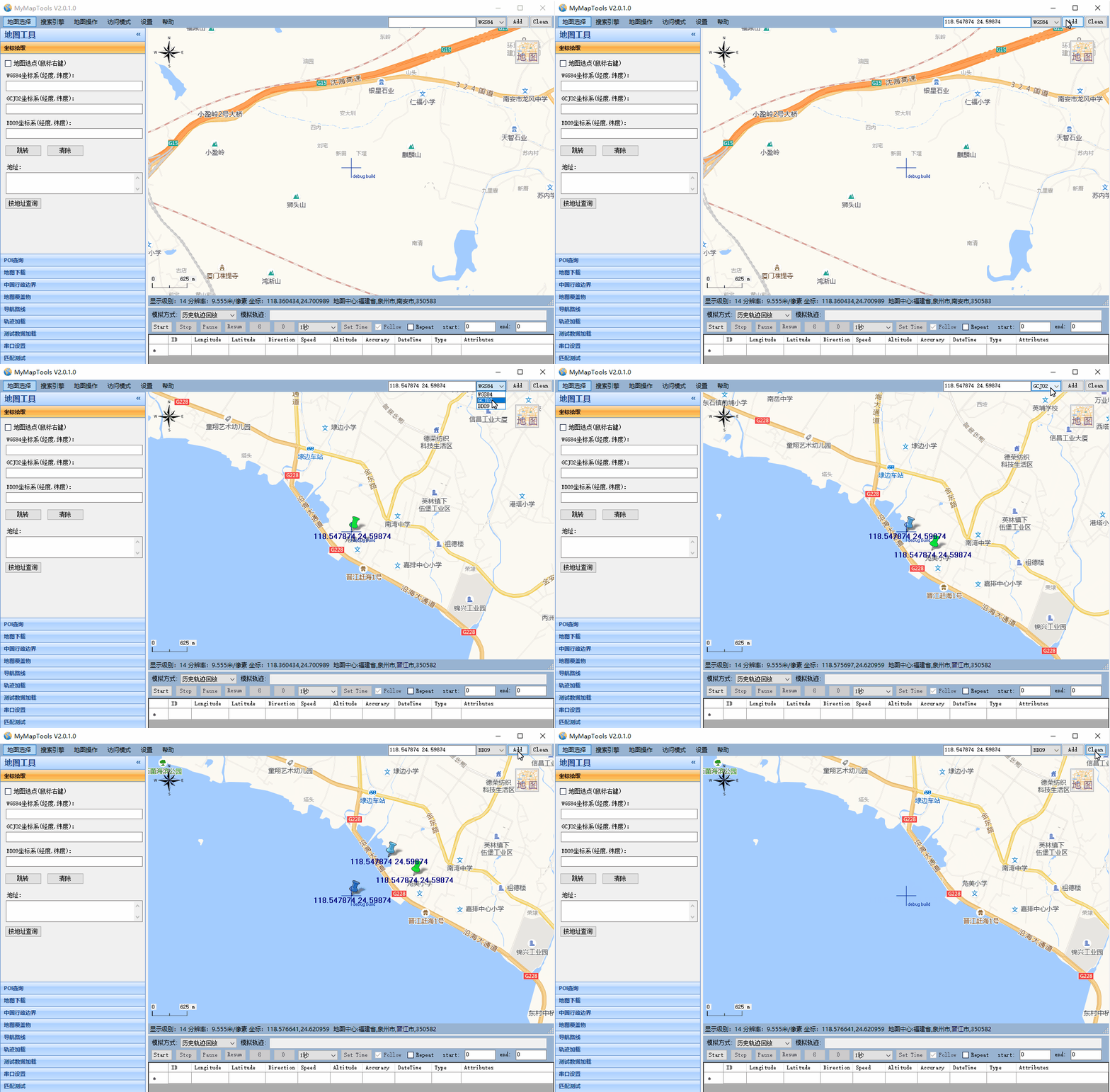
1.2 经纬度坐标显示
- 可以根据不同类型的经纬度坐标,将坐标标注到地图上显示
1.3 坐标拾取功能
- 在地图指定点右键鼠标,选择拾取该点坐标和地址菜单,可以在坐标坐标拾取标签页下查看该点的坐标和地址
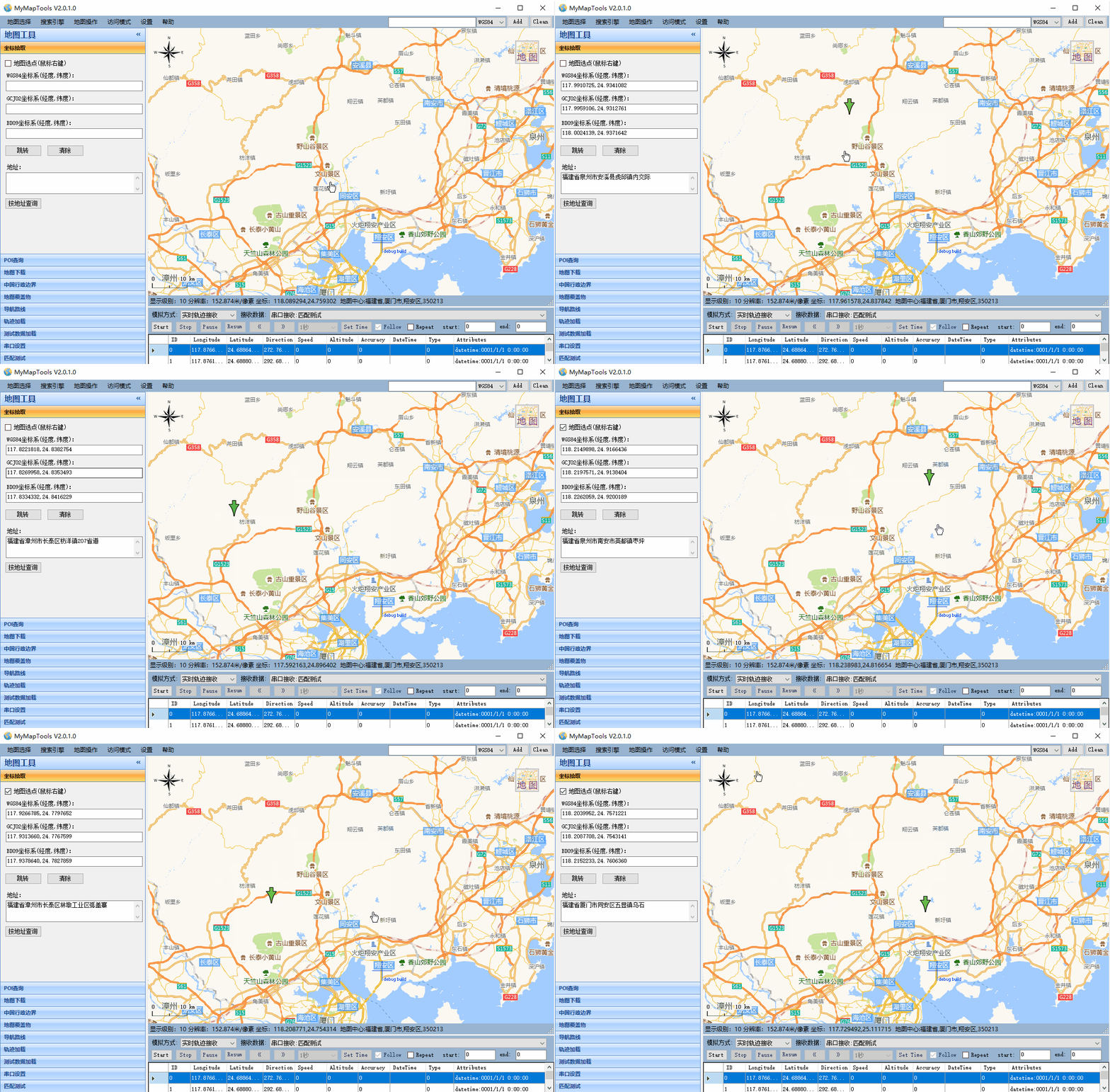
- 根据坐标和地址也可查询在地图上的点位
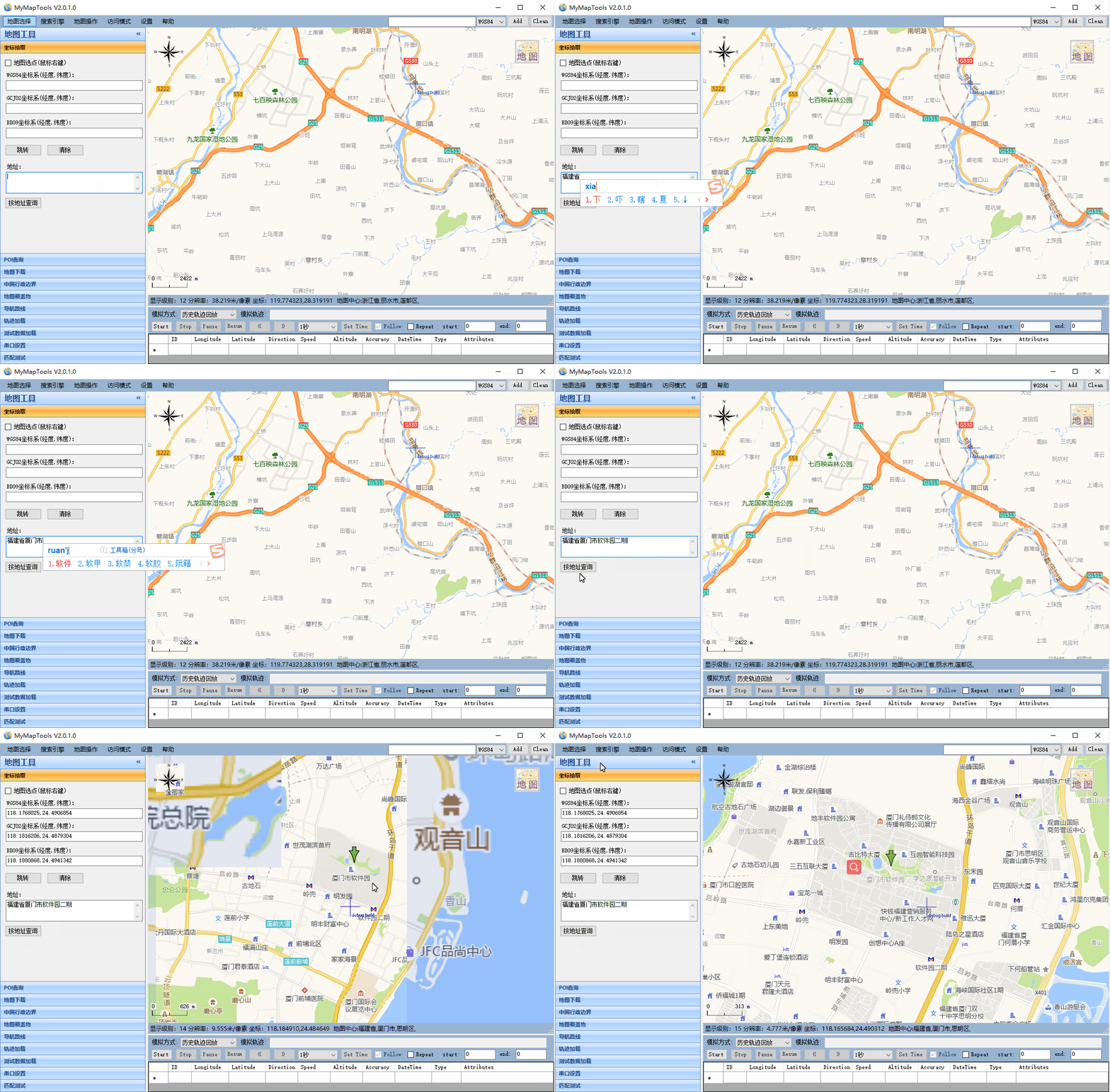
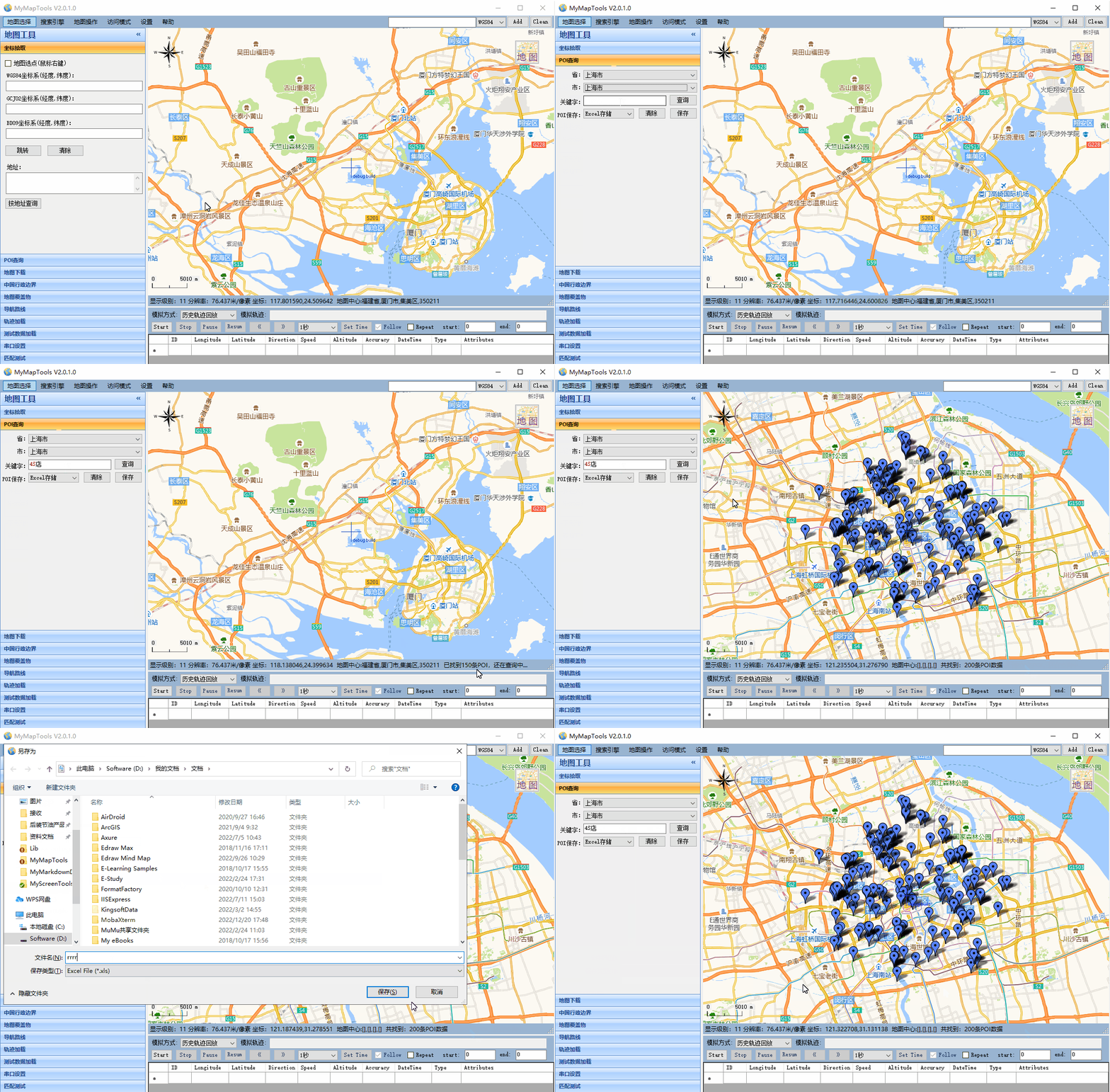
1.4 POI查询功能
- 根据关键字查询POI,并在地图中标注显示,还可以将搜索结果导出成Excel文件
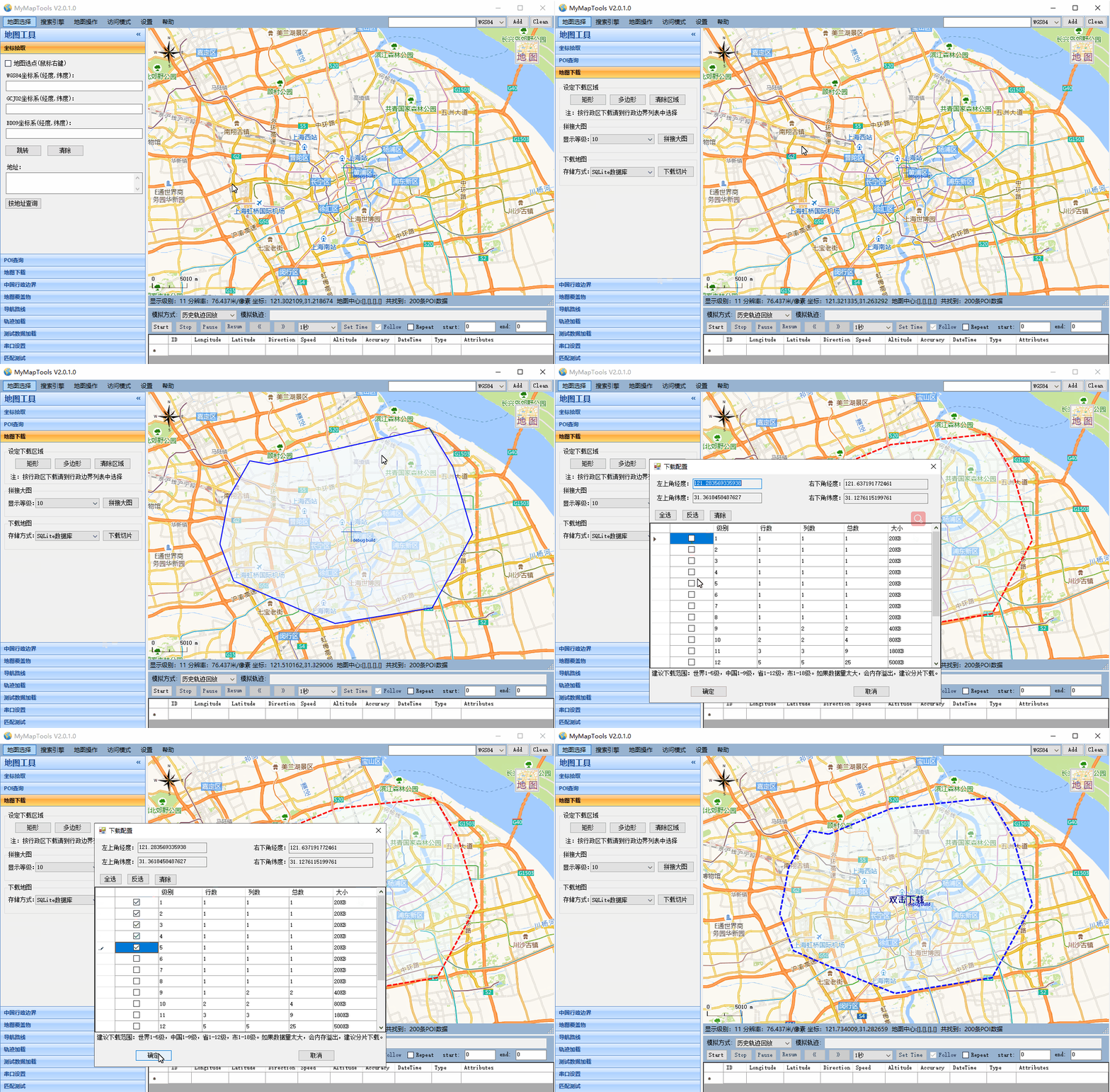
1.5 地图下载拼接
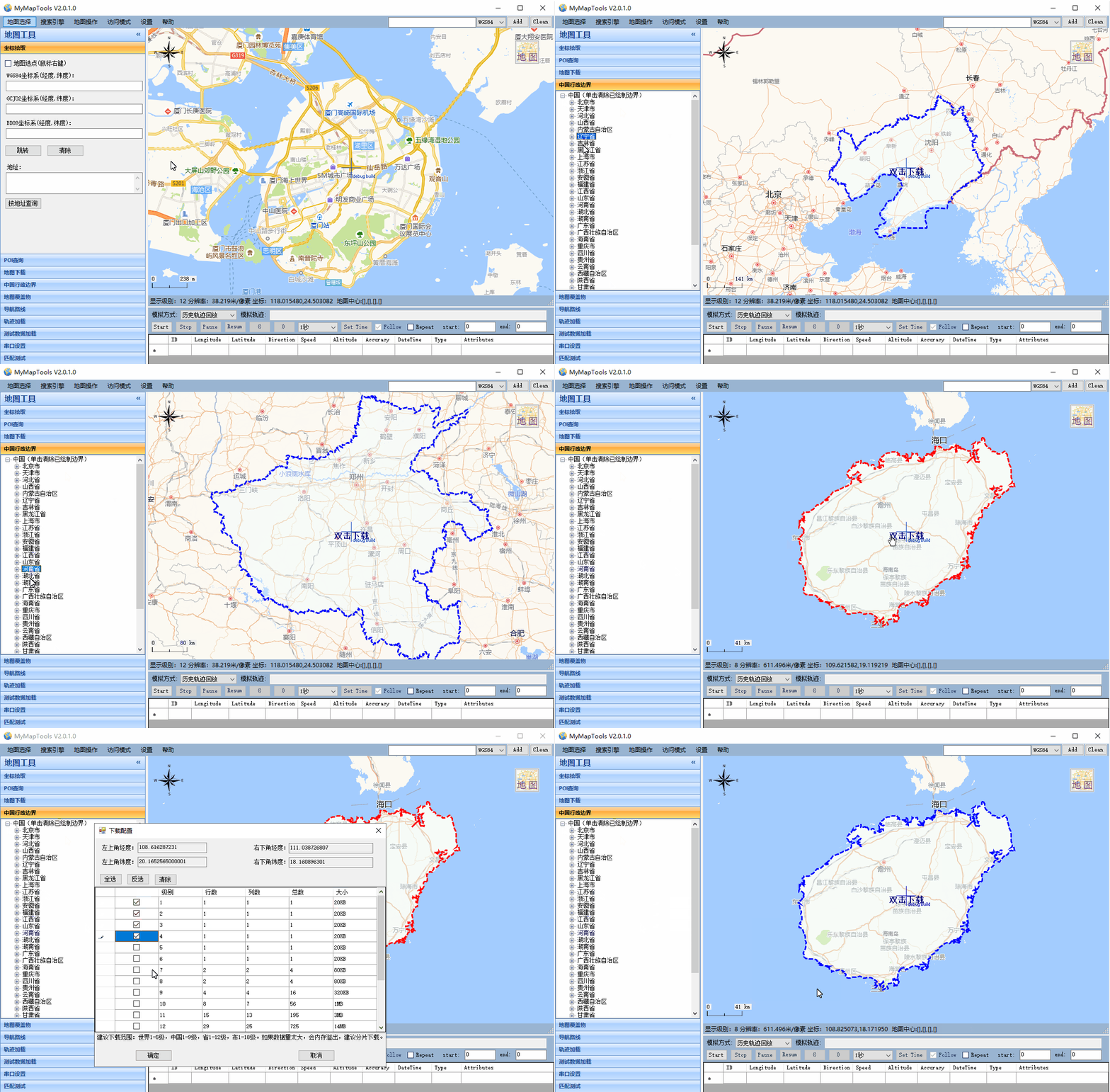
- 可以根据绘制矩形和多边形下载指定区域地图,可以根据行政区划下载地图
1.6 导航路线规划
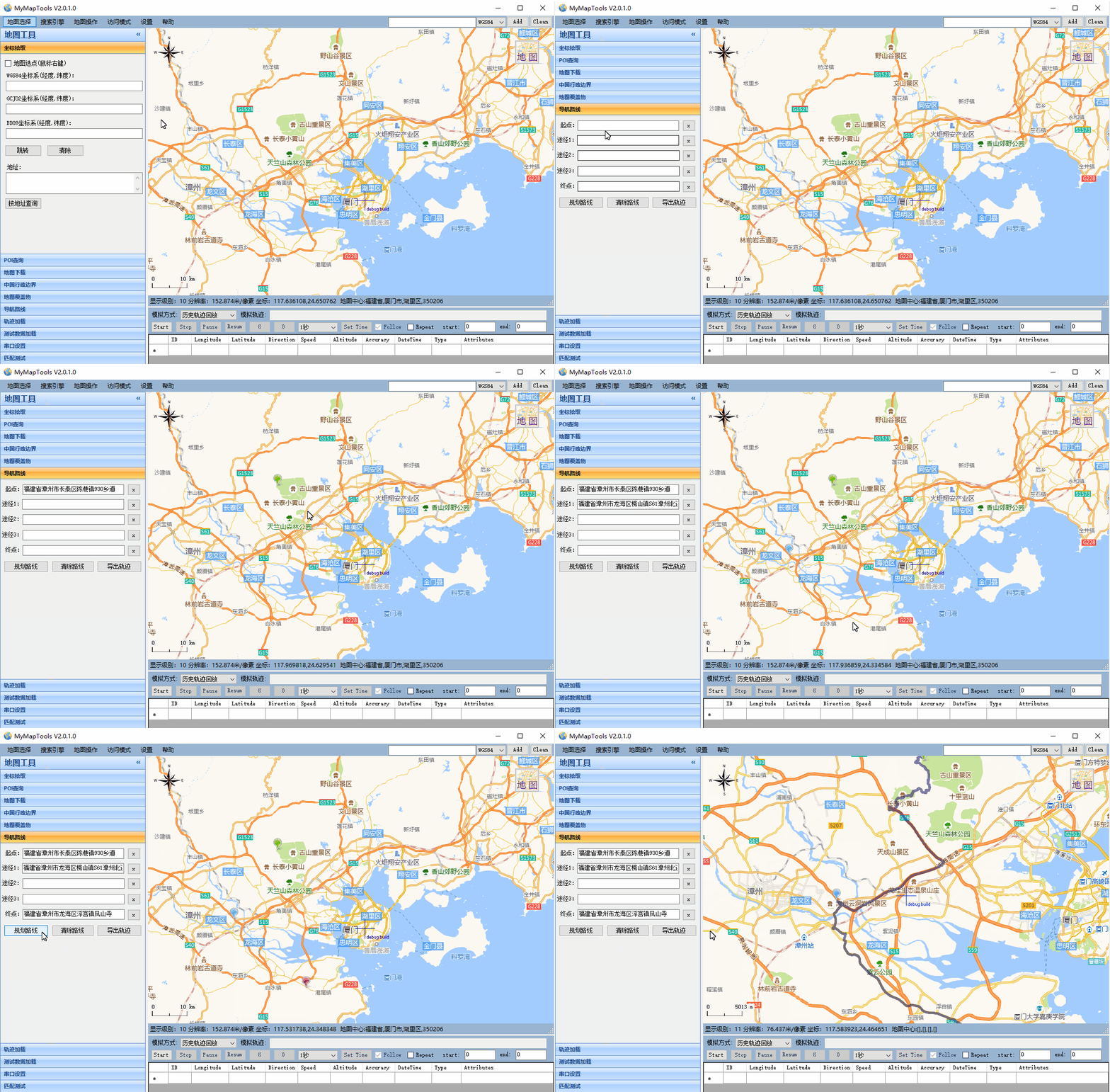
- 地图上右键选取导航起点、途经点、终点,点击规划路线,生成一条导航路线
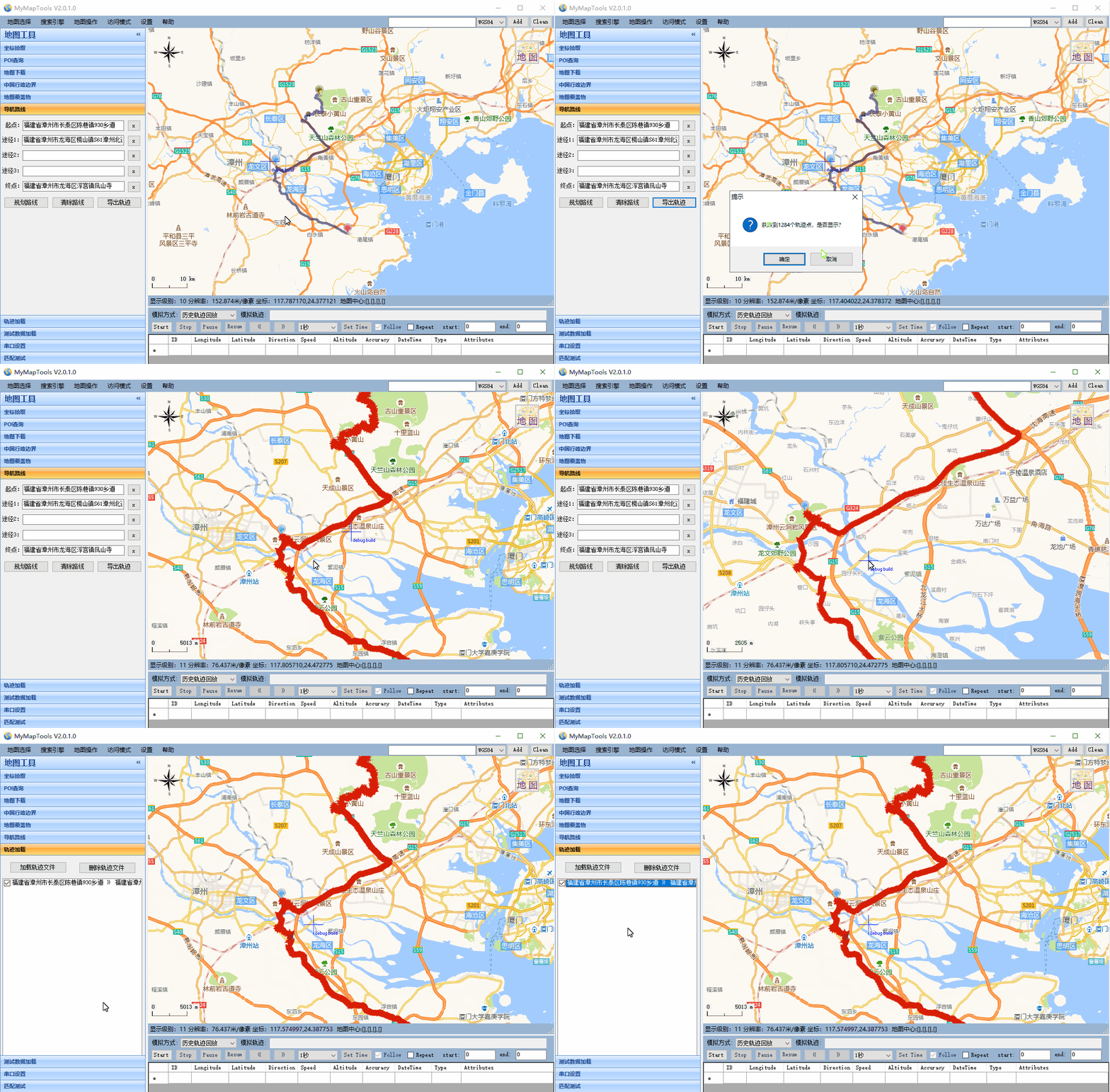
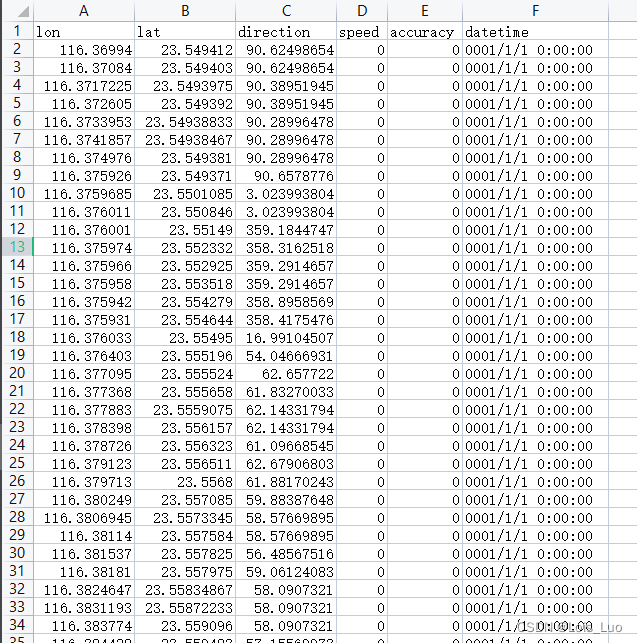
- 可以将导航路线导出成轨迹点
- 还可以将轨迹导出成文件
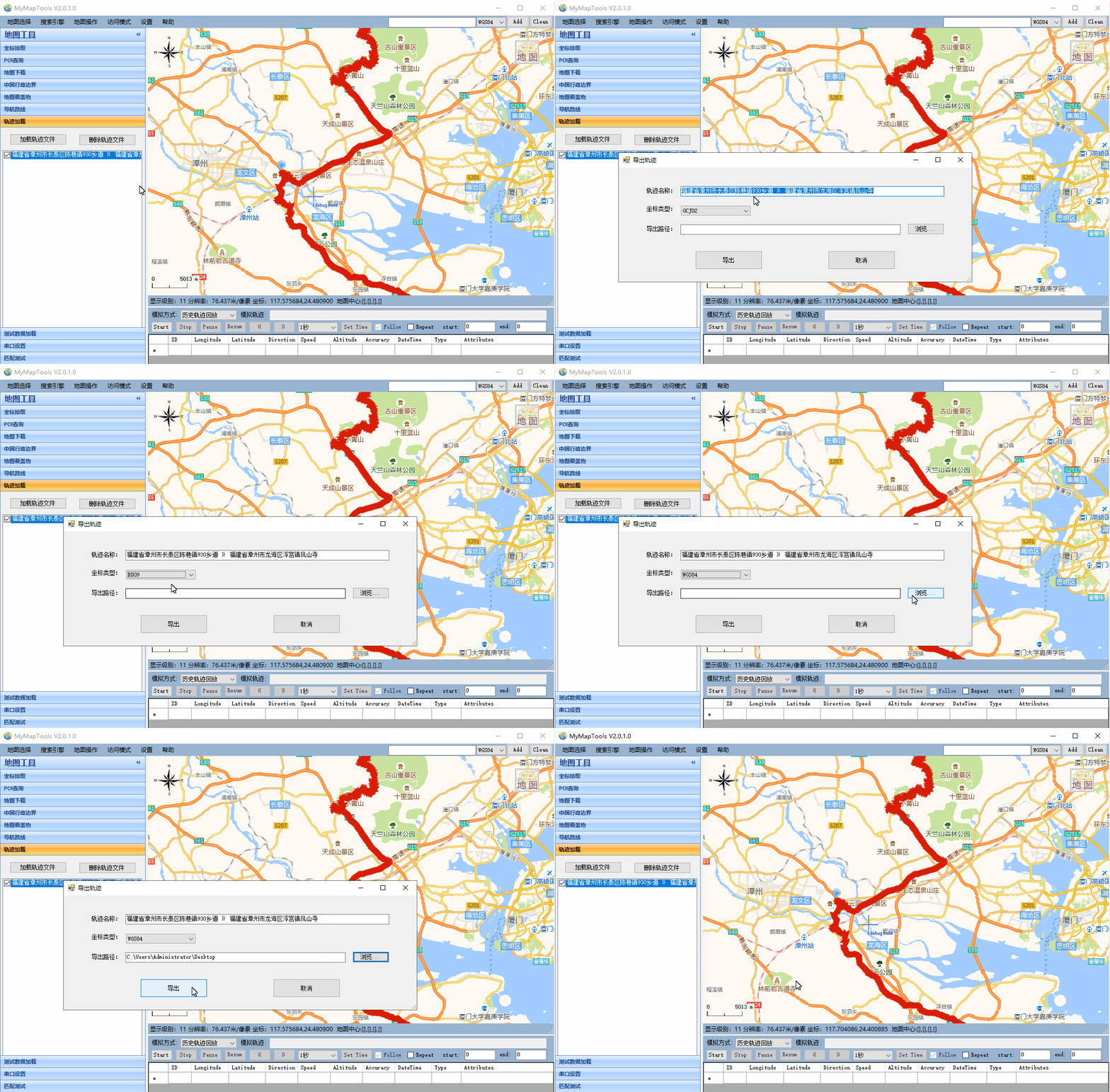
- 文件格式如下
1.7 历史轨迹加载与回放
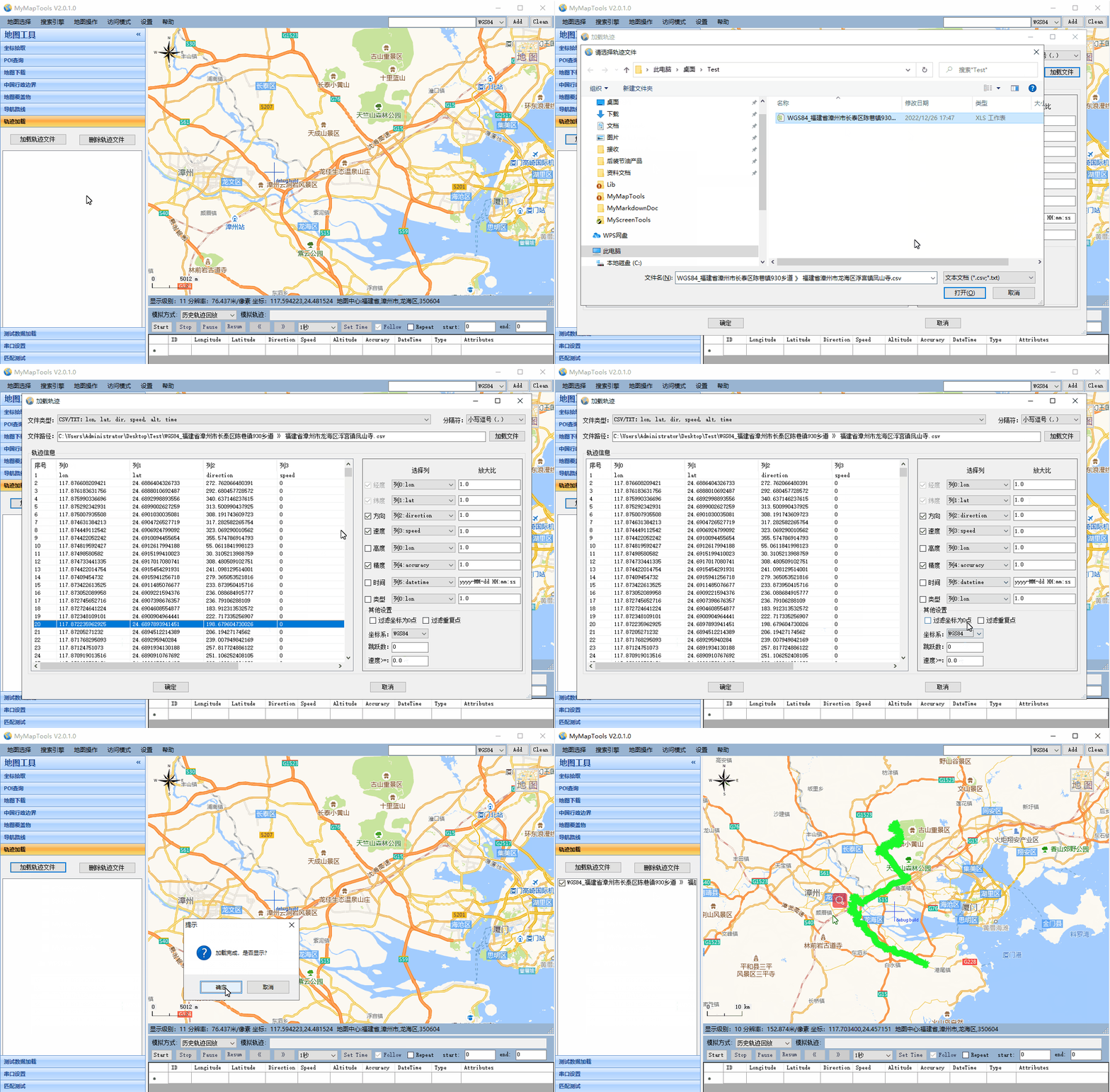
- 可以通过加载csv、excel、nmea等文件将历史轨迹显示到地图上
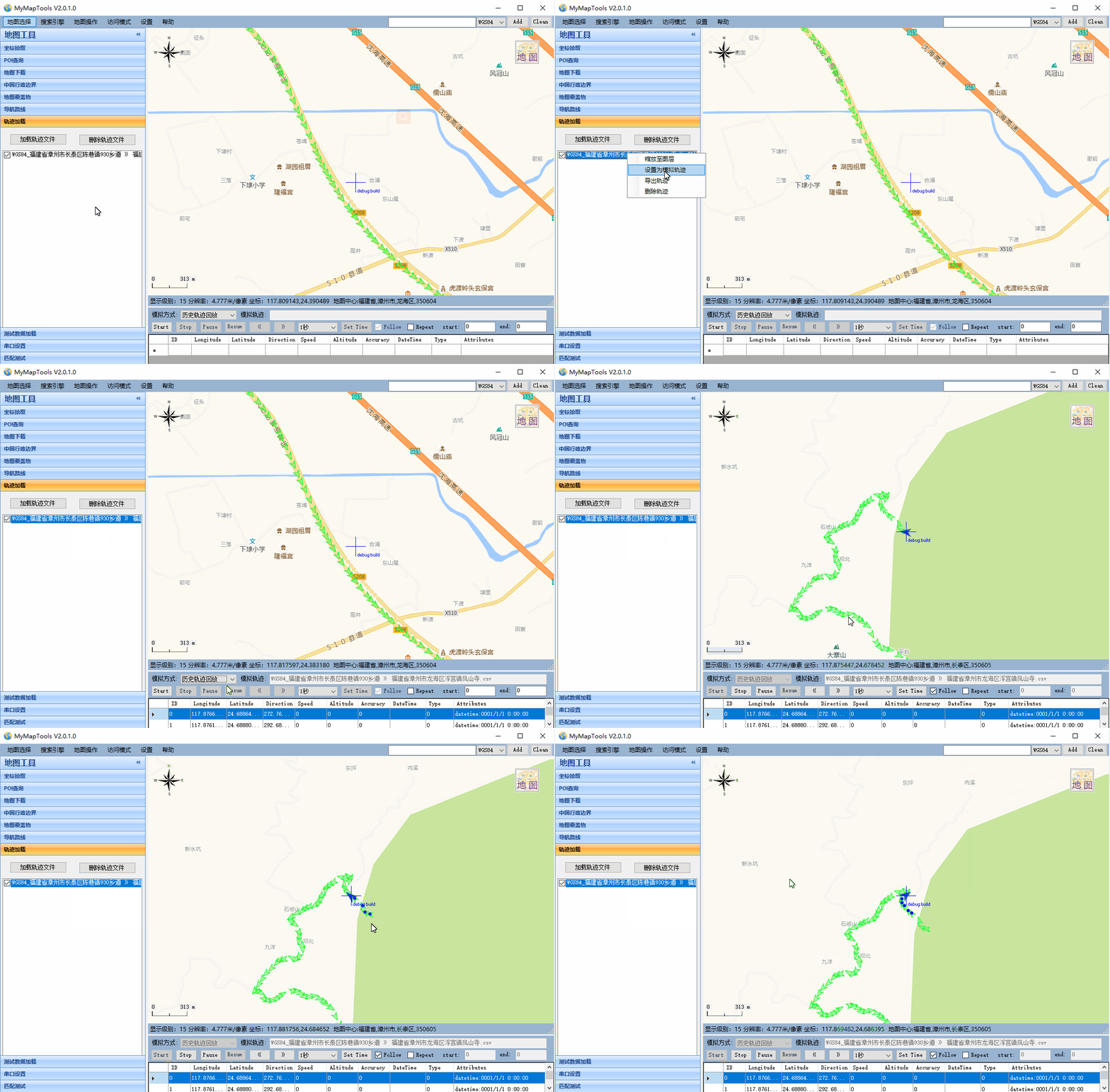
- 可以将历史轨迹设置成模拟轨迹,模拟历史数据,并将模拟信息通过Pipe方式发送到其他进程作为输入,进行模拟GPS测试
1.8 串口接收实时轨迹
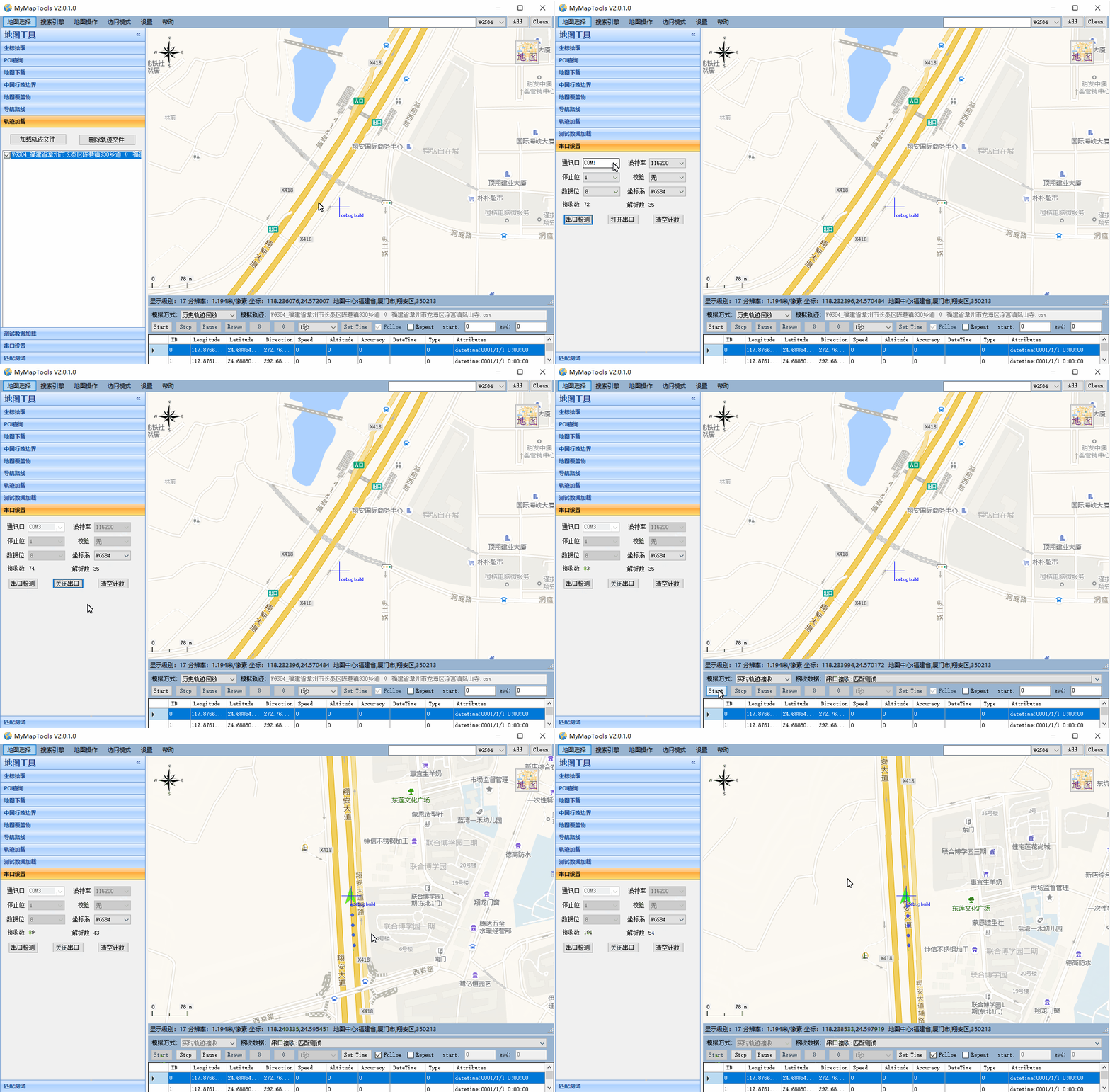
- 可以根据串口接收到的NMEA或者其他指定格式实时定位信息,并显示到地图上
2 代码实现
2.1 GMap.NET库使用
GMap.NET是一个强大、免费、跨平台、开源的.NET控件,它在Windows Forms和WPF环境中使用Google, Yahoo!, Bing, OpenStreetMap, ArcGIS, Pergo, SigPac等路径规划、地理编码以及地图展示功能。下面介绍从下载安装到如何使用GMap.NET。
2.1.1 下载和安装
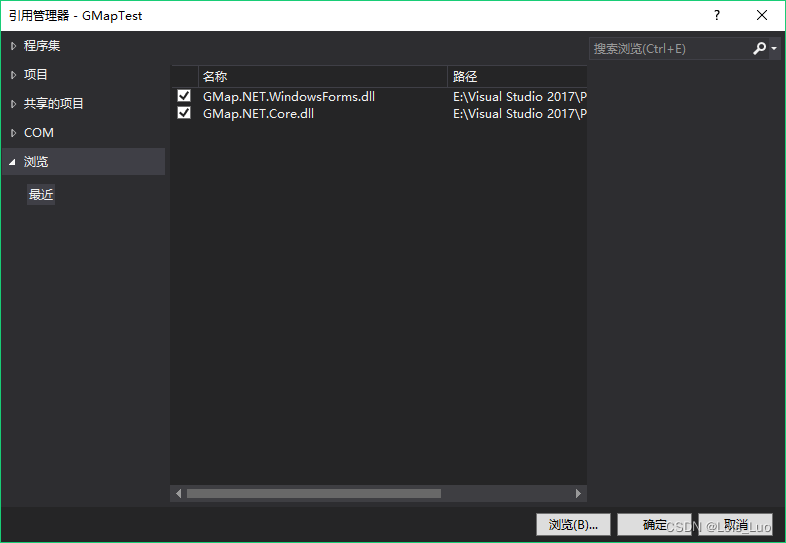
从这里下载,解压后得到两个文件(GMap.NET.Core.dll 和 GMap.NET.WindowsForms.dll)。然后在项目中添加引用。
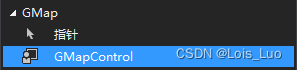
添加GMapControl到工具箱。在“选择项”时,选择“GMap.NET.WindowsForms.dll”文件即可添加。
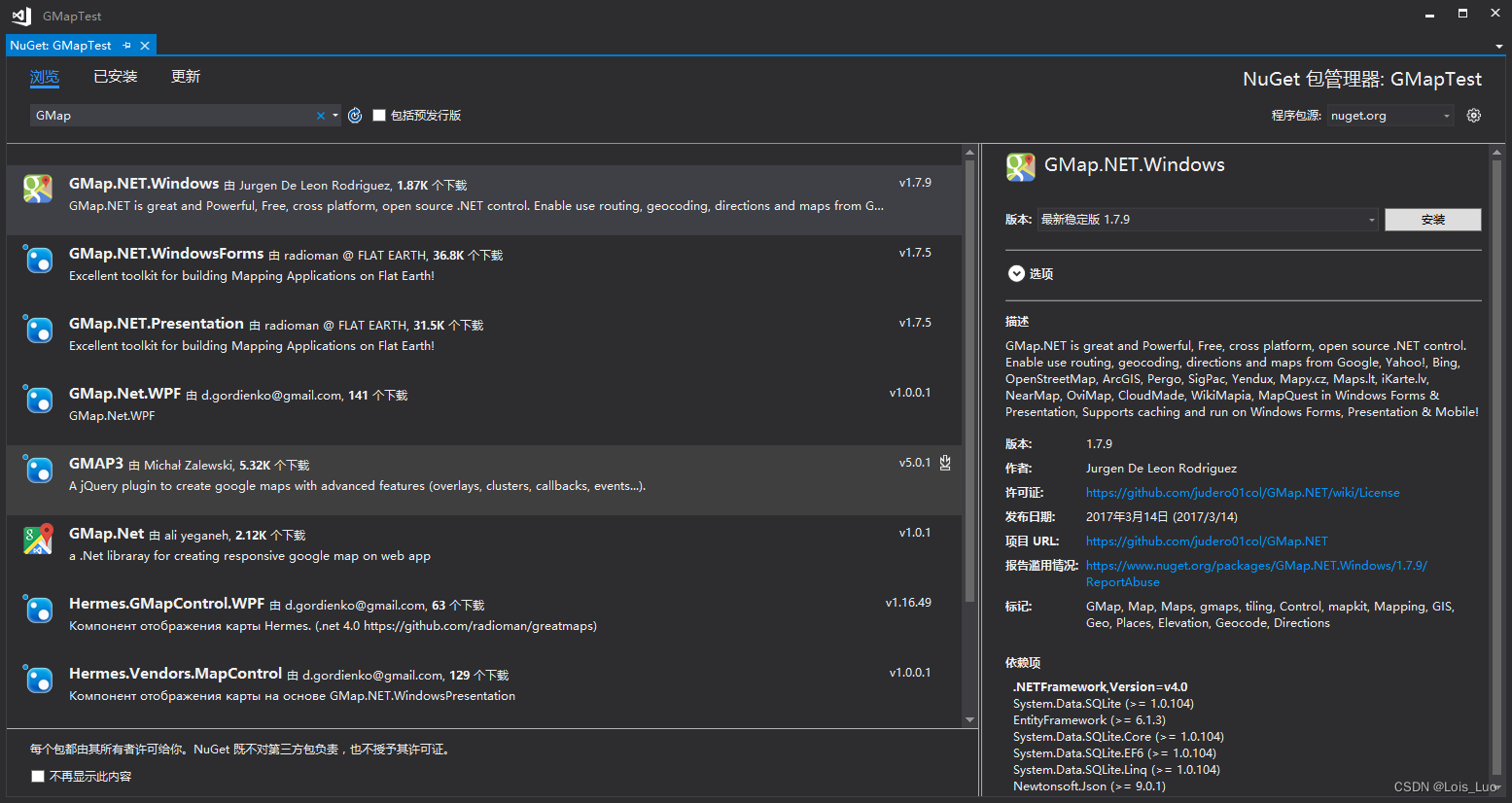
使用NUGET安装
2.1.2 添加地图控件
拖拽GMapControl到Windows Form中,可看到控件中心有个小十字。查看属性,你会发现GMap.NET的一些特有属性。通过设置这些属性可以配置地图的行为,但是不能设置其内容。
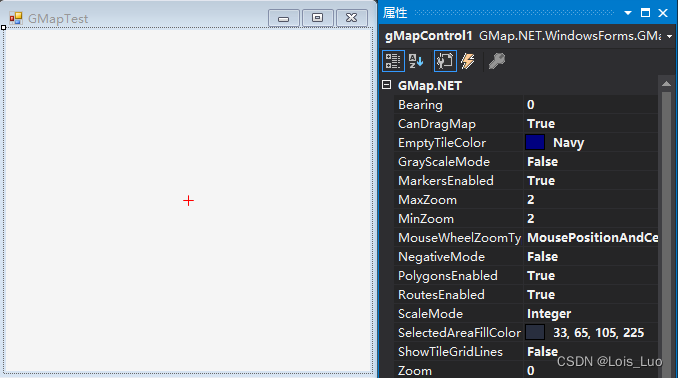
- Bearing - 按照指定的度数向左旋转地图
- CanDragMap – 是否启用鼠标右键拖动(平移)地图
- EmptyTileColor – 设置没有数据的切片所显示的颜色
- MarkersEnabled – 是否显示定义的标记,同PolygonsEnabled和RoutesEnabled
- ShowTileGridLines – 显示网格线
- Zoom,MinZoom和MaxZoom - 缩放级别
GMap.NET支持多种地图源,定义地图源需要在代码中去设置。可以在GMapControl的 Load 事件中添加如下代码:
this.gMapControl1.MapProvider = OpenStreet4UMapProvider.Instance; // 设置地图源
GMaps.Instance.Mode = AccessMode.ServerAndCache; // GMap工作模式
this.gMapControl1.SetPositionByKeywords("北京"); // 地图中心位置

//使用经纬度设置地图中心
//this.gMapControl1.Position = new GMap.NET.PointLatLng(39.923518, 116.539009);
- 1
- 2
- 3
- 4
- 5
- 6
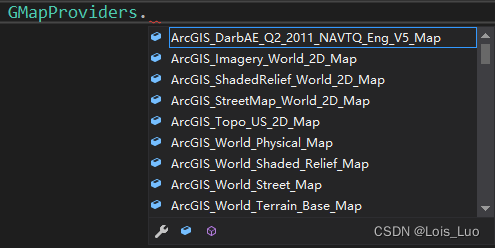
① MapProvider:设置地图源,输入GMapProviders可以看到GMap所支持的所有地图源。
② GMaps.Instance.Mode: GMap可以从服务器、本地缓存、服务器或本地缓存获取数据。这适用于在应用程序中创建的所有GMap控件实例,只需要设置一次该值。

③ 设置地图中心位置可以使用关键字或者经纬度。
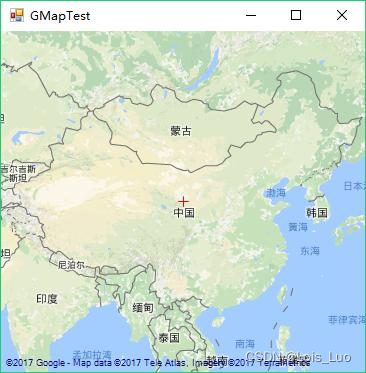
④ 地图显示结果。按住鼠标右键可以拖拽地图,当然也可以设置其他键来拖拽。
this.gMapControl1.DragButton = MouseButtons.Left;
- 1
2.1.3 添加标记
//创建一个名为“markers”的图层
GMapOverlay markers = new GMapOverlay("markers");
//创建标记,并设置位置及样式
GMapMarker marker = new GMarkerGoogle(new PointLatLng(39.923518, 116.539009), GMarkerGoogleType.blue_pushpin);
//将标记添加到图层
markers.Markers.Add(marker);
//将图层添加到地图
this.gMapControl1.Overlays.Add(markers);
- 1
- 2
- 3
- 4
- 5
- 6
- 7
- 8
① GMapOverlay:图层。添加的标记、图形、路径等都是在图层上操作的。
② GMapMarker:GMarkerGoogle,提供标记位置(PointLatLng)和标记样式。 它有两个重载,可以使用GMarkerGoogleType和位图。GMap.NET还提供了GMarkerCross,这是一个简单的十字,不允许使用图标。
public GMarkerGoogle(PointLatLng p, GMarkerGoogleType type);
public GMarkerGoogle(PointLatLng p, Bitmap Bitmap);
- 1
- 2
GMapMarker还可以设置ToolTip。
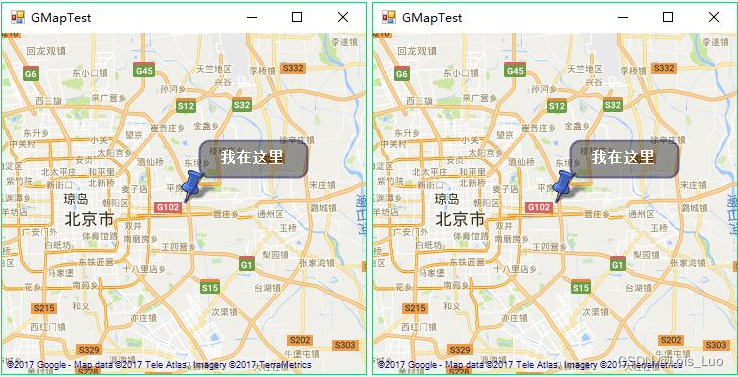
marker.ToolTipText = "我在这里";
marker.ToolTip.Fill = new SolidBrush(Color.FromArgb(100, Color.Black));
marker.ToolTip.Foreground = Brushes.White;
marker.ToolTip.TextPadding = new Size(20, 20);
- 1
- 2
- 3
- 4
③ 地图显示结果。(发现中心的小十字没了吗,因为这是可以设置的)
this.gMapControl1.ShowCenter = false; //隐藏中心十字
- 1
④ 标记点击事件
标记本身没有任何事件钩子,GMapControl的OnMarkerClick事件即为标记点击事件。在下面的示例中,点击标记会弹出提示框显示ToolTip的文本内容。当然GMap.NET不只有点击事件,还有OnMarkerEnter、OnMarkerLeave。
private void gMapControl1_OnMarkerClick(GMapMarker item, MouseEventArgs e)
{
    MessageBox.Show(String.Format("Marker:{0} 被点了。", item.ToolTipText));
}
- 1
- 2
- 3
- 4
2.1.4 添加多边形
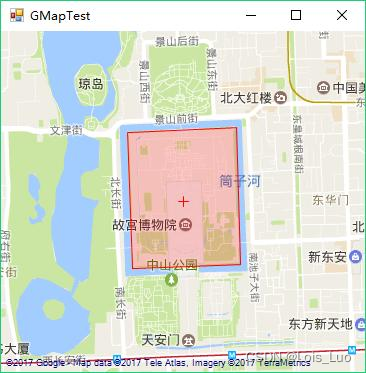
添加多边形和添加标记的原理是一样的。
GMapOverlay polygons = new GMapOverlay("polygons");
// 多边形的顶点
List<PointLatLng> points = new List<PointLatLng>();
points.Add(new PointLatLng(39.92244, 116.3922));
points.Add(new PointLatLng(39.92280, 116.4015));
points.Add(new PointLatLng(39.91378, 116.4019));
points.Add(new PointLatLng(39.91346, 116.3926));
GMapPolygon polygon = new GMapPolygon(points, "故宫");
polygon.Fill = new SolidBrush(Color.FromArgb(50, Color.Red));
polygon.Stroke = new Pen(Color.Red, 1);
polygons.Polygons.Add(polygon);
this.gMapControl1.Overlays.Add(polygons);
- 1
- 2
- 3
- 4
- 5
- 6
- 7
- 8
- 9
- 10
- 11
- 12
显示结果。
版权声明:以上内容参考huangli0原创文章,遵循 CC 4.0 BY-SA 版权协议,转载请附上原文出处链接和本声明。
链接:https://blog.csdn.net/huangli0/article/details/80147243
2.2 坐标转换
坐标转换包含CoordType.cs、PointLatLng.cs、CoordinateTransform.cs、PointInDiffCoord.cs四个类,分别作用和代码如下:
CoordType.cs:坐标类型定义
PointLatLng.cs:经纬度封装类
CoordinateTransform.cs:不同坐标转换工具类
PointInDiffCoord.cs:不同坐标转换封装类
- CoordType.cs 代码如下:
using System;
using System.Collections.Generic;
using System.Text;

namespace GMap.NET
{
    /// <summary>
    /// 坐标系类型
    /// </summary>
    public enum CoordType
    {
        WGS84,
        GCJ02,
        BD09,
        UNKNOW
    }
}

- 1
- 2
- 3
- 4
- 5
- 6
- 7
- 8
- 9
- 10
- 11
- 12
- 13
- 14
- 15
- 16
- 17
- PointLatLng.cs 代码如下:
namespace GMap.NET
{
   using System;
   using System.Globalization;

   /// <summary>
   /// the point of coordinates
   /// </summary>
   [Serializable]
   public struct PointLatLng
   {
      public static readonly PointLatLng Empty = new PointLatLng();
      private double lat;
      private double lng;
      private CoordType type;


      bool NotEmpty;

      public PointLatLng(double lat, double lng)
      {
         this.lat = lat;
         this.lng = lng;
         this.type = CoordType.UNKNOW;
         NotEmpty = true;
      }

      public PointLatLng(double lat, double lng, CoordType type) : this(lat, lng)
      {
          this.type = type;
      }

      /// <summary>
      /// returns true if coordinates wasn't assigned
      /// </summary>
      public bool IsEmpty
      {
         get
         {
            return !NotEmpty;
         }
      }

      public double Lat
      {
         get
         {
            return this.lat;
         }
         set
         {
            this.lat = value;
            NotEmpty = true;
         }
      }

      public double Lng
      {
         get
         {
            return this.lng;
         }
         set
         {
            this.lng = value;
            NotEmpty = true;
         }
      }

      public CoordType Type
      {
          get
          {
              return this.type;
          }
          set
          {
              this.type = value;
          }
      }

      public static PointLatLng operator +(PointLatLng pt, SizeLatLng sz)
      {
         return Add(pt, sz);
      }

      public static PointLatLng operator -(PointLatLng pt, SizeLatLng sz)
      {
         return Subtract(pt, sz);
      }

      public static SizeLatLng operator -(PointLatLng pt1, PointLatLng pt2)
      {
          return new SizeLatLng(pt1.Lat - pt2.Lat, pt2.Lng - pt1.Lng);
      }

      public static bool operator ==(PointLatLng left, PointLatLng right)
      {
         return ((left.Lng == right.Lng) && (left.Lat == right.Lat));
      }

      public static bool operator !=(PointLatLng left, PointLatLng right)
      {
         return !(left == right);
      }

      public static PointLatLng Add(PointLatLng pt, SizeLatLng sz)
      {
         return new PointLatLng(pt.Lat - sz.HeightLat, pt.Lng + sz.WidthLng);
      }

      public static PointLatLng Subtract(PointLatLng pt, SizeLatLng sz)
      {
         return new PointLatLng(pt.Lat + sz.HeightLat, pt.Lng - sz.WidthLng);
      }

      public override bool Equals(object obj)
      {
         if(!(obj is PointLatLng))
         {
            return false;
         }
         PointLatLng tf = (PointLatLng)obj;
         return (((tf.Lng == this.Lng) && (tf.Lat == this.Lat)) && tf.GetType().Equals(base.GetType()));
      }

      public void Offset(PointLatLng pos)
      {
         this.Offset(pos.Lat, pos.Lng);
      }

      public void Offset(double lat, double lng)
      {
         this.Lng += lng;
         this.Lat -= lat;
      }

      public override int GetHashCode()
      {
         return (this.Lng.GetHashCode() ^ this.Lat.GetHashCode());
      }

      public override string ToString()
      {
         return string.Format(CultureInfo.CurrentCulture, "{{Lat={0}, Lng={1}}}", this.Lat, this.Lng);
      }
   }
}
- 1
- 2
- 3
- 4
- 5
- 6
- 7
- 8
- 9
- 10
- 11
- 12
- 13
- 14
- 15
- 16
- 17
- 18
- 19
- 20
- 21
- 22
- 23
- 24
- 25
- 26
- 27
- 28
- 29
- 30
- 31
- 32
- 33
- 34
- 35
- 36
- 37
- 38
- 39
- 40
- 41
- 42
- 43
- 44
- 45
- 46
- 47
- 48
- 49
- 50
- 51
- 52
- 53
- 54
- 55
- 56
- 57
- 58
- 59
- 60
- 61
- 62
- 63
- 64
- 65
- 66
- 67
- 68
- 69
- 70
- 71
- 72
- 73
- 74
- 75
- 76
- 77
- 78
- 79
- 80
- 81
- 82
- 83
- 84
- 85
- 86
- 87
- 88
- 89
- 90
- 91
- 92
- 93
- 94
- 95
- 96
- 97
- 98
- 99
- 100
- 101
- 102
- 103
- 104
- 105
- 106
- 107
- 108
- 109
- 110
- 111
- 112
- 113
- 114
- 115
- 116
- 117
- 118
- 119
- 120
- 121
- 122
- 123
- 124
- 125
- 126
- 127
- 128
- 129
- 130
- 131
- 132
- 133
- 134
- 135
- 136
- 137
- 138
- 139
- 140
- 141
- 142
- 143
- 144
- 145
- 146
- 147
- 148
CoordinateTransform.cs 代码如下:
using System;
using System.Collections.Generic;
using System.Linq;
using System.Text;

namespace GMap.NET
{
    /// <summary>
    /// 各坐标系统转换
    /// WGS84坐标系:即地球坐标系,国际上通用的坐标系。设备一般包含GPS芯片或者北斗芯片获取的经纬度为WGS84地理坐标系,
    /// 谷歌地图采用的是WGS84地理坐标系(中国范围除外);
    /// GCJ02坐标系:即火星坐标系,是由中国国家测绘局制订的地理信息系统的坐标系统。由WGS84坐标系经加密后的坐标系。
    /// 高德地图、腾讯地图、谷歌中国地图采用的是GCJ02地理坐标系;
    /// BD09坐标系:即百度坐标系,GCJ02坐标系经加密后的坐标系;
    /// 搜狗坐标系、图吧坐标系等,估计也是在GCJ02基础上加密而成的。
    /// </summary>
    public static class CoordinateTransform
    {
        /// <summary>
        /// 检查坐标是否在中国范围内
        /// </summary>
        /// <param name="lat">latitude 纬度</param>
        /// <param name="lng">longitude 经度</param>
        /// <returns></returns>
        private static bool OutOfChina(double lat, double lng)
        {
            if (lng < 72.004 || lng > 137.8347)
                return true;
            if (lat < 0.8293 || lat > 55.8271)
                return true;
            return false;
        }

        /// <summary>
        /// 火星坐标(GCJ02)转换为WGS坐标
        /// </summary>
        /// <param name="lngMars">火星坐标经度longitude</param>
        /// <param name="latMars">火星坐标纬度latitude</param>
        /// <param name="lngWgs">WGS经度</param>
        /// <param name="latWgs">WGS纬度</param>
        public static void ConvertGcj02ToWgs84(double lngMars, double latMars, out double lngWgs, out double latWgs)
        {
            lngWgs = lngMars;
            latWgs = latMars;
            double lngtry = lngMars;
            double lattry = latMars;
            ConvertWgs84ToGcj02(lngMars, latMars, out lngtry, out lattry);
            double dx = lngtry - lngMars;
            double dy = lattry - latMars;

            lngWgs = lngMars - dx;
            latWgs = latMars - dy;
        }

        /// <summary>
        /// WGS坐标转换为火星坐标(GCJ02)
        /// </summary>
        /// <param name="lngWgs">WGS经度</param>
        /// <param name="latWgs">WGS纬度</param>
        /// <param name="lngMars">火星坐标经度</param>
        /// <param name="latMars">火星坐标纬度</param>
        public static void ConvertWgs84ToGcj02(double lngWgs, double latWgs, out double lngMars, out double latMars)
        {
            lngMars = lngWgs;
            latMars = latWgs;

            const double pi = 3.14159265358979324;

            //
            // Krasovsky 1940
            //
            // a = 6378245.0, 1/f = 298.3
            // b = a * (1 - f)
            // ee = (a^2 - b^2) / a^2;
            const double a = 6378245.0;
            const double ee = 0.00669342162296594323;

            if (lngWgs < 72.004 || lngWgs > 137.8347)
                return;
            if (latWgs < 0.8293 || latWgs > 55.8271)
                return;

            double x = 0, y = 0;
            x = lngWgs - 105.0;
            y = latWgs - 35.0;

            double dLon = 300.0 + 1.0 * x + 2.0 * y + 0.1 * x * x + 0.1 * x * y + 0.1 * Math.Sqrt(Math.Abs(x));
            dLon += (20.0 * Math.Sin(6.0 * x * pi) + 20.0 * Math.Sin(2.0 * x * pi)) * 2.0 / 3.0;
            dLon += (20.0 * Math.Sin(x * pi) + 40.0 * Math.Sin(x / 3.0 * pi)) * 2.0 / 3.0;
            dLon += (150.0 * Math.Sin(x / 12.0 * pi) + 300.0 * Math.Sin(x / 30.0 * pi)) * 2.0 / 3.0;

            double dLat = -100.0 + 2.0 * x + 3.0 * y + 0.2 * y * y + 0.1 * x * y + 0.2 * Math.Sqrt(Math.Abs(x));
            dLat += (20.0 * Math.Sin(6.0 * x * pi) + 20.0 * Math.Sin(2.0 * x * pi)) * 2.0 / 3.0;
            dLat += (20.0 * Math.Sin(y * pi) + 40.0 * Math.Sin(y / 3.0 * pi)) * 2.0 / 3.0;
            dLat += (160.0 * Math.Sin(y / 12.0 * pi) + 320.0 * Math.Sin(y * pi / 30.0)) * 2.0 / 3.0;

            double radLat = latWgs / 180.0 * pi;
            double magic = Math.Sin(radLat);
            magic = 1 - ee * magic * magic;
            double sqrtMagic = Math.Sqrt(magic);
            dLon = (dLon * 180.0) / (a / sqrtMagic * Math.Cos(radLat) * pi);
            dLat = (dLat * 180.0) / ((a * (1 - ee)) / (magic * sqrtMagic) * pi);
            lngMars = lngWgs + dLon;
            latMars = latWgs + dLat;
        }

        /// <summary>
        /// 火星坐标(GCJ02)转换为baidu坐标
        /// </summary>
        /// <param name="lngMars"></param>
        /// <param name="latMars"></param>
        /// <param name="lngBaidu"></param>
        /// <param name="latBaidu"></param>
        public static void ConvertGcj02ToBd09(double lngMars, double latMars, out double lngBaidu, out double latBaidu)
        {
            const double x_pi = 3.14159265358979324 * 3000.0 / 180.0;
            //const double x_pi = 3.14159265358979324;
            double x = lngMars;
            double y = latMars;
            double z = Math.Sqrt(x * x + y * y) + 0.00002 * Math.Sin(y * x_pi);
            double theta = Math.Atan2(y, x) + 0.000003 * Math.Cos(x * x_pi);
            lngBaidu = z * Math.Cos(theta) + 0.0065;
            latBaidu = z * Math.Sin(theta) + 0.006;
        }

        /// <summary>
        /// baidu坐标转换为火星坐标(GCJ02)
        /// </summary>
        /// <param name="lngBaidu"></param>
        /// <param name="latBaidu"></param>
        /// <param name="lngMars"></param>
        /// <param name="latMars"></param>
        public static void ConvertBd09ToGcj02(double lngBaidu, double latBaidu, out double lngMars, out double latMars)
        {
            const double x_pi = 3.14159265358979324 * 3000.0 / 180.0;

            double x = lngBaidu - 0.0065;
            double y = latBaidu - 0.006;
            double z = Math.Sqrt(x * x + y * y) - 0.00002 * Math.Sin(y * x_pi);
            double theta = Math.Atan2(y, x) - 0.000003 * Math.Cos(x * x_pi);
            lngMars = z * Math.Cos(theta);
            latMars = z * Math.Sin(theta);
        }

        /// <summary>
        /// WGS坐标转换为baidu坐标
        /// </summary>
        /// <param name="lngWgs"></param>
        /// <param name="latWgs"></param>
        /// <param name="lngBaidu"></param>
        /// <param name="latBaidu"></param>
        public static void ConvertWgs84ToBd09(double lngWgs, double latWgs, out double lngBaidu, out double latBaidu)
        {
            double lng;
            double lat;
            ConvertWgs84ToGcj02(lngWgs, latWgs, out lng, out lat);
            ConvertGcj02ToBd09(lng, lat, out lngBaidu, out latBaidu);
        }

        /// <summary>
        /// baidu坐标转换为WGS坐标
        /// </summary>
        /// <param name="lngBaidu"></param>
        /// <param name="latBaidu"></param>
        /// <param name="lngWgs"></param>
        /// <param name="latWgs"></param>
        public static void ConvertBd09ToWgs84(double lngBaidu, double latBaidu,out double lngWgs, out double latWgs)
        {
            double lng;
            double lat;
            ConvertBd09ToGcj02(lngBaidu, latBaidu, out lng, out lat);
            ConvertGcj02ToWgs84(lng, lat, out lngWgs, out latWgs);
        }
    }
}
- 1
- 2
- 3
- 4
- 5
- 6
- 7
- 8
- 9
- 10
- 11
- 12
- 13
- 14
- 15
- 16
- 17
- 18
- 19
- 20
- 21
- 22
- 23
- 24
- 25
- 26
- 27
- 28
- 29
- 30
- 31
- 32
- 33
- 34
- 35
- 36
- 37
- 38
- 39
- 40
- 41
- 42
- 43
- 44
- 45
- 46
- 47
- 48
- 49
- 50
- 51
- 52
- 53
- 54
- 55
- 56
- 57
- 58
- 59
- 60
- 61
- 62
- 63
- 64
- 65
- 66
- 67
- 68
- 69
- 70
- 71
- 72
- 73
- 74
- 75
- 76
- 77
- 78
- 79
- 80
- 81
- 82
- 83
- 84
- 85
- 86
- 87
- 88
- 89
- 90
- 91
- 92
- 93
- 94
- 95
- 96
- 97
- 98
- 99
- 100
- 101
- 102
- 103
- 104
- 105
- 106
- 107
- 108
- 109
- 110
- 111
- 112
- 113
- 114
- 115
- 116
- 117
- 118
- 119
- 120
- 121
- 122
- 123
- 124
- 125
- 126
- 127
- 128
- 129
- 130
- 131
- 132
- 133
- 134
- 135
- 136
- 137
- 138
- 139
- 140
- 141
- 142
- 143
- 144
- 145
- 146
- 147
- 148
- 149
- 150
- 151
- 152
- 153
- 154
- 155
- 156
- 157
- 158
- 159
- 160
- 161
- 162
- 163
- 164
- 165
- 166
- 167
- 168
- 169
- 170
- 171
- 172
- 173
- 174
- 175
PointInDiffCoord.cs 代码如下:
using System;
using System.Collections.Generic;
using System.Linq;
using System.Text;
using GMap.NET;
using GMapPositionFix;

namespace GMapCommonType
{
    public class PointInDiffCoord
    {
        private PointLatLng wgs84;
        public PointLatLng WGS84
        {
            get
            {
                double lon, lat;
                if (CoordType == CoordType.WGS84)
                {
                    return wgs84;
                }
                else if (CoordType == CoordType.GCJ02)
                {
                    if (wgs84 == PointLatLng.Empty)
                    {
                        CoordinateTransform.ConvertGcj02ToWgs84(gcj02.Lng, gcj02.Lat, out lon, out lat);
                        wgs84.Lat = lat;
                        wgs84.Lng = lon;
                    }
                    return wgs84;
                }
                else if (CoordType == CoordType.BD09)
                {
                    if (wgs84 == PointLatLng.Empty)
                    {
                        CoordinateTransform.ConvertBd09ToWgs84(bd09.Lng, bd09.Lat, out lon, out lat);
                        wgs84.Lat = lat;
                        wgs84.Lng = lon;
                    }
                    return wgs84;
                }
                else
                {
                    return PointLatLng.Empty;
                }
            }
        }
        private PointLatLng gcj02;
        public PointLatLng GCJ02
        {
            get
            {
                double lon, lat;
                if (CoordType == CoordType.WGS84)
                {
                    if (gcj02 == PointLatLng.Empty)
                    {
                        CoordinateTransform.ConvertWgs84ToGcj02(wgs84.Lng, wgs84.Lat, out lon, out lat);
                        gcj02.Lat = lat;
                        gcj02.Lng = lon;
                    }
                    return gcj02;
                }
                else if (CoordType == CoordType.GCJ02)
                {
                    return gcj02;
                }
                else if (CoordType == CoordType.BD09)
                {
                    if (gcj02 == PointLatLng.Empty)
                    {
                        CoordinateTransform.ConvertBd09ToGcj02(bd09.Lng, bd09.Lat, out lon, out lat);
                        gcj02.Lat = lat;
                        gcj02.Lng = lon;
                    }
                    return gcj02;
                }
                else
                {
                    return PointLatLng.Empty;
                }
            }
        }
        private PointLatLng bd09;
        public PointLatLng BD09
        {
            get
            {
                double lon, lat;
                if (CoordType == CoordType.WGS84)
                {
                    if (bd09 == PointLatLng.Empty)
                    {
                        CoordinateTransform.ConvertWgs84ToBd09(wgs84.Lng, wgs84.Lat, out lon, out lat);
                        bd09.Lat = lat;
                        bd09.Lng = lon;
                    }
                    return bd09;
                }
                else if (CoordType == CoordType.GCJ02)
                {
                    if (bd09 == PointLatLng.Empty)
                    {
                        CoordinateTransform.ConvertGcj02ToBd09(gcj02.Lng, gcj02.Lat, out lon, out lat);
                        bd09.Lat = lat;
                        bd09.Lng = lon;
                    }
                    return bd09;
                }
                else if (CoordType == CoordType.BD09)
                {
                    return bd09;
                }
                else
                {
                    return PointLatLng.Empty;
                }
            }
        }
        public CoordType CoordType;
        public PointInDiffCoord()
        {
            wgs84 = PointLatLng.Empty;
            gcj02 = PointLatLng.Empty;
            bd09 = PointLatLng.Empty;
            CoordType = CoordType.UNKNOW;
        }

        /// <summary>
        /// 构造方法
        /// </summary>
        /// <param name="p"></param>
        public PointInDiffCoord(PointLatLng p)
        {
            if (p.Type == CoordType.WGS84)
            {
                wgs84 = p;
                gcj02 = PointLatLng.Empty;
                bd09 = PointLatLng.Empty;
                CoordType = CoordType.WGS84;
            }
            else if (p.Type == CoordType.GCJ02)
            {
                wgs84 = PointLatLng.Empty;
                gcj02 = p;
                bd09 = PointLatLng.Empty;
                CoordType = CoordType.GCJ02;
            }
            else if (p.Type == CoordType.BD09)
            {
                wgs84 = PointLatLng.Empty;
                gcj02 = PointLatLng.Empty;
                bd09 = p;
                CoordType = CoordType.BD09;
            }
            else
            {
                wgs84 = PointLatLng.Empty;
                gcj02 = PointLatLng.Empty;
                bd09 = PointLatLng.Empty;
                CoordType = CoordType.UNKNOW;
            }
        }

        /// <summary>
        /// 构造方法
        /// </summary>
        /// <param name="lat"></param>
        /// <param name="lon"></param>
        public PointInDiffCoord(double lat, double lon)
            : this(new PointLatLng(lat, lon))
        {

        }

        public static PointLatLng GetWGS84Point(PointLatLng p)
        {
            double lon, lat;
            if (p != PointLatLng.Empty)
            {
                if (p.Type == CoordType.WGS84)
                {
                    return p;
                }
                else if (p.Type == CoordType.GCJ02)
                {
                    CoordinateTransform.ConvertGcj02ToWgs84(p.Lng, p.Lat, out lon, out lat);
                    return new PointLatLng(lat, lon, CoordType.WGS84);
                }
                else if (p.Type == CoordType.BD09)
                {
                    CoordinateTransform.ConvertBd09ToWgs84(p.Lng, p.Lat, out lon, out lat);
                    return new PointLatLng(lat, lon, CoordType.WGS84);
                }
                else
                {
                    return PointLatLng.Empty;
                }
            }
            else
            {
                return PointLatLng.Empty;
            }
        }

        public static PointLatLng GetGCJ02Point(PointLatLng p)
        {
            double lon, lat;
            if (p != PointLatLng.Empty)
            {
                if (p.Type == CoordType.WGS84)
                {
                    CoordinateTransform.ConvertWgs84ToGcj02(p.Lng, p.Lat, out lon, out lat);
                    return new PointLatLng(lat, lon, CoordType.GCJ02);
                }
                else if (p.Type == CoordType.GCJ02)
                {
                    return p;
                }
                else if (p.Type == CoordType.BD09)
                {
                    CoordinateTransform.ConvertBd09ToGcj02(p.Lng, p.Lat, out lon, out lat);
                    return new PointLatLng(lat, lon, CoordType.GCJ02);
                }
                else
                {
                    return PointLatLng.Empty;
                }
            }
            else
            {
                return PointLatLng.Empty;
            }
        }

        public static PointLatLng GetBD09Point(PointLatLng p)
        {
            double lon, lat;
            if (p != PointLatLng.Empty)
            {
                if (p.Type == CoordType.WGS84)
                {
                    CoordinateTransform.ConvertWgs84ToBd09(p.Lng, p.Lat, out lon, out lat);
                    return new PointLatLng(lat, lon, CoordType.BD09);
                }
                else if (p.Type == CoordType.GCJ02)
                {
                    CoordinateTransform.ConvertGcj02ToBd09(p.Lng, p.Lat, out lon, out lat);
                    return new PointLatLng(lat, lon, CoordType.BD09);
                }
                else if (p.Type == CoordType.BD09)
                {
                    return p;
                }
                else
                {
                    return PointLatLng.Empty;
                }
            }
            else
            {
                return PointLatLng.Empty;
            }
        }

        public static PointLatLng GetPointInCoordType(PointLatLng p, CoordType destType)
        {
            if (destType == CoordType.WGS84)
            {
                return GetWGS84Point(p);
            }
            else if (destType == CoordType.GCJ02)
            {
                return GetGCJ02Point(p);
            }
            else if (destType == CoordType.BD09)
            {
                return GetBD09Point(p);
            }
            else
            {
                return p;
            }
        }

        public static PointLatLng GetPointInCoordType(PointLatLng p, CoordType srcType, CoordType destType)
        {
            p.Type = srcType;
            if (destType == CoordType.WGS84)
            {
                return GetWGS84Point(p);
            }
            else if (destType == CoordType.GCJ02)
            {
                return GetGCJ02Point(p);
            }
            else if (destType == CoordType.BD09)
            {
                return GetBD09Point(p);
            }
            else
            {
                return p;
            }
        }

        public static PointLatLng GetPointInCoordType(double lat, double lon, CoordType srcType, CoordType destType)
        {
            PointLatLng p = new PointLatLng(lat, lon, srcType);
            if (destType == CoordType.WGS84)
            {
                return GetWGS84Point(p);
            }
            else if (destType == CoordType.GCJ02)
            {
                return GetGCJ02Point(p);
            }
            else if (destType == CoordType.BD09)
            {
                return GetBD09Point(p);
            }
            else
            {
                return p;
            }
        }

        public static List<PointLatLng> GetPointListInCoordType(List<PointLatLng> pList, CoordType srcType, CoordType destType)
        {
            if (srcType == destType)
            {
                return pList;
            }
            List<PointLatLng> retList = new List<PointLatLng>();
            foreach (var item in pList)
            {
                retList.Add(GetPointInCoordType(item, srcType, destType));
            }
            return retList;
        }
    }
}
- 1
- 2
- 3
- 4
- 5
- 6
- 7
- 8
- 9
- 10
- 11
- 12
- 13
- 14
- 15
- 16
- 17
- 18
- 19
- 20
- 21
- 22
- 23
- 24
- 25
- 26
- 27
- 28
- 29
- 30
- 31
- 32
- 33
- 34
- 35
- 36
- 37
- 38
- 39
- 40
- 41
- 42
- 43
- 44
- 45
- 46
- 47
- 48
- 49
- 50
- 51
- 52
- 53
- 54
- 55
- 56
- 57
- 58
- 59
- 60
- 61
- 62
- 63
- 64
- 65
- 66
- 67
- 68
- 69
- 70
- 71
- 72
- 73
- 74
- 75
- 76
- 77
- 78
- 79
- 80
- 81
- 82
- 83
- 84
- 85
- 86
- 87
- 88
- 89
- 90
- 91
- 92
- 93
- 94
- 95
- 96
- 97
- 98
- 99
- 100
- 101
- 102
- 103
- 104
- 105
- 106
- 107
- 108
- 109
- 110
- 111
- 112
- 113
- 114
- 115
- 116
- 117
- 118
- 119
- 120
- 121
- 122
- 123
- 124
- 125
- 126
- 127
- 128
- 129
- 130
- 131
- 132
- 133
- 134
- 135
- 136
- 137
- 138
- 139
- 140
- 141
- 142
- 143
- 144
- 145
- 146
- 147
- 148
- 149
- 150
- 151
- 152
- 153
- 154
- 155
- 156
- 157
- 158
- 159
- 160
- 161
- 162
- 163
- 164
- 165
- 166
- 167
- 168
- 169
- 170
- 171
- 172
- 173
- 174
- 175
- 176
- 177
- 178
- 179
- 180
- 181
- 182
- 183
- 184
- 185
- 186
- 187
- 188
- 189
- 190
- 191
- 192
- 193
- 194
- 195
- 196
- 197
- 198
- 199
- 200
- 201
- 202
- 203
- 204
- 205
- 206
- 207
- 208
- 209
- 210
- 211
- 212
- 213
- 214
- 215
- 216
- 217
- 218
- 219
- 220
- 221
- 222
- 223
- 224
- 225
- 226
- 227
- 228
- 229
- 230
- 231
- 232
- 233
- 234
- 235
- 236
- 237
- 238
- 239
- 240
- 241
- 242
- 243
- 244
- 245
- 246
- 247
- 248
- 249
- 250
- 251
- 252
- 253
- 254
- 255
- 256
- 257
- 258
- 259
- 260
- 261
- 262
- 263
- 264
- 265
- 266
- 267
- 268
- 269
- 270
- 271
- 272
- 273
- 274
- 275
- 276
- 277
- 278
- 279
- 280
- 281
- 282
- 283
- 284
- 285
- 286
- 287
- 288
- 289
- 290
- 291
- 292
- 293
- 294
- 295
- 296
- 297
- 298
- 299
- 300
- 301
- 302
- 303
- 304
- 305
- 306
- 307
- 308
- 309
- 310
- 311
- 312
- 313
- 314
- 315
- 316
- 317
- 318
- 319
- 320
- 321
- 322
- 323
- 324
- 325
- 326
- 327
- 328
- 329
- 330
- 331
- 332
- 333
- 334
- 335
- 336
- 337
- 338
- 339
- 340
- 341
- 342
- 坐标转换示例代码:
// 创建一个GCJ02坐标
PointLatLng p = new PointLatLng(25.254845, 118.658454, CoordType.GCJ02);
// 获取指定类型坐标点
PointLatLng p_type = PointInDiffCoord.GetPointInCoordType(p, type);
// 通过GCJ02坐标点创建PointInDiffCoord对象
PointInDiffCoord pidc = new PointInDiffCoord(p);
// 获取WGS84坐标
PointLatLng p_wgs = pidc.WGS84;
// 获取GCJ02坐标
PointLatLng p_gcj = pidc.GCJ02;
// 获取BD09坐标
PointLatLng p_bd = pidc.BD09;
- 1
- 2
- 3
- 4
- 5
- 6
- 7
- 8
- 9
- 10
- 11
- 12
2.4 模拟跑车
使用历史轨迹进行模拟跑车时,程序将创建NamedPipeServer服务,将GPS信息发送出来,其他进程或程序可以通过连接该服务接收GPS信息,NamedPipeServer服务代码如下:
using System;
using System.Collections.Generic;
using System.Linq;
using System.Text;
using System.IO;
using System.IO.Pipes;
using System.Threading;

namespace MapToolsWinForm
{
    /// <summary>
    /// Windows命名管道服务类
    /// </summary>
    class NamedPipeServer
    {
        private NamedPipeServerStream serverStream;
        private string pipeName;
        private Thread connThread;
        private Thread sendThread;
        private int sleepTime = 10;

        public NamedPipeServer(string pipeName)
        {
            this.pipeName = pipeName;
            serverStream = new NamedPipeServerStream(pipeName, PipeDirection.InOut, 254, PipeTransmissionMode.Message);
            connThread = new Thread(ConnThreadTask);
            connThread.Start();
            sendThread = new Thread(SendThreadTask);
            sendThread.Start();
        }

        private void ConnThreadTask(object obj)
        {
            while (true)
            {
                if (!serverStream.IsConnected)
                {
                    try
                    {
                        serverStream.WaitForConnection();
                        sendQueue.Clear();
                    }
                    catch (Exception)
                    {
                        serverStream.Disconnect();
                        serverStream.Dispose();
                        serverStream = new NamedPipeServerStream(pipeName, PipeDirection.InOut, 1, PipeTransmissionMode.Message);
                    }
                }
                Thread.Sleep(sleepTime);
            }
        }

        Queue<string> sendQueue = new Queue<string>();
        private void SendThreadTask(object obj)
        {
            while (true)
            {
                try
                {
                    if (!serverStream.IsConnected)
                    {
                        Thread.Sleep(sleepTime);
                        continue;
                    }
                    if (sendQueue.Count <= 0)
                    {
                        Thread.Sleep(sleepTime);
                        continue;
                    }
                    string send_str = sendQueue.Dequeue();
                    byte[] byteArr = Encoding.UTF8.GetBytes(send_str);
                    serverStream.Write(byteArr, 0, byteArr.Length);
                    serverStream.Flush();
                    Thread.Sleep(sleepTime);
                }
                catch (Exception ex)
                {

                }
            }
        }

        public bool sendCanData(string send_str)
        {
            if (!serverStream.IsConnected)
            {
                return false;
            }
            lock (sendQueue)
            {
                if (sendQueue.Count > 20)
                {
                    sendQueue.Clear();
                }
                sendQueue.Enqueue(send_str);
            }
            return true;
        }

        public void Close()
        {
            if (connThread != null && connThread.IsAlive)
            {
                connThread.Abort();
            }
            if (sendThread != null && sendThread.IsAlive)
            {
                sendThread.Abort();
            }
            if (sendQueue != null && sendQueue.Count > 0)
            {
                sendQueue.Clear();
            }
            try
            {
                serverStream.Disconnect();
                serverStream.Dispose();
            }
            catch (Exception)
            {
            }
        }
    }
}
- 1
- 2
- 3
- 4
- 5
- 6
- 7
- 8
- 9
- 10
- 11
- 12
- 13
- 14
- 15
- 16
- 17
- 18
- 19
- 20
- 21
- 22
- 23
- 24
- 25
- 26
- 27
- 28
- 29
- 30
- 31
- 32
- 33
- 34
- 35
- 36
- 37
- 38
- 39
- 40
- 41
- 42
- 43
- 44
- 45
- 46
- 47
- 48
- 49
- 50
- 51
- 52
- 53
- 54
- 55
- 56
- 57
- 58
- 59
- 60
- 61
- 62
- 63
- 64
- 65
- 66
- 67
- 68
- 69
- 70
- 71
- 72
- 73
- 74
- 75
- 76
- 77
- 78
- 79
- 80
- 81
- 82
- 83
- 84
- 85
- 86
- 87
- 88
- 89
- 90
- 91
- 92
- 93
- 94
- 95
- 96
- 97
- 98
- 99
- 100
- 101
- 102
- 103
- 104
- 105
- 106
- 107
- 108
- 109
- 110
- 111
- 112
- 113
- 114
- 115
- 116
- 117
- 118
- 119
- 120
- 121
- 122
- 123
- 124
- 125
服务创建和数据发送:
// 服务创建
NamedPipeServer namePipeServer = new NamedPipeServer("com.lois.pipe.gps.string");

// 数据发送,格式:lon,lat,dir,speed,alt
if (namePipeServer != null)
{
  namePipeServer.sendCanData(string.Format("{0},{1},{2},{3},{4}", wgsP.Lng, wgsP.Lat, historyGeoData.Direction, historyGeoData.Speed, historyGeoData.Altitude));
}
- 1
- 2
- 3
- 4
- 5
- 6
- 7
- 8