
热门标签
热门文章
- 1华为云云耀云服务器L实例评测|Python Selenium加Chrome Driver构建UI自动化测试实践_华为浏览器driver
- 2使用Flutter的image_picker插件实现设备的相册的访问和拍照
- 3[点云学习] 一、点云相关知识了解
- 4HarmonyOS云开发基础认证【最新题库 满分答案】
- 5aigc修复美颜学习笔记
- 6Java 算法篇-深入了解单链表的反转(实现:用 5 种方式来具体实现)
- 7华为 ensp SSL VPN 史诗级配置
- 8如何解决大模型的「幻觉」问题
- 9【动态规划】【广度优先搜索】LeetCode:2617 网格图中最少访问的格子数
- 10视觉机械臂自主抓取全流程_机械臂视觉抓取
当前位置: article > 正文
Java怎么实现几十万条数据插入(30万条数据插入MySQL仅需13秒)_java大量数据快速入库
作者:算法创新者 | 2024-01-16 14:10:35
赞
踩
java大量数据快速入库
本文主要讲述通过MyBatis、JDBC等做大数据量数据插入的案例和结果。
验证的数据库表结构如下:
CREATE TABLE `t_user` (
  `id` int(11) NOT NULL AUTO_INCREMENT COMMENT '用户id',
  `username` varchar(64) DEFAULT NULL COMMENT '用户名称',
  `age` int(4) DEFAULT NULL COMMENT '年龄',
  PRIMARY KEY (`id`)
) ENGINE=InnoDB DEFAULT CHARSET=utf8 COMMENT='用户信息表';
- 1
- 2
- 3
- 4
- 5
- 6
话不多说,开整!
实体类、mapper和配置文件定义
User实体
/**
 * <p>用户实体</p>
 *
 * @Author zjq
 * @Date 2021/8/3
 */
@Data
public class User {

    private int id;
    private String username;
    private int age;

}
- 1
- 2
- 3
- 4
- 5
- 6
- 7
- 8
- 9
- 10
- 11
- 12
- 13
- 14
mapper接口
public interface UserMapper {

    /**
     * 批量插入用户
     * @param userList
     */
    void batchInsertUser(@Param("list") List<User> userList);


}
- 1
- 2
- 3
- 4
- 5
- 6
- 7
- 8
- 9
- 10
mapper.xml文件
    <!-- 批量插入用户信息 -->
    <insert id="batchInsertUser" parameterType="java.util.List">
        insert into t_user(username,age) values
        <foreach collection="list" item="item" index="index" separator=",">
            (
            #{item.username},
            #{item.age}
            )
        </foreach>
    </insert>
- 1
- 2
- 3
- 4
- 5
- 6
- 7
- 8
- 9
- 10
jdbc.properties
jdbc.driver=com.mysql.jdbc.Driver
jdbc.url=jdbc:mysql://localhost:3306/test
jdbc.username=root
jdbc.password=root
- 1
- 2
- 3
- 4
sqlMapConfig.xml
<?xml version="1.0" encoding="UTF-8" ?>
<!DOCTYPE configuration PUBLIC "-//mybatis.org//DTD Config 3.0//EN" "http://mybatis.org/dtd/mybatis-3-config.dtd">
<configuration>

    <!--通过properties标签加载外部properties文件-->
    <properties resource="jdbc.properties"></properties>


    <!--自定义别名-->
    <typeAliases>
        <typeAlias type="com.zjq.domain.User" alias="user"></typeAlias>
    </typeAliases>


    <!--数据源环境-->
    <environments default="developement">
        <environment id="developement">
            <transactionManager type="JDBC"></transactionManager>
            <dataSource type="POOLED">
                <property name="driver" value="${jdbc.driver}"/>
                <property name="url" value="${jdbc.url}"/>
                <property name="username" value="${jdbc.username}"/>
                <property name="password" value="${jdbc.password}"/>
            </dataSource>
        </environment>
    </environments>


    <!--加载映射文件-->
    <mappers>
        <mapper resource="com/zjq/mapper/UserMapper.xml"></mapper>
    </mappers>


</configuration>
- 1
- 2
- 3
- 4
- 5
- 6
- 7
- 8
- 9
- 10
- 11
- 12
- 13
- 14
- 15
- 16
- 17
- 18
- 19
- 20
- 21
- 22
- 23
- 24
- 25
- 26
- 27
- 28
- 29
- 30
- 31
- 32
- 33
- 34
- 35
- 36
不分批次直接梭哈
MyBatis直接一次性批量插入30万条,代码如下:
    @Test
    public void testBatchInsertUser() throws IOException {
        InputStream resourceAsStream =
                Resources.getResourceAsStream("sqlMapConfig.xml");
        SqlSessionFactory sqlSessionFactory = new SqlSessionFactoryBuilder().build(resourceAsStream);
        SqlSession session = sqlSessionFactory.openSession();
        System.out.println("===== 开始插入数据 =====");
        long startTime = System.currentTimeMillis();
        try {
            List<User> userList = new ArrayList<>();
            for (int i = 1; i <= 300000; i++) {
                User user = new User();
                user.setId(i);
                user.setUsername("共饮一杯无 " + i);
                user.setAge((int) (Math.random() * 100));
                userList.add(user);
            }
            session.insert("batchInsertUser", userList); // 最后插入剩余的数据
            session.commit();

            long spendTime = System.currentTimeMillis()-startTime;
            System.out.println("成功插入 30 万条数据,耗时:"+spendTime+"毫秒");
        } finally {
            session.close();
        }
    }
- 1
- 2
- 3
- 4
- 5
- 6
- 7
- 8
- 9
- 10
- 11
- 12
- 13
- 14
- 15
- 16
- 17
- 18
- 19
- 20
- 21
- 22
- 23
- 24
- 25
- 26
可以看到控制台输出:
Cause: com.mysql.jdbc.PacketTooBigException: Packet for query is too large (27759038 >yun 4194304). You can change this value on the server by setting the max_allowed_packet’ variable.
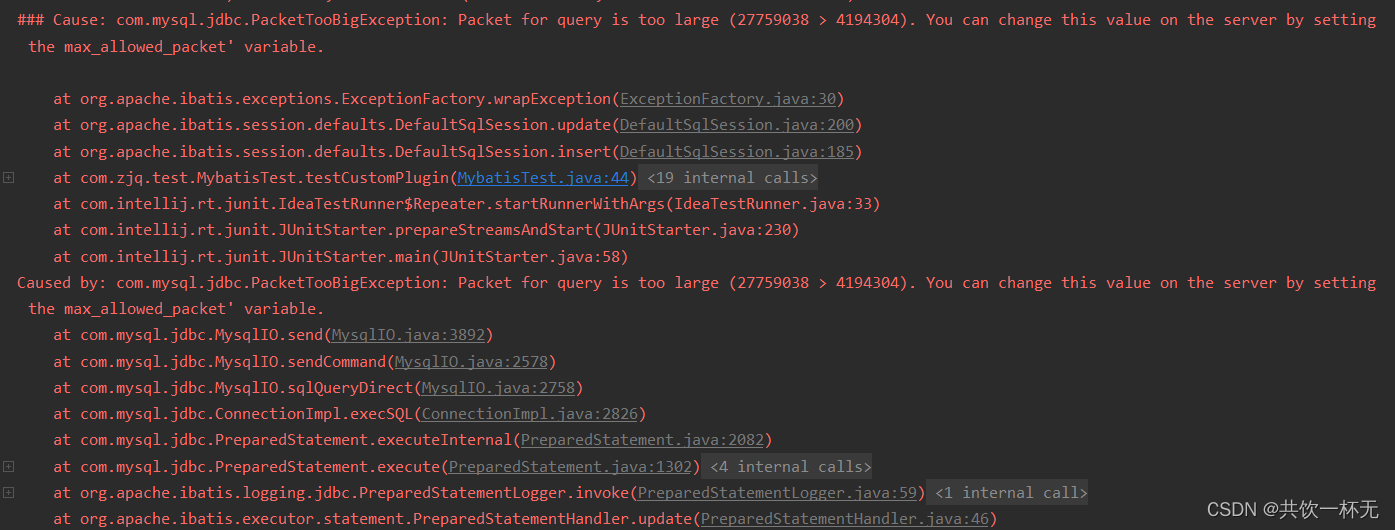
超出最大数据包限制了,可以通过调整max_allowed_packet限制来提高可以传输的内容,不过由于30万条数据超出太多,这个不可取,梭哈看来是不行了
声明:本文内容由网友自发贡献,不代表【wpsshop博客】立场,版权归原作者所有,本站不承担相应法律责任。如您发现有侵权的内容,请联系我们。转载请注明出处:https://www.wpsshop.cn/article/detail/40199
推荐阅读
![[ 云计算 | AWS 实践 ] 使用 Java 更新现有 Amazon S3 对象](https://img-blog.csdnimg.cn/direct/f6b4b45ef01445aa9a147e7c5f1a8f15.png?x-oss-process=image/resize,m_fixed,h_300,image/format,png)



相关标签
Copyright © 2003-2013 www.wpsshop.cn 版权所有,并保留所有权利。

