
热门标签
热门文章
- 1华为云云耀云服务器L实例评测|Python Selenium加Chrome Driver构建UI自动化测试实践_华为浏览器driver
- 2使用Flutter的image_picker插件实现设备的相册的访问和拍照
- 3[点云学习] 一、点云相关知识了解
- 4HarmonyOS云开发基础认证【最新题库 满分答案】
- 5aigc修复美颜学习笔记
- 6Java 算法篇-深入了解单链表的反转(实现:用 5 种方式来具体实现)
- 7华为 ensp SSL VPN 史诗级配置
- 8如何解决大模型的「幻觉」问题
- 9【动态规划】【广度优先搜索】LeetCode:2617 网格图中最少访问的格子数
- 10视觉机械臂自主抓取全流程_机械臂视觉抓取
当前位置: article > 正文
大学生数据库课程设计之学生选课系统(一个超级简单的系统)_设计一个简单的学生选课系统
作者:算法研究专家 | 2024-01-16 13:42:35
赞
踩
设计一个简单的学生选课系统
大学数据库课程设计–一个简单的学生选课系统
一、系统简介
一个超级简单的学生选课系统,使用Windows窗体设计界面,使用C#语言实现各种功能,数据库使用的是SQL。由于时间原因,做的非常仓促,系统中没有查询功能,能够实现数据的增删改。下面开始系统演示吧。
二、系统演示
1、登录界面
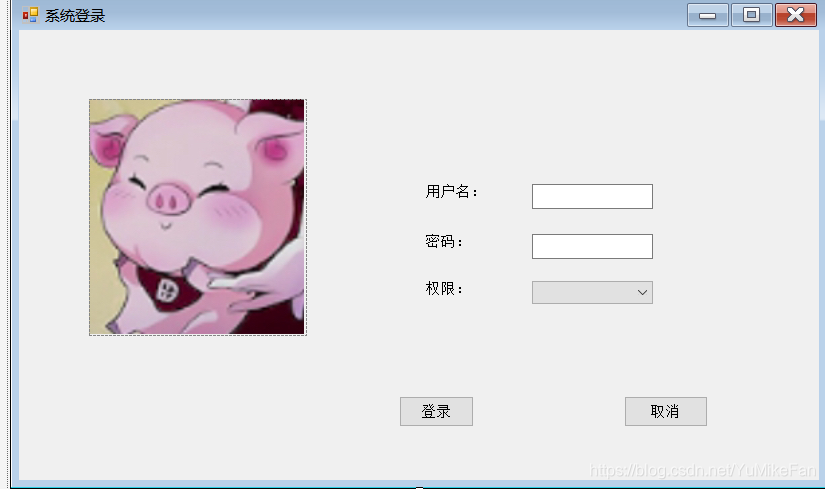
我使用Windows窗体设计成这个样子 看着还算不错,嘻嘻。
    public partial class Form1 : Form
    {
        public Form1()
        {
            InitializeComponent();
        }
        private void timer1_Tick(object sender, EventArgs e)
        {
            if(pictureBox1.Location.X<150)
            {
                pictureBox1.Location = new Point(pictureBox1.Location.X + 1, pictureBox1.Location.Y);
            }//图标移动
            else
            {
                if(comboBox1.Text == "学生")
                {
                    string sql = "select * from Stu where Name = '" + textBox1.Text + "'and Password ='" + textBox2.Text + "'";
                    Dao dao = new Dao();
                    IDataReader dr = dao.read(sql);
                    dr.Read();
                    string Sid = dr["ID"].ToString();
                    Form3 form3 = new Form3(Sid);
                    form3.Show();//显示这个窗体
                    this.Hide();//隐藏这个窗体
                }
                else
                {
                    if(comboBox1.Text == "老师")
                    {
                        string sql = "select * from Teacher where Name = '" + textBox1.Text + "'and Password ='" + textBox2.Text + "'";
                        Dao dao = new Dao();
                        IDataReader dr = dao.read(sql);
                        dr.Read();
                        string Tid = dr["ID"].ToString();
                        Form7 form7 = new Form7(Tid);
                        form7.Show();
                        this.Hide();
                    }
                    else
                    {
                        if(comboBox1.Text == "管理员")
                        {
                            Form5 form5 = new Form5();
                            form5.Show();
                            this.Hide();
                        }
                    }
                }

                timer1.Stop();
            }
        }


        //判断是否登录
        private string login()
        {
            if(textBox1.Text == ""||textBox2.Text == ""||comboBox1.Text == "")
            {
                MessageBox.Show("输入不完整,请检查","提示",MessageBoxButtons.OK, MessageBoxIcon.Warning);
            }

            if(comboBox1.Text == "学生")
            {
                string sql = "select * from Stu where Name = '" +textBox1.Text+ "'and Password ='" +textBox2.Text+ "'";
                Dao dao = new Dao();

                IDataReader dr = dao.read(sql);
                if(dr.Read())
                {
                    return "学生";
                }
                else
                {
                    MessageBox.Show("用户名或密码错误");
                    return "-1";
                }


            }
            if(comboBox1.Text == "老师")
            {
                string sql = "select * from Teacher where Name = '" +textBox1.Text+ "'and Password ='" +textBox2.Text+ "'";
                Dao dao = new Dao();

                IDataReader dr = dao.read(sql);
                if (dr.Read())
                {
                    return "老师";
                }
                else
                {
                    MessageBox.Show("用户名或密码错误");
                    return "-1";
                }
            }
            if(comboBox1.Text == "管理员")
            {
                if(textBox1.Text == "admin"&&textBox2.Text == "admin")
                {
                    return "管理员";
                }
                else
                {
                    MessageBox.Show("用户名或密码错误");
                    return "-1";
                }
            }

            return "-1";
        }
        private void button2_Click(object sender, EventArgs e)
        {
            textBox1.Text = null;
            textBox2.Text = null;
            comboBox1.Text = null;
        }

        private void textBox1_TextChanged(object sender, EventArgs e)
        {

        }
        //登录事件
        private void button1_Click_1(object sender, EventArgs e)
        {
            if (login() != "-1")
            {
                timer1.Start();//启动计时器控件,图片开始移动
                textBox1.Visible = false;
                textBox2.Visible = false;
                comboBox1.Visible = false;
                label1.Visible = false;
                label2.Visible = false;
                label3.Visible = false;
            }
            else
            {
                MessageBox.Show("信息错误", "提示", MessageBoxButtons.OK, MessageBoxIcon.Warning);
            }
        }

        private void comboBox1_SelectedIndexChanged(object sender, EventArgs e)
        {

        }

        private void Form1_FormClosed(object sender, FormClosedEventArgs e)
        {
            Application.Exit();//强行结束整个程序
        }
    }

- 1
- 2
- 3
- 4
- 5
- 6
- 7
- 8
- 9
- 10
- 11
- 12
- 13
- 14
- 15
- 16
- 17
- 18
- 19
- 20
- 21
- 22
- 23
- 24
- 25
- 26
- 27
- 28
- 29
- 30
- 31
- 32
- 33
- 34
- 35
- 36
- 37
- 38
- 39
- 40
- 41
- 42
- 43
- 44
- 45
- 46
- 47
- 48
- 49
- 50
- 51
- 52
- 53
- 54
- 55
- 56
- 57
- 58
- 59
- 60
- 61
- 62
- 63
- 64
- 65
- 66
- 67
- 68
- 69
- 70
- 71
- 72
- 73
- 74
- 75
- 76
- 77
- 78
- 79
- 80
- 81
- 82
- 83
- 84
- 85
- 86
- 87
- 88
- 89
- 90
- 91
- 92
- 93
- 94
- 95
- 96
- 97
- 98
- 99
- 100
- 101
- 102
- 103
- 104
- 105
- 106
- 107
- 108
- 109
- 110
- 111
- 112
- 113
- 114
- 115
- 116
- 117
- 118
- 119
- 120
- 121
- 122
- 123
- 124
- 125
- 126
- 127
- 128
- 129
- 130
- 131
- 132
- 133
- 134
- 135
- 136
- 137
- 138
- 139
- 140
- 141
- 142
- 143
- 144
- 145
- 146
- 147
- 148
- 149
- 150
- 151
上述为系统登录的代码,请结合一些注释理解。系统登录界面,有三个权限,分别为学生、老师及管理员,在代码中,都有对应的代码 ,请仔细看。
2、学生操作界面
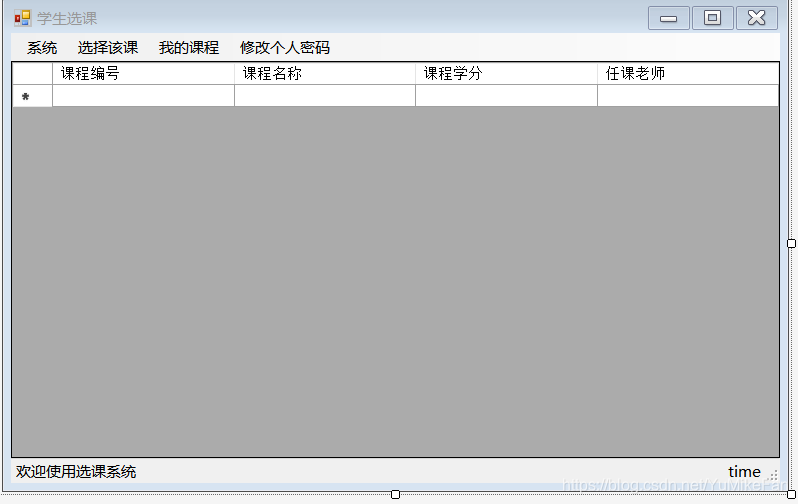
 public partial class Form3 : Form
    {
        string SID;
        public Form3(string Sid)
        {
            SID = Sid;
            InitializeComponent();
            toolStripStatusLabel3.Text = DateTime.Now.ToString("yyyy-MM-dd HH:mm:ss");//显示当前时间
            toolStripStatusLabel1.Text = "欢迎学号为" + SID + "的同学登录选课系统";
            timer1.Start();
            Table();
        }
        public void Table()
        {
            dataGridView1.Rows.Clear();
            string sql = "select * from Course";
            Dao dao = new Dao();
            IDataReader dr = dao.read(sql);
            while (dr.Read())
            {
                string a, b, c, d;
                a = dr["ID"].ToString();
                b = dr["Name"].ToString();
                c = dr["Credit"].ToString();
                d = dr["Teacher"].ToString();

                string[] str = { a, b, c, d};
                dataGridView1.Rows.Add(str);
            }
            dr.Close();//关闭链接
        }
        private void timer1_Tick(object sender, EventArgs e)
        {
            toolStripStatusLabel3.Text = DateTime.Now.ToString("yyyy-MM-dd HH:mm:ss");//显示当前时间
        }

        private void Form3_FormClosed(object sender, FormClosedEventArgs e)
        {
            Application.Exit();//强行结束整个程序
        }

        private void 选课ToolStripMenuItem_Click(object sender, EventArgs e)
        {
            string Cid = dataGridView1.SelectedCells[0].Value.ToString();//获取选中得课程号
            string sql1 = "Select * from  CourseChoose where Sid = '"+SID+"' and Cid = '"+Cid+"'";

            Dao dao = new Dao();
            IDataReader dc = dao.read(sql1);

            if(!dc.Read())
            {
                string sql = "Insert into CourseChoose values('" + SID + "','" + Cid + "')";

                int i = dao.Execute(sql);
                if(i>0)
                {
                    MessageBox.Show("选课成功");
                }
- 1
- 2
- 3
- 4
- 5
- 6
- 7
- 8
- 9
- 10
- 11
- 12
- 13
- 14
- 15
- 16
- 17
- 18
- 19
- 20
- 21
- 22
- 23
- 24
- 25
- 26
- 27
- 28
- 29
- 30
- 31
- 32
- 33
- 34
- 35
- 36
- 37
- 38
- 39
- 40
- 41
- 42
- 43
- 44
- 45
- 46
- 47
- 48
- 49
- 50
- 51
- 52
- 53
- 54
- 55
- 56
- 57
- 58
声明:本文内容由网友自发贡献,不代表【wpsshop博客】立场,版权归原作者所有,本站不承担相应法律责任。如您发现有侵权的内容,请联系我们。转载请注明出处:https://www.wpsshop.cn/article/detail/39995
推荐阅读
相关标签

