
- 1Vue代理模式和Nginx反向代理(Vue代理部署不生效)_nginx vue springboot 刷新路由失效 反向代理
- 27个惊艳众人的 Python 实用项目!【附源码】
- 3联想拯救者Y9000P 2022 i7-12* + 3070Ti安装ubuntu20.04(解决wifi失效、亮度调节问题)_y9000p ubuntu drivers
- 4【图像处理OpenCV(C++版)】——4.6 限制对比度的自适应直方图均衡化_c++ opencv 图像归一化 equ 自适应
- 5淘宝直播三大核心技术揭秘_淘宝av
- 6华为认证体系下网络工程师——初级 (HICA) First Day_华为网络工程师初级
- 7Unity3d 使用统一可寻址资产系统(Addressables)实现服务器资源热更新和资源版本管理等功能(含源码)_unity addressables启用版本控制
- 88086汇编语言(16位)键盘输入一串二进制数求其和,并将十进制结果显示在屏幕上_8086将数据显示在屏幕
- 9android10adb模式命令大全,史上最全ADB命令使用大全,一步教你成为玩机大神
- 10DOS命令FOR /F 字符处理功能_dos for /f 字符串处理
C#结合JavaScript实现多文件上传_c#js上传文件
赞
踩
目录
需求
在许多应用场景里,多文件上传是一项比较实用的功能。实际应用中,多文件上传可以考虑如下需求:
1、对上传文件的类型、大小有一个基本的控制。
2、上传文件时有一个进度显示,包括当前文件和整体进度。
3、上传后,在服务端后续事件进行一些处理。
引入
首先请在WEB应用程序根目录下创建COMMON目录,并引入 JavaScript 程序包,该程序包已经打包,下载地址为:https://download.csdn.net/download/michaelline/88615565。
下载成功后解压到COMMON目录即可,请引入如下图中的 JS 文件:
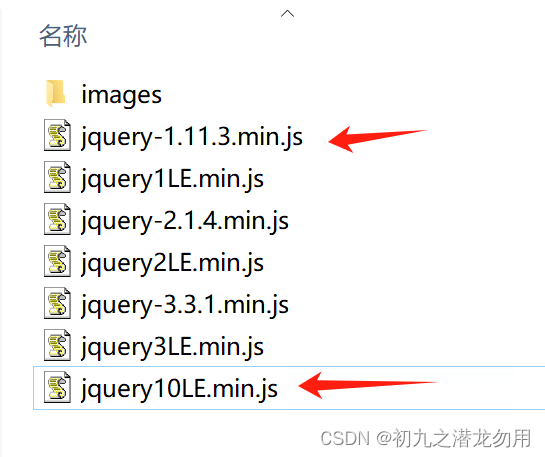
另外,我们还需要在 app_data目录下创建 ajaxUploadFiles 子目录,以备上传创建文件使用。
关键代码
操作界面
界面上放置标准的 input file 控件,并将其服务器化,即 runat="server"。点击选择文件,选中所有目标文件后,自动实现文件上传功能。
示例界面如下:

示例UI代码如下:
- <input class="file" type="file" id="ajaxMfile" runat="server"
- onbeginupload="ajax_uploadFiles_beginUpload" onprogressupload="ajax_uploadFiles_progressUpload" onendupload="ajax_uploadFiles_endUpload"
- multiple="multiple" allowtype="pptx|docx|mp3|txt|std" allowsize="500m|100m" fileindex="0" name="fileupload"
- serverbuttonid="ajaxEndBtn" serverfilelistid="ajaxReturnFileName"
- progresspanelid="ajaxMfileProgressPanel"
- onchange="ajax_uploadFiles(this);return false" />
- <asp:TextBox runat="server" Width="100%" ID="ajaxReturnFileName" style="display:none" ></asp:TextBox>
- <br />
- <asp:button ID="ajaxEndBtn" text="后台处理" runat="server" style="display:none" onclick="ajaxEndBtn_Click" />
- <br />
- <br />
- <table style="display:none; color:White" id="ajaxMfileProgressPanel">
- <tr>
- <td >
- 当前文件:</td>
- <td style="position:relative; padding:0px">
- <asp:Label Font-Size="9pt" style="z-index:1;position:absolute;left:0px;top:-9px;" Width="300px" runat="server" ID="ajax_uploadFiles_curfilename"/>
- </td>
- </tr>
- <tr>
- <td style="position:relative; padding:0px;width:120px">
- 当前文件进度<asp:Label style="z-index:1;position:absolute;left:85px;top:-9px;" runat="server" Font-Size="9pt" ID="ajax_uploadFiles_upprogress"></asp:Label>
- </td>
- <td style="position:relative; padding:10px">
- <img id="ajax_uploadFiles_curprogress" style="z-index:1;position:absolute;left:0px;top:4px;width:0px;height:12px" alt="" src="/common/Jquery/images/win7progress.jpg" />
- <div id="ajax_uploadFiles_curbg" style="z-index:0;position:absolute;left:0px;top:4px;width:300px;height:12px;background-color:Gray"></div>
- </td>
-
- </tr>
- <tr>
- <td style="position:relative; padding:0px">
- 上传总量进度<asp:Label style="z-index:1;position:absolute;left:85px;top:-9px;" runat="server" Font-Size="9pt" ID="ajax_uploadFiles_cprogress"></asp:Label></td>
- <td style="position:relative; padding:10px">
- <img id="ajax_uploadFiles_totalprogress" style="z-index:1;position:absolute;left:0px;top:4px;width:0px;height:12px" alt="" src="/common/Jquery/images/win7progress2.jpg" />
- <div id="ajax_uploadFiles_totalbg" style="z-index:0; position:absolute;left:0px;top:4px;width:300px;height:12px;background-color:Gray"></div>
- </td>
- </tr>
-
- </table>
- <table style="color:White; width:100%">
- <tr>
- <td style="position:relative">
- <asp:Label runat="server" Font-Size="11pt" ID="ajax_uploadFiles_serverProcessTip"></asp:Label>
- </td>
- </tr>
- </table>

input file 控件的一些设置如下:
(1)onbeginupload="ajax_uploadFiles_beginUpload" js方法,开始上传前事件,默认值
(2)onprogressupload="ajax_uploadFiles_progressUpload" js方法,上传中事件,默认值
(3)onendupload="ajax_uploadFiles_endUpload" js方法,选择完文件上传事件,默认值
(4)multiple="multiple" 控件属性,允许多文件选中上传
(5)allowtype="pptx|docx|mp3|txt|std" 自定义属性,允许上传的文件类型,以 | 分隔
(6)allowsize="500m|100m" 自定义属性,允许上传的文件最大尺寸,可以以 | 分隔,并一一对应,如果不对应,则根据 allowtype 的设置从左至右进行匹配
如举例中的设置则表示为,pptx 允许最大 500M , docx 最大 100M,后面未设置则均为100M
(7) serverbuttonid="ajaxEndBtn" 自定义属性,执行的服务器按钮ID,默认值
(8)serverfilelistid="ajaxReturnFileName" 自定义属性,服务器端返回的文件ID列表,默认值
(9)οnchange="ajax_uploadFiles(this);return false" 自定义属性,js方法,选择文件后自动执行上传功能,默认值
根据示例代码的设置,以上部分除了 allowtype和 allowsize 均可以不用改变设置。
上传中的效果如下图:

JavaScript包程序
本包程序实现了前面设置的界面元素方法、事件、属性的实现及对文件上传的客户端控制,示例代码如下:
- //批量上传文件的内置默认辅助方法,表示每上传一个文件之前发生的事件,
- //事件的fileObj参数代表 file对象(上传控件),由主方法自动传入,开发者可以重新指定自定义方法
- function ajax_uploadFiles_beginUpload(fileObj) {
- var fIndex = parseInt(fileObj.getAttribute("fileindex"), 10);
- if (fIndex == 0) {
- document.getElementById('ajax_uploadFiles_serverProcessTip').innerHTML = '';
- document.getElementById("ajax_uploadFiles_upprogress").innerHTML = "";
- document.getElementById("ajax_uploadFiles_cprogress").innerHTML = "";
- document.getElementById("ajax_uploadFiles_totalprogress").style.width = "0px";
- document.getElementById(fileObj.getAttribute("serverfilelistid")).value = "";
- }
- document.getElementById("ajax_uploadFiles_curfilename").innerHTML = fileObj.files[fIndex].name;
- }
- //批量上传文件的内置默认辅助方法,表示当前正在上传文件时发生的事件(主要用于显示上传进度),
- //事件的fileObj参数代表 file对象(上传控件), loaded:已经上传的文件总字节, total:正在上传的文件总字数,
- // percent:不超过100的整数,表示为百分比。这些参数由主方法自动传入,开发者可以重新指定自定义方法
- function ajax_uploadFiles_progressUpload(fileObj, loaded, total, percent) {
- document.getElementById("ajax_uploadFiles_upprogress").innerHTML = ("" + percent + "%");
- var curb = parseInt(document.getElementById("ajax_uploadFiles_curbg").style.width, 10);
- document.getElementById("ajax_uploadFiles_curprogress").style.width = Math.floor(curb * loaded / total) + "px";
- }
- //批量上传文件的内置默认辅助方法,表示当前文件上传完成时发生的事件(主要用于处理文件上传后的跟踪处理,并且返回服务器上保存的文件列到一个文本框中,以|分隔),
- //事件的fileObj参数代表 file对象(上传控件), type:上传状态返回,包括success成功,error失败,
- //data:文件的数据,暂时未使用, desfile:要保存在服务器上的文件名
- // 这些参数由主方法自动传入,开发者可以重新指定自定义方法
- function ajax_uploadFiles_endUpload(fileObj, type, data, desfile) {
- var fIndex = parseInt(fileObj.getAttribute("fileindex"), 10);
- var filecount = fileObj.files.length;
- document.getElementById(fileObj.getAttribute("serverfilelistid")).value += desfile + "|";
- var totalb = parseInt(document.getElementById("ajax_uploadFiles_totalbg").style.width, 10);
- document.getElementById("ajax_uploadFiles_totalprogress").style.width = Math.floor(totalb * (fIndex + 1) / filecount) + "px";
- document.getElementById("ajax_uploadFiles_cprogress").innerHTML = ("" + Math.floor(100 * (fIndex + 1) / filecount) + "%");
- if (fIndex < filecount - 1) {
- fIndex++;
- fileObj.setAttribute("fileindex", fIndex);
- ajax_uploadFiles(fileObj);
- return;
- }
- fileObj.setAttribute("fileindex", 0);
-
- if (type == "success") {
- document.getElementById('ajaxMfile').style.display='none';
- document.getElementById('ajax_uploadFiles_serverProcessTip').innerHTML = '上传完成!正在进行后台处理...';
- document.getElementById(fileObj.getAttribute("serverbuttonid")).click();
- } else if (type == "error") {
- alert("error");
- }
- }
- //生成一个guid
- function newguid() {
- function S4() {
- return (((1 + Math.random()) * 0x10000) | 0).toString(16).substring(1);
- }
- return (S4() + S4() + "-" + S4() + "-" + S4() + "-" + S4() + "-" + S4() + S4() + S4());
- }
- //批量上传文件的主方法,fileObj参数代表 file对象(上传控件)
- function ajax_uploadFiles(fileObj) {
- var formData = new FormData();
- var fIndex = parseInt(fileObj.getAttribute("fileindex"), 10);
- var filecount = fileObj.files.length;
- if (filecount == 0) {
- alert('请先浏览选择文件...');
- return;
- }
- var uploadSessionId = newguid();
- var upfile = fileObj.files[fIndex].name;
- var dotpos = upfile.lastIndexOf('.');
- var desfile = "";
- var exname = "";
- if (dotpos > 0) {
- exname = upfile.substring(dotpos + 1, upfile.length);
- desfile = uploadSessionId + upfile.substring(0, dotpos) + '.' + exname;
- } else {
- desfile = uploadSessionId + upfile;
- }
- // alert(Math.round(upsize / 1024));
- if (fIndex == 0) {
- var allowtype = fileObj.getAttribute("allowtype");
- var allowsize = fileObj.getAttribute("allowsize");
- var at = allowtype.split('|');
- var as = allowsize.split('|');
- for (var j = 0; j < filecount; j++) {
- var validfile = fileObj.files[j].name;
- var upsize = fileObj.files[j].size;
- var validdotpos = validfile.lastIndexOf('.');
- var validexname = "";
- if (validdotpos > 0) {
- validexname = validfile.substring(validdotpos + 1, validfile.length);
- }
- var i = 0;
- if (allowtype != "") {
- var find = false;
- for (i = 0; i < at.length; i++) {
- if (at[i].toLowerCase() == validexname.toLowerCase()) {
- find = true;
- break;
- }
- }
- if (find == false) {
- alert("文件" + validfile + "上传的类型不符合要求!仅允许上传扩展名为:" + allowtype.split("|").join("、") + "的文件。");
- fileObj.style.display = '';
- document.getElementById(fileObj.getAttribute("progresspanelid")).style.display = 'none';
- var t = fileObj;
- t.outerHTML = t.outerHTML;
- return;
- }
- }
- if (allowsize != "") {
- if (at.length <= as.length) {
- } else {
- i = 0;
- }
- as[i] = as[i].toLowerCase();
- var csize = parseInt(as[i]);
- var tsize = upsize;
- if (as[i].lastIndexOf('k') != -1) {
- csize = csize * 1024;
- tsize = Math.round(upsize / 1024) + "KB";
- } else if (as[i].lastIndexOf('m') != -1) {
- csize = csize * 1024 * 1024;
- tsize = Math.round(upsize / 1024 / 1024) + "MB";
- } else if (as[i].lastIndexOf('g') != -1) {
- csize = csize * 1024 * 1024 * 1024;
- tsize = Math.round(upsize / 1024 / 1024 / 1024) + "GB";
- } else if (as[i].lastIndexOf('t') != -1) {
- csize = csize * 1024 * 1024 * 1024 * 1024;
- tsize = Math.round(upsize / 1024 / 1024 / 1024 / 1024) + "TB";
- }
- if (upsize > csize) {
- alert("上传文件" + validfile + "的大小近" + tsize + ",系统规定大小不能超过" + as[i].toUpperCase() + ",请重新选择。");
- fileObj.style.display = '';
- document.getElementById(fileObj.getAttribute("progresspanelid")).style.display = 'none';
- var t = fileObj;
- t.outerHTML = t.outerHTML;
- return;
-
- }
- }
- } //j
- } // findex
- // document.getElementById(callObjId).disabled = 'disabled';
-
- // if (beginFuncName != null) {
- // beginFuncName(fIndex, filecount,upfile);
- // }
- fileObj.style.display = 'none';
- document.getElementById(fileObj.getAttribute("progresspanelid")).style.display = '';
- var findfunc = fileObj.getAttribute("onbeginupload");
- if (eval(findfunc)) {
- var execfunc = eval(findfunc);
- // alert(findfunc);
- execfunc(fileObj);
- }
-
- formData.append("file", fileObj.files[fIndex]); //append()里面的第一个参数file对应permission/upload里面的参数file
- var processUploadUrl = window.location.protocol + "//" + window.location.host + "//common//uploadfile.ashx?guid=" + uploadSessionId;
- $.ajax({
- type: "post",
- async: true, //这里要设置异步上传,才能成功调用myXhr.upload.addEventListener('progress',function(e){}),progress的回掉函数
- Accept: 'text/html;charset=UTF-8',
- data: formData,
- contentType: "multipart/form-data",
- url: processUploadUrl,
- processData: false, // 告诉jQuery不要去处理发送的数据
- contentType: false, // 告诉jQuery不要去设置Content-Type请求头
- xhr: function () {
- myXhr = $.ajaxSettings.xhr();
- if (myXhr.upload) { // check if upload property exists
- myXhr.upload.addEventListener('progress', function (e) {
- var loaded = e.loaded; //已经上传大小情况
- var total = e.total; //附件总大小
- var percent = Math.floor(100 * loaded / total); //已经上传的百分比
- // if (progressFuncName != null) {
- // progressFuncName(loaded, total, percent);
- // }
- var findfunc = fileObj.getAttribute("onprogressupload");
- if (eval(findfunc)) {
- var execfunc = eval(findfunc);
- // alert(findfunc);
- execfunc(fileObj, loaded, total, percent);
- }
- // $("#processBar").css("width", percent);
- }, false); // for handling the progress of the upload
- }
- return myXhr;
- },
- success: function (data) {
- if (fIndex == fileObj.files.length - 1) {
- fileObj.style.display = '';
- document.getElementById(fileObj.getAttribute("progresspanelid")).style.display = 'none';
- var t = fileObj;
- t.outerHTML = t.outerHTML;
- }
- // if (endFuncName != null) {
- // endFuncName("success", data, desfile, fIndex,filecount);
- // }
- var findfunc = fileObj.getAttribute("onendupload");
- if (eval(findfunc)) {
- var execfunc = eval(findfunc);
- // alert(findfunc);
- execfunc(fileObj, "success", data, desfile);
- }
- },
- error: function (XMLHttpRequest, textStatus, errorThrown) {
- alert(errorThrown);
- if (endFuncName != null) {
- endFuncName(fileObj, "error", null, '');
- }
- }
- });
- }
服务端 ashx 程序
ashx,一般处理程序(HttpHandler)是·NET众多web组件的一种。一个 httpHandler 接受并处理一个http请求,类似 Java 中的 servlet 。
本程序实现服务器端上传文件的接收和另存操作,在这里我们存为uploadfile.ashx,代码如下:
- <%@ WebHandler Language="C#" Class="Handler" %>
-
- using System;
- using System.Web;
- using System.IO;
-
- public class Handler : IHttpHandler {
-
- public void ProcessRequest (HttpContext context) {
- if (context.Request.Files.Count > 0)
- {
- //HttpContext.Current.Request.FilePath;
- string strPath = System.Web.HttpContext.Current.Server.MapPath("~/app_data/ajaxUploadFiles/");
- string strName = context.Request.Files[0].FileName;
- string ext=Path.GetExtension(strName);
- string filename =HttpContext.Current.Request.QueryString["guid"].ToString()+Path.GetFileNameWithoutExtension(strName);
- if(ext!=""){
- filename = filename + ext;
- }
- context.Request.Files[0].SaveAs(System.IO.Path.Combine(strPath, filename));
- }
- }
-
- public bool IsReusable {
- get {
- return false;
- }
- }
-
- }
服务端上传后处理程序
在多个文件上传到服务器后,我们需要对文件进行后期处理,在前端我们设置了ID为 “ajaxEndBtn”的服务器按钮,进行模拟调用其 click 事件。
服务器端按钮处理事件示例代码如下:
- void ajaxEndBtn_Click(object sender, EventArgs e)
- {
- //得到保存后的文件名列表
- string[] upfiles = ajaxReturnFileName.Text.Split('|');
- //给予用户基本的提示
- ajax_uploadFiles_serverProcessTip.Text = "本次上传分析:共计上传" + (upfiles.Length - 1).ToString() + "个文件。";
- //遍历上传文件列表,进行后期处理
- foreach (string filename in upfiles)
- {
- if (filename.Trim() == "") continue;
- string upfilename = Request.PhysicalApplicationPath + "app_data\\ajaxUploadFiles\\" + filename;
- string exname = System.IO.Path.GetExtension(upfilename);
-
- //执行业务处理程序
-
-
- }
小结
以上提供的代码仅供参考,默认的设置仅可能提供最基础的实现,比如 ashx 程序还需要进行安全控制;进度图片和UI可以重新设计;实际的业务可以根据需求对控件的属性、事件进行重写。
以上就是自己的一些分享,时间仓促,不妥之处还请大家批评指正!

