- 1程序员如何赚到自己人生中的第一桶金?是100万还会是1000万,大家不妨一起探讨一下!...
- 2区块链钱包分类及BIP协议
- 3ubuntu 20.04 WIFI适配器找不到问题_ubuntu20.04无wifi adapter
- 4怎样利用PowerBulider的Datawindow建立中国式的动态报表_powerbuilder datawindow 图表
- 5【Kubernetes 系列】 一文带你吃透 K8S 中Pod 的生命周期_简述下k8s pod 生命周期
- 6Python之Selenium知识总结_python selenium
- 7Spring boot 自定义banner的在线制作
- 8人工智能之配置环境教程二:在Anaconda中创建虚拟环境安装GPU版本的Pytorch及torchvision并在VsCode中使用虚拟环境_conda下载torchvision
- 9python文件操作_python 文件操作
- 10一文解读,网络安全行业人才需求情况《网络安全产业人才发展报告》_网络安全人才需求分析
JavaFX 用户界面控件1——ChoiceBox ComboBox_javafx choicebox
赞
踩
1.选择框ChoiceBox
JavaFX的ChoiceBox是一个用户界面控件,用于向用户显示一个选项列表,并允许用户从中选择一个或多个选项。下面是一个ChoiceBox的简单示例和使用介绍:
首先,导入JavaFX的相关类:
import javafx.application.Application;
import javafx.collections.FXCollections;
import javafx.scene.Scene;
import javafx.scene.control.ChoiceBox;
import javafx.scene.layout.VBox;
import javafx.stage.Stage;
在JavaFX应用程序中,创建一个ChoiceBox对象并填充选项:
public class Main extends Application {
@Override
public void start(Stage primaryStage) {
// 创建一个ChoiceBox对象
ChoiceBox<String> choiceBox = new ChoiceBox<>();
// 填充选项列表
choiceBox.getItems().addAll("Option 1", "Option 2", "Option 3");
// 设置默认选择
choiceBox.setValue("Option 1");
// 创建一个布局并将ChoiceBox添加到其中
VBox layout = new VBox();
layout.getChildren().add(choiceBox);
// 创建一个场景并将布局添加到其中
Scene scene = new Scene(layout, 300, 200);
// 设置场景并显示舞台
primaryStage.setScene(scene);
primaryStage.show();
}
public static void main(String[] args) {
launch(args);
}
}
在这个示例中,我们创建一个包含三个选项的ChoiceBox对象,并将其添加到一个垂直布局VBox中。我们设置了默认选项为“Option 1”。最后,我们将布局添加到场景中,并显示舞台。
1.1 字符转换器
当使用复杂对象来支持ChoiceBox时,需要StringConverter。这个对象序列化一个往返于选择框的字符串。对于这个程序,只需要编码toString()来替换Pair对象的默认toString()。(toString和fromString都需要实现才能编译。)
空对象EMPTY_PAIR用于防止nullpointerexception。可以访问和比较assetClass(). getvalue()的返回值,而无需添加特殊的null处理逻辑。
- public class ChoicesApp extends Application {
-
- // 创建一个ChoiceBox对象
- private final ChoiceBox<Pair<String,String>> assetClass = new ChoiceBox<>();
- //创建空Pair对象
- private final static Pair<String, String> EMPTY_PAIR = new Pair<>("", "");
-
- @Override
- public void start(Stage primaryStage) throws Exception {
-
- Label label = new Label("Asset Class:");
- assetClass.setPrefWidth(200);
- Button saveButton = new Button("Save");
-
-
- // 创建一个布局并将ChoiceBox添加到其中
- HBox hbox = new HBox(
- label,
- assetClass,
- saveButton);
- hbox.setSpacing( 10.0d );
- hbox.setAlignment(Pos.CENTER );
- hbox.setPadding( new Insets(40) );
-
- Scene scene = new Scene(hbox);
-
- initChoice();
-
- saveButton.setOnAction(
- (evt) -> System.out.println("saving " + assetClass.getValue())
- );
-
- primaryStage.setTitle("ChoicesApp");
- primaryStage.setScene( scene );
- primaryStage.show();
-
- }
-
- //创建复杂对象choiceBox
- private void initChoice() {
-
- List<Pair<String,String>> assetClasses = new ArrayList<>();
- assetClasses.add( new Pair("Equipment", "20000"));
- assetClasses.add( new Pair("Furniture", "21000"));
- assetClasses.add( new Pair("Investment", "22000"));
-
- assetClass.setConverter( new StringConverter<Pair<String,String>>() {
- @Override
- public String toString(Pair<String, String> pair) {
- return pair.getKey();
- }
-
- @Override
- public Pair<String, String> fromString(String string) {
- return null;
- }
- });
-
- assetClass.getItems().add( EMPTY_PAIR );
- assetClass.getItems().addAll( assetClasses );
- assetClass.setValue( EMPTY_PAIR );
-
- }
-
- public static void main(String[] args) {
- launch(args);
- }
- }

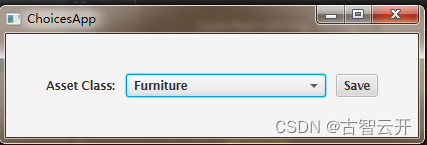
2.组合框ComboBox
JavaFX的ComboBox是一个用户界面控件,它结合了文本框和下拉列表,可以向用户显示一组选项,并允许用户从中选择一个或多个选项。下面是一个ComboBox的简单示例和使用说明:
首先,导入JavaFX的相关类:
import javafx.application.Application;
import javafx.collections.FXCollections;
import javafx.scene.Scene;
import javafx.scene.control.ComboBox;
import javafx.scene.layout.VBox;
import javafx.stage.Stage;
在JavaFX应用程序中,创建一个ComboBox对象并填充选项:
-
- public class ComboBoxTest extends Application {
- @Override
- public void start(Stage primaryStage) {
- // 创建一个ComboBox对象
- ComboBox<String> comboBox = new ComboBox<>();
-
- // 填充选项列表
- comboBox.setItems(FXCollections.observableArrayList("Option 1", "Option 2", "Option 3"));
-
- // 设置默认选择
- comboBox.setValue("Option 1");
-
- // 创建一个布局并将ComboBox添加到其中
- VBox layout = new VBox();
- layout.getChildren().add(comboBox);
-
- // 创建一个场景并将布局添加到其中
- Scene scene = new Scene(layout, 300, 200);
-
- // 设置场景并显示舞台
- primaryStage.setScene(scene);
- primaryStage.show();
- }
-
- public static void main(String[] args) {
- launch(args);
- }
- }
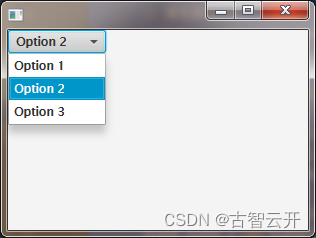
在这个示例中,我们创建了一个包含三个选项的ComboBox对象,并将其添加到一个垂直布局VBox中。我们设置了默认选项为“Option 1”。最后,我们将布局添加到场景中,并显示舞台。
除了上述示例,ComboBox还有一些其他特性,例如可以设置最大可见行数、设置下拉列表的最大高度、设置事件监听器等。你可以根据需求来定制ComboBox的使用。
2.1 ComboBox设置选中回调
- public class ComboBoxTest2 extends Application {
-
- // 创建一个ComboBox对象
- private final ComboBox<Pair<String, String>> account = new ComboBox<>();
- private final static Pair<String, String> EMPTY_PAIR = new Pair<>("", "");
-
- @Override
- public void start(Stage primaryStage) throws Exception {
-
- Label accountsLabel = new Label("Account:");
- account.setPrefWidth(200);
- Button saveButton = new Button("Save");
-
- // 创建一个布局并将ComboBox添加到其中
- HBox hbox = new HBox(
- accountsLabel,
- account,
- saveButton);
- hbox.setSpacing( 10.0d );
- hbox.setAlignment(Pos.CENTER );
- hbox.setPadding( new Insets(40) );
-
- Scene scene = new Scene(hbox);
- //初始化
- initCombo();
-
- saveButton.setOnAction( (evt) -> {
- if( account.getValue().equals(EMPTY_PAIR ) ) {
- System.out.println("no save needed; no item selected");
- } else {
- System.out.println("saving " + account.getValue());
- }
- });
-
- primaryStage.setTitle("CombosApp");
- primaryStage.setScene( scene );
- primaryStage.show();
- }
-
- private void initCombo() {
-
- List<Pair<String,String>> accounts = new ArrayList<>();
- accounts.add( new Pair<>("Auto Expense", "60000") );
- accounts.add( new Pair<>("Interest Expense", "61000") );
- accounts.add( new Pair<>("Office Expense", "62000") );
- accounts.add( new Pair<>("Salaries Expense", "63000") );
-
- account.getItems().add( EMPTY_PAIR );
- account.getItems().addAll( accounts );
- account.setValue( EMPTY_PAIR );
-
- //设置选中回调
- Callback<ListView<Pair<String,String>>, ListCell<Pair<String,String>>> factory =
- (lv) ->
- new ListCell<Pair<String,String>>() {
- @Override
- protected void updateItem(Pair<String, String> item, boolean empty) {
- super.updateItem(item, empty);
- if( empty ) {
- setText("");
- } else {
- setText( item.getKey() );
- }
- }
- };
-
- account.setCellFactory( factory );
- account.setButtonCell( factory.call( null ) );
- }
-
- public static void main(String[] args) {
- launch(args);
- }
- }

若此文档不够详细,可以参考JAVAFX基础入门_哔哩哔哩_bilibili
![[ 云计算 | AWS 实践 ] 使用 Java 更新现有 Amazon S3 对象](https://img-blog.csdnimg.cn/direct/f6b4b45ef01445aa9a147e7c5f1a8f15.png?x-oss-process=image/resize,m_fixed,h_300,image/format,png)