
热门标签
热门文章
- 1判断日期是否合法(Java精练版)_java判断日期是否合法
- 2力扣每日一题:80. 删除有序数组中的重复项 II_力扣删除有序数组中的重复项
- 3对称美学:如何判断一颗二叉树是否对称?_判断二叉树是否对称c语言
- 4idea控制台出现乱码的解决方案
- 538. 【农产品溯源项目前后端Demo】概述 + 环境准备_溯源demo
- 6python爬取漫画_漫画:正好满足我
- 7docker: Error response from daemon: could not select device driver的原因及解决办法
- 8手把手教你流畅访问Github
- 949个Python实战项目,附完整源代码!_puthon人工智能实战案例 附源码
- 10SpringBoot学习(一(1),【2021Java最新学习路线_springboot 学习路线
当前位置: article > 正文
解决VScode激活conda环境报错:usage: conda-script.py [-h] [--no-plugins] [-V] COMMAND ...
作者:代码优化者 | 2023-12-29 02:16:08
赞
踩
usage: conda-script.py [-h] [--no-plugins] [-v] command ... conda-script.py:
1.使用VScode运行Python时提示以下错误:
PS C:\Users\86158> activate
PS C:\Users\86158> conda activate yolov8
usage: conda-script.py [-h] [--no-plugins] [-V] COMMAND ...
conda-script.py: error: argument COMMAND: invalid choice: 'activate' (choose from 'clean', 'compare', 'config', 'create', 'info', 'init', 'install', 'list', 'notices', 'package', 'remove', 'uninstall', 'rename', 'run', 'search', 'update', 'upgrade', 'build', 'content-trust', 'convert', 'debug', 'develop', 'doctor', 'index', 'inspect', 'metapackage', 'render', 'skeleton', 'verify', 'server', 'repo', 'token', 'env', 'pack')
PS C:\Users\86158>
- 1
- 2
- 3
- 4
- 5
2.在终端窗口可以发现默认终端是PowerShell。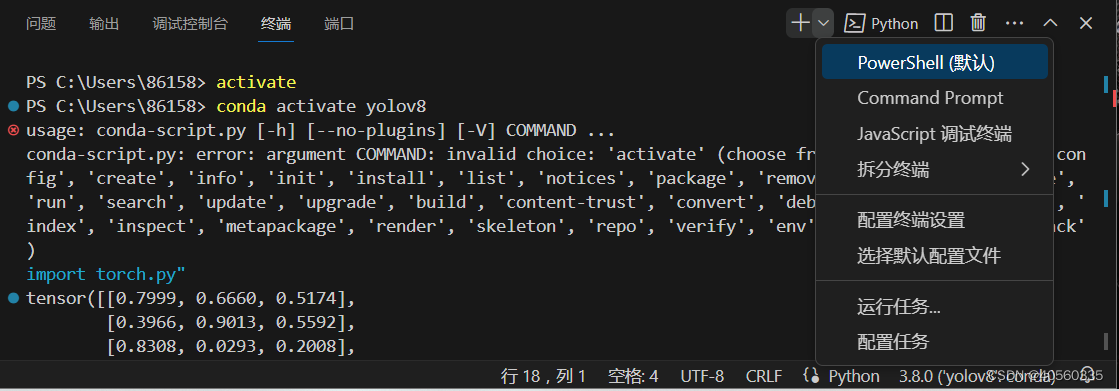
3.选择第二个:“Command Prompt”可以看到环境激活正常。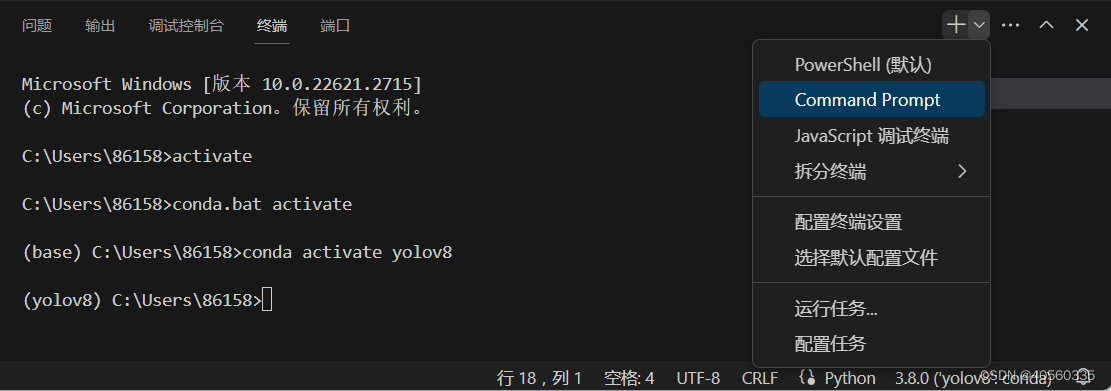
4.再次选择“选择默认配置文件”,在弹出的配置菜单中选择:“Command Prompt”,否则下次运行仍然会使用“PowerShell”打开终端。
选择:“Command Prompt”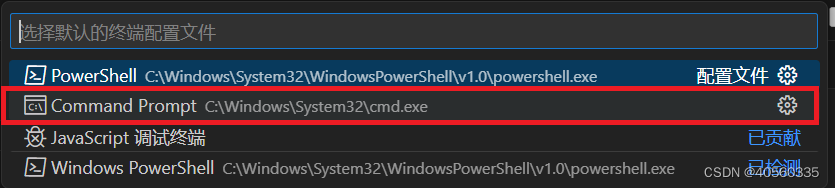
声明:本文内容由网友自发贡献,转载请注明出处:【wpsshop】
推荐阅读
![[DNS网络] 网页无法打开、显示不全、加载卡顿缓慢 | 解决方案](https://img-blog.csdnimg.cn/direct/057eae5c083548c292c2cf24475aa0e6.png?x-oss-process=image/resize,m_fixed,h_300,image/format,png)


相关标签

