
热门标签
热门文章
- 1python pip安装对应版本的包_pip install 对应斑斑
- 2如何在VSCode上使用C++_c++ vscode
- 31分钟了解js如何实现下载文件功能的4种方式_js下载文件
- 4spring源码解析之从AbstractApplicationContext#refresh()初始化单例过程看Bean的创建过程_abstractapplicationcontext.refresh()方法中,哪一步是对bean的
- 5Vue播放m3u8各种实现方式_m3u8自动播放
- 62021-10-12_transform-origin 属性允许更改转换元素在 x 轴、y 轴、z 轴上的位置。
- 7《eclipse》eclipse导入导出配置_ecplise 导入配置文件
- 82017春招互联网产品经理笔试题整理|腾讯,阿里,京东,网易,头条,去哪儿,携程,人人_互联网产品经理考试选择题
- 9389. Find the Difference(Leetcode每日一题-2020.12.18)_you are given two string s and t
- 10文心千帆为你而来_文心千帆的主要功能
当前位置: article > 正文
uniApp应用软件在运行时,未见向用户告知权限申请的目的,向用户索取(存储、相机、电话)等权限,不符合华为应用市场审核标准。_应用在运行时,未同步告知权限申请的使用目的,向用户索取(相机、存储、电话、位置)
作者:数据科学创新者 | 2023-12-28 20:04:31
赞
踩
应用在运行时,未同步告知权限申请的使用目的,向用户索取(相机、存储、电话、位置)
根据应用市场审核标准。我们开发的软件想要过审就必须要在应用在运行时,向用户告知权限申请的目的,向用户索取(存储、相机、电话)等权限!!
但是我们会发现做了提示弹框后又会驳回弹窗评频繁弹窗等等一系列的问题出来。
关于权限申请最终解决方案我也是问过了官方人员: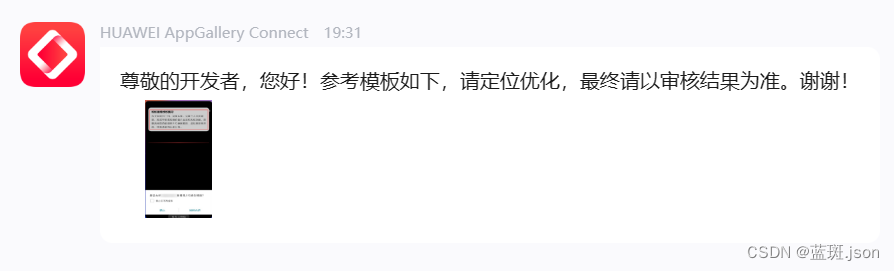
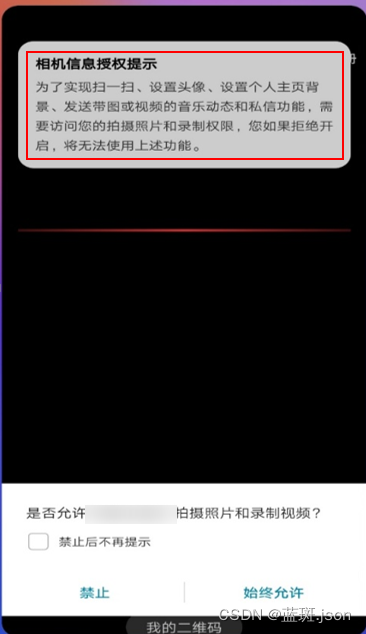
由此可见最好的解决方案便是:应同步告知用户申请该权限的目的,那么我们应该怎么做呐?
首先在uniApp项目中创建一个vuex:
- // main.js vue3
-
- // #ifdef VUE3
- import store from './store'
- import { createSSRApp } from 'vue'
- export function createApp() {
- const app = createSSRApp(App)
- app.use(store)
- return {
- app
- }
- }
- // #endif
创建store
- // 页面路径:store/index.js
- import {
- createStore
- } from 'vuex'
- const store = createStore({
- // 初始化状态
- state: {
- // 处理应用程序权限请求
- CAMERA:false,
- WRITE_EXTERNAL_STORAGE: false,
- ACCESS_FINE_LOCATION: false,
- CALL_PHONE: false,
- /* #ifdef APP-PLUS */
- isIos: plus.os.name == "iOS",
- /* #endif */
- mapping: {
- 'CAMERA': {
- title: "摄像头权限说明",
- content: "摄像头权限将用于拍摄照片和视频。这样,您可以在应用程序中记录瞬间、分享内容或进行其他相关操作。",
- methods: 'SET_CAMERA'
- },
- 'WRITE_EXTERNAL_STORAGE': {
- title: "****对存储空间/照片权限申请说明",
- content: "便于您使用该功能上传您的照片/图片/视频及用于更换头像、发布商品/分享、下载、与客服沟通等场景中读取和写入相册和文件内容。",
- methods: 'SET_WRITE_EXTERNAL_STORAGE'
- },
- 'ACCESS_FINE_LOCATION': {
- title: "****对地理位置权限申请说明",
- content: "****应用程序可以提供基于位置的服务、定位导航、附近搜索等功能。",
- methods: 'SET_ACCESS_FINE_LOCATION'
- },
- 'CALL_PHONE': {
- title: "****拨打/管理电话权限申请说明",
- content: "便于您使用该功能联系买家、骑手或者客服、业务经理与联系等场景下使用",
- methods: 'SET_CALL_PHONE'
- }
- }
- },
- mutations: {
- // 管理权限告知目的
- SET_CAMERA(state, val) {
- state.CAMERA = val
- },
- SET_WRITE_EXTERNAL_STORAGE(state, val) {
- state.WRITE_EXTERNAL_STORAGE = val
- },
- SET_CALL_PHONE(state, val) {
- state.CALL_PHONE = val
- },
- SET_ACCESS_FINE_LOCATION(state, val) {
- state.ACCESS_FINE_LOCATION = val
- }
- },
- actions: {
- //权限获取
- async requestPermissions({state,dispatch,commit}, permissionID) {
- try {
- if (!state[permissionID] && !state.isIos) {
- var viewObj = await dispatch('nativeObjView', permissionID);
- viewObj.show();
- }
- console.log('android.permission.' + permissionID, '当前手机权限');
- return new Promise(async (resolve, reject) => {
- //苹果不需要这个
- if (state.isIos) {
- resolve(1);
- return
- }
- // Android权限查询
- function requestAndroidPermission(permissionID_) {
- return new Promise((resolve, reject) => {
- plus.android.requestPermissions(
- [permissionID_], // 理论上支持多个权限同时查询,但实际上本函数封装只处理了一个权限的情况。有需要的可自行扩展封装
- function(resultObj) {
- var result = 0;
- for (var i = 0; i < resultObj.granted.length; i++) {
- // var grantedPermission = resultObj.granted[i];
- // console.log('已获取的权限:' + grantedPermission);
- result = 1
- }
- for (var i = 0; i < resultObj.deniedPresent.length; i++) {
- // var deniedPresentPermission = resultObj.deniedPresent[i];
- // console.log('拒绝本次申请的权限:' + deniedPresentPermission);
- result = 0
- }
- for (var i = 0; i < resultObj.deniedAlways.length; i++) {
- // var deniedAlwaysPermission = resultObj.deniedAlways[i];
- // console.log('永久拒绝申请的权限:' + deniedAlwaysPermission);
- result = -1
- }
- resolve(result);
- },
- function(error) {
- console.log('申请权限错误:' + error.code + " = " + error
- .message);
- resolve({
- code: error.code,
- message: error.message
- });
- }
- );
- });
- }
-
- const result = await requestAndroidPermission(
- 'android.permission.' + permissionID
- );
- if (result === 1) {
- //'已获得授权'
- commit(state.mapping[permissionID].methods, true)
- } else if (result === 0) {
- //'未获得授权'
- commit(state.mapping[permissionID].methods, false)
- } else {
- commit(state.mapping[permissionID].methods, true)
- uni.showModal({
- title: '提示',
- content: '操作权限已被拒绝,请手动前往设置',
- confirmText: "立即设置",
- success: (res) => {
- if (res.confirm) {
- dispatch('gotoAppPermissionSetting')
- }
- }
- })
- }
- if (viewObj) viewObj.close()
- resolve(result);
- });
- } catch (error) {
- console.log(error);
- reject(error);
- }
- },
- //提示框
- nativeObjView({state}, permissionID) {
- const systemInfo = uni.getSystemInfoSync();
- const statusBarHeight = systemInfo.statusBarHeight;
- const navigationBarHeight = systemInfo.platform === 'android' ? 48 :
- 44; // Set the navigation bar height based on the platform
- const totalHeight = statusBarHeight + navigationBarHeight;
- let view = new plus.nativeObj.View('per-modal', {
- top: '0px',
- left: '0px',
- width: '100%',
- backgroundColor: '#444',
- //opacity: .5;
- })
- view.drawRect({
- color: '#fff',
- radius: '5px'
- }, {
- top: totalHeight + 'px',
- left: '5%',
- width: '90%',
- height: "100px",
- })
- view.drawText(state.mapping[permissionID].title, {
- top: totalHeight + 5 + 'px',
- left: "8%",
- height: "30px"
- }, {
- align: "left",
- color: "#000",
- }, {
- onClick: function(e) {
- console.log(e);
- }
- })
- view.drawText(state.mapping[permissionID].content, {
- top: totalHeight + 35 + 'px',
- height: "60px",
- left: "8%",
- width: "84%"
- }, {
- whiteSpace: 'normal',
- size: "14px",
- align: "left",
- color: "#656563"
- })
-
- function show() {
- view = plus.nativeObj.View.getViewById('per-modal');
- view.show()
- view = null //展示的时候也得清空,不然影响下次的关闭,不知道为啥
- }
-
- function close() {
- view = plus.nativeObj.View.getViewById('per-modal');
- view.close();
- view = null
- }
- return {
- show,
- close
- }
- },
- // 跳转到**应用**的权限页面
- gotoAppPermissionSetting({state}) {
- if (state.isIos) {
- var UIApplication = plus.ios.import("UIApplication");
- var application2 = UIApplication.sharedApplication();
- var NSURL2 = plus.ios.import("NSURL");
- // var setting2 = NSURL2.URLWithString("prefs:root=LOCATION_SERVICES");
- var setting2 = NSURL2.URLWithString("app-settings:");
- application2.openURL(setting2);
-
- plus.ios.deleteObject(setting2);
- plus.ios.deleteObject(NSURL2);
- plus.ios.deleteObject(application2);
- } else {
- // console.log(plus.device.vendor);
- var Intent = plus.android.importClass("android.content.Intent");
- var Settings = plus.android.importClass("android.provider.Settings");
- var Uri = plus.android.importClass("android.net.Uri");
- var mainActivity = plus.android.runtimeMainActivity();
- var intent = new Intent();
- intent.setAction(Settings.ACTION_APPLICATION_DETAILS_SETTINGS);
- var uri = Uri.fromParts("package", mainActivity.getPackageName(), null);
- intent.setData(uri);
- mainActivity.startActivity(intent);
- }
- }
-
- }
-
- })
- // 导出 store
- export default store

在页面中引用
- // demo click
- onclick() {
- /* #ifdef APP-PLUS */
- let result = await store.dispatch("requestPermissions",'WRITE_EXTERNAL_STORAGE')
- if (result !== 1) return
- /* #endif */
-
- // 下面的逻辑随便 怎么写
- return uni.showToast({
- title:'权限获取成功'
- })
- },
(最新更新时间:2023-12-13)
-解决了小伙伴不知道相机和相册权限怎么分开问题
声明:本文内容由网友自发贡献,不代表【wpsshop博客】立场,版权归原作者所有,本站不承担相应法律责任。如您发现有侵权的内容,请联系我们。转载请注明出处:https://www.wpsshop.cn/article/detail/36507
推荐阅读

相关标签

