- 1向着阳光的华为,淬火而行的哪吒
- 2用HTML和Javascript编写一个可在线编辑并存储表格的网页_js table 在线编辑
- 3百度飞桨系列课程:百度架构师手把手带你零基础实践深度学习——21日学习打卡(第二周第三日)_得到两个类别的预测概率,并沿第一个维度级联
- 4经典必读:门控循环单元(GRU)的基本概念与原理
- 5UI和UI有什么不同,是如何协助的_ui不不不
- 6使用CSS自定义属性实现页面的主题切换_--bg-color
- 7Qt图形视图框架三--坐标系统简介_qgraphicsscene 坐标系
- 8Unity编辑器扩展——自定义窗口_unity 自定义编辑窗口
- 9RHEL5中实现对用户家目录/home的迁移
- 10Pygame 基础教程01: Python (Pygame) 游戏开发模块简介与安装_pygame模块
HarmonyOS应用开发-闪屏启动页
赞
踩
这是鸿蒙开发者网站的一个应用《溪村小镇》示例代码,把闪屏启动页单拿出来,分析一下代码。
一、先上效果图
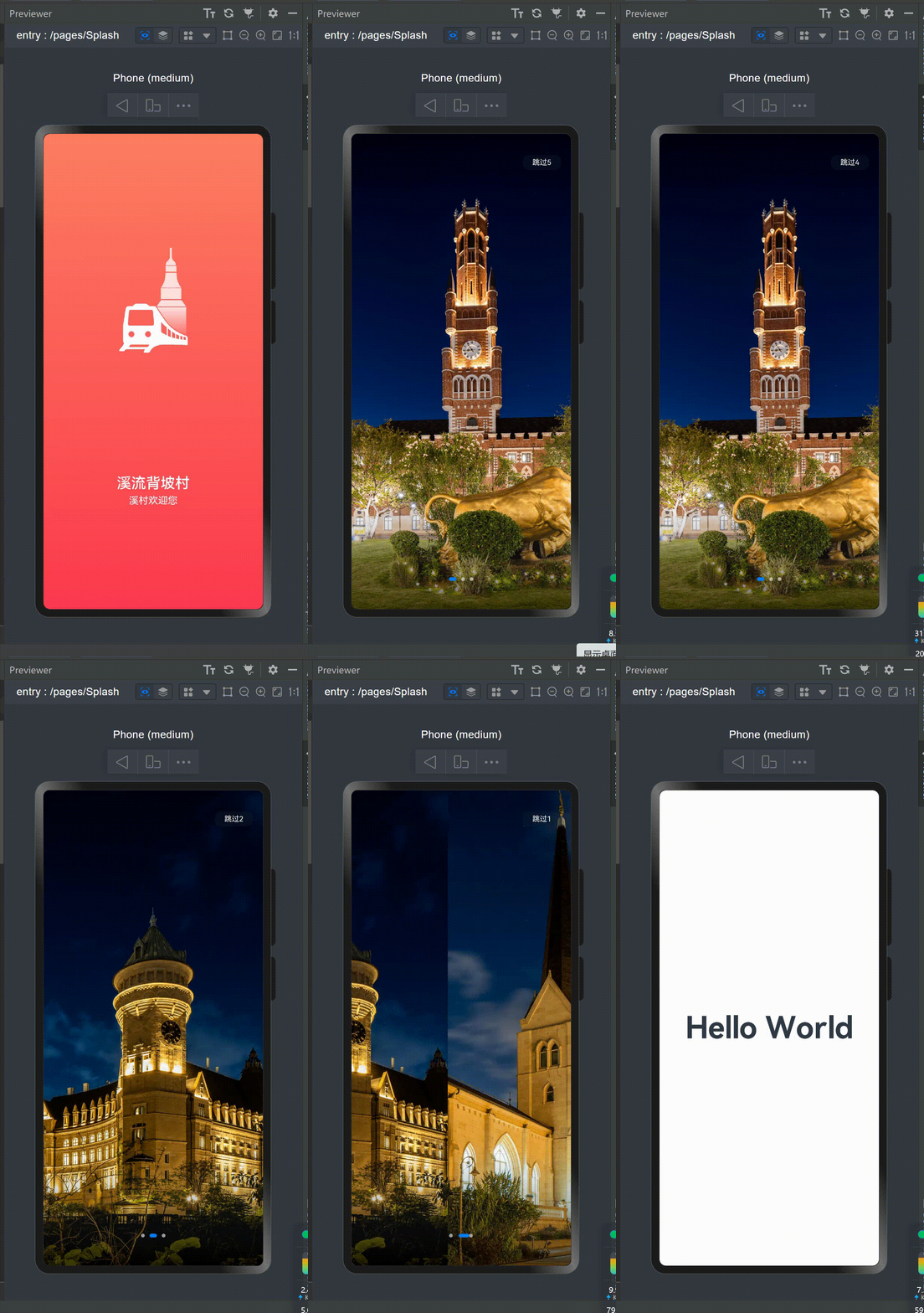
这是应用打开时的一个启动页,启动页会根据三个时间段(白天、傍晚、晚上)来分别展示溪村小镇不同的景色。
二、实现方法:
1.在pages页面下新建一个页面命名为“Splash”,Splash页面的代码在下面展示。
2.然后在onWindowStageCreate生命周期中配置启动页入口,可以看到“pages/Splash”为启动页入口:
- // EntryAbility.ets
- onWindowStageCreate(windowStage: window.WindowStage) {
- // 设置沉浸式窗口,背景透明
- const windowBarMag = new WindowBarManager();
- windowBarMag.immersiveWindow(windowStage, Const.TRANSPARENT_COLOR, true);
- // 加载启动页内容
- windowStage.loadContent('pages/Splash', (err, data) => {
- if (err.code) {
- hilog.error(0x0000, 'testTag', 'Failed to load the content. Cause: %{public}s', JSON.stringify(err) ?? '');
- return;
- }
- hilog.info(0x0000, 'testTag', 'Succeeded in loading the content. Data: %{public}s', JSON.stringify(data) ?? '');
- });
- }
WindowBarManager用于管理窗口样式,这里设置了沉浸式窗口,并将背景设为透明。- 通过
windowStage.loadContent加载启动页的内容,路径为'pages/Splash'。
启动页会在aboutToAppear生命周期内初始化轮播图片资源及定时任务,会展示5秒溪村的优美风景,用户可以点击右上角的跳过直接进入应用主页,也可以等5秒结束自动进入应用主页;5秒倒计时结束、用户主动点击跳过或启动页面销毁时都会取消定时器任务。
启动页的代码如下,代码分析在下面:
- import router from '@ohos.router';
- import { CommonConstants as Const } from '../common/constants/CommonConstants';
- import { splashImages } from '../viewmodel/SplashModel';
-
- @Entry
- @Component
- struct Splash {
- private swiperController: SwiperController = new SwiperController();
- private data: Resource[]
- @State showSwiper: boolean = false;
- @State countdown: number = Const.COUNTDOWN;
- private timer: number = -1;
-
- // 在此生命周期内根据当前时间段分配轮播展示的溪村小镇风景图
- aboutToAppear(): void {
- let hours = new Date().getHours();
- if (hours >= Const.MORNING_TIME && hours < Const.EVENING_TIME) {
- this.data = splashImages.day;
- } else if (hours >= Const.EVENING_TIME && hours <= Const.NIGHT_TIME) {
- this.data = splashImages.dusk;
- } else {
- this.data = splashImages.night;
- }
- // 启动画面展示3秒后 轮播展示溪村小镇风景
- setTimeout(() => {
- this.showSwiper = true;
- this.startTiming();
- }, Const.SPLASH_DURATION)
- }
-
- // 轮播展示溪村小镇风景倒计时5秒
- startTiming() {
- this.timer = setInterval(() => {
- this.countdown--;
- if (this.countdown === 0) {
- this.clearTiming();
- // 5秒钟后自动跳转到应用首页
- this.jumpToMainPage();
- }
- }, Const.DURATION);
- }
-
- // 清理定时器
- clearTiming() {
- if (this.timer !== -1) {
- clearInterval(this.timer);
- this.timer = -1;
- }
- }
-
- // 跳转到应用首页
- jumpToMainPage() {
- this.clearTiming();
- router.replaceUrl({
- url: 'pages/Index'
- });
- }
-
- // 页面销毁时清理定时器
- aboutToDisappear() {
- this.clearTiming();
- }
-
- build() {
- Column() {
- Stack() {
- // 轮播展示溪村小镇风景
- if (this.showSwiper) {
- Swiper(this.swiperController) {
- ForEach(this.data, (item: Resource) => {
- Image(item)
- .width(Const.FULL_SIZE)
- .height(Const.FULL_SIZE)
- .objectFit(ImageFit.Cover)
- })
- }
- .loop(true)
- .interval(2 * Const.DURATION)
- .duration(Const.DURATION)
- .autoPlay(true)
- .indicatorStyle({
- bottom: $r('app.float.100'),
- color: $r('app.color.swiper_dot_color')
- })
- .curve(Curve.Linear)
- .onChange((index: number) => {
- console.info(index.toString())
- })
-
- // 轮播倒计时,点击可进入应用主页
- Text() {
- Span($r('app.string.skip'))
- Span(`${this.countdown}`)
- }
- .onClick(() => this.jumpToMainPage())
- .fontColor(Color.White)
- .fontSize($r('app.float.12fp'))
- .backgroundColor($r('app.color.swiper_jump_bg_color'))
- .width($r('app.float.63'))
- .height($r('app.float.24'))
- .borderRadius($r('app.float.10'))
- .textAlign(TextAlign.Center)
- .position({
- x: Const.PERCENTAGE_78,
- y: $r('app.float.35')
- })
- } else { // 应用启动画面
- Image($r('app.media.splash_bg'))
- .width(Const.FULL_PERCENT)
- .height(Const.FULL_PERCENT)
- Image($r('app.media.ic_splash'))
- .width($r('app.float.192'))
- .height($r('app.float.192'))
- .offset({
- y: `-${Const.PERCENTAGE_15}`
- })
- .objectFit(ImageFit.Contain)
-
- Column() {
- Text(Const.SPLASH_DES)
- .fontColor(Color.White)
- .fontSize($r('app.float.font_size_24fp'))
- .fontWeight(FontWeight.Medium)
-
- Text(Const.SPLASH_WELCOME)
- .fontSize($r('app.float.font_size_16fp'))
- .fontColor(Color.White)
- .margin({
- top: $r('app.float.5')
- })
- }
- .offset({
- y: Const.PERCENTAGE_25
- })
- }
- }
- }
- .height(Const.FULL_SIZE)
- .width(Const.FULL_SIZE)
- }
- }

让我来对这段代码进行详细的解释:
-
导入模块:
- import router from '@ohos.router';
- import { CommonConstants as Const } from '../common/constants/CommonConstants';
- import { splashImages } from '../viewmodel/SplashModel';
这里导入了一些模块和常量,其中
router模块用于导航,CommonConstants包含了一些常量,Const是它的别名,在代码中就可以用Const.COUNTDOWN来使用其COUNTDOWN常量了,splashImages包含了一些溪村小镇风景图的资源。 -
组件定义:
- @Entry
- @Component
- struct Splash {
使用 HarmonyOS 提供的注解
@Entry和@Component定义了一个名为Splash的组件结构。 -
私有变量和状态:
- private swiperController: SwiperController = new SwiperController();
- private data: Resource[];
- @State showSwiper: boolean = false;
- @State countdown: number = Const.COUNTDOWN;
- private timer: number = -1;
在组件结构中定义了一些私有变量和状态,其中包括一个用于控制轮播的
swiperController,一个存储资源的数组data,以及控制页面状态的变量和计时器。 -
生命周期函数
aboutToAppear:- // 在此生命周期内根据当前时间段分配轮播展示的溪村小镇风景图
- aboutToAppear(): void {
- //获取当前的时间:几点钟
- let hours = new Date().getHours();
- //大于6点并且小于18点,属于白天
- if (hours >= Const.MORNING_TIME && hours < Const.EVENING_TIME) {
- this.data = splashImages.day;
- } else if (hours >= Const.EVENING_TIME && hours <= Const.NIGHT_TIME) {//大于18点小于19点,属于黄昏
- this.data = splashImages.dusk;
- } else {//其他时间就是晚上了
- this.data = splashImages.night;
- }
- // 启动画面展示3秒后 轮播展示溪村小镇风景
- setTimeout(() => {
- this.showSwiper = true;
- this.startTiming();
- }, Const.SPLASH_DURATION)
- }
在组件即将显示的生命周期内,根据当前时间段分配溪村小镇风景图,并设置定时器,在一定时间后展示轮播图。
-
定时器函数
startTiming和clearTiming:- startTiming() {
- this.timer = setInterval(() => {
- this.countdown--;
- if (this.countdown === 0) {
- this.clearTiming();
- this.jumpToMainPage();
- }
- }, Const.DURATION);
- }
- clearTiming() {
- if (this.timer !== -1) {
- clearInterval(this.timer);
- this.timer = -1;
- }
- }
这两个函数用于启动和清理倒计时定时器。
-
页面跳转函数
- jumpToMainPage() {
- this.clearTiming();
- router.replaceUrl({
- url: 'pages/MainPage'
- });
- }
使用系统提供的router组件,用于页面跳转到应用首页,并在跳转前清理定时器。其中router.replaceUrl代表用下一个页面代替当前页,当前页会被销毁,进入到下一页之后如果按返回键也是不能返回到启动页的。 此外router还有router.pushUrl方法可以保存当前页并跳转到下一页,router.back返回上一页面或指定的页面,router.clear清空页面栈中的所有历史页面,仅保留当前页面作为栈顶页面等方法。
-
生命周期函数
aboutToDisappear:- aboutToDisappear() {
- this.clearTiming();
- }
在组件即将销毁的生命周期内清理定时器。
-
页面构建函数
build:build() { // ... }构建页面的函数,使用 HarmonyOS 提供的组件和样式语法构建了页面的布局和样式。
总体来说,这段代码实现了一个具有定时展示溪村小镇风景的启动画面,包括轮播图、倒计时和页面跳转等功能。在页面的构建函数中使用了 HarmonyOS 提供的组件和样式语法来定义页面的结构和样式。